

Vocal Remover AI: Melvo
ICONBENCH LTD. Music iPhoneiPadiPod touch
Vocal Remover AI: Melvo is a free Music app for iPhone and iPad by ICONBENCH LTD. Rated 5.0/5 from 7 ratings. Requires iOS 18.6. Updated May 4, 2026.
- Rating
- 5.0
- 7 ratings
- Price
- Free
- on the App Store
- Size
- 44 MB
- Age 4+
- Updated
- May 4
- 2026 · v1.2
Screenshots


About Vocal Remover AI: Melvo
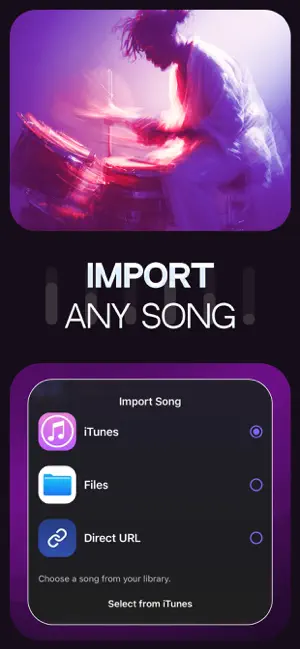
Separate vocals and instruments from any song. Remove vocal. AI-powered chord detection in real time Change the key instantly to match your voice or instrument Classic metronome / beat-synced metronome Speed control Count-in Loop specific song sections, including verses and choruses Melvo is an AI-powered music app that separates vocals and instruments from any song. It is built for professional musicians, learners, and anyone who wants to explore music in a deeper, more interactive way. Main Features: -AI Stem Separation: isolate vocals and split any song into individual instrument tracks such as vocals, drums, bass, guitar, piano, and more. Mute, solo, or adjust each stem to create custom practice or backing tracks. -Automatic Lyrics & Chords: AI analyzes your track to generate synchronized lyrics and detect chords in real time. Works with songs in any languages. -Key & Tempo Control: change the key to match your vocal range or instrument tuning. Speed up or slow down playback without affecting sound quality. -Smart Metronome: choose between a classic metronome or a beat-synced mode that follows the song’s rhythm. Adjust BPM for precise timing during practice. -Count-In: get a customizable count-in before playback starts so you can enter exactly on beat. -Loop Sections: repeat specific parts of the song—such as verses or choruses—to focus on difficult passages and learn faster. -Song Structure Navigation: quickly jump between detected sections of the track for efficient rehearsal. -Flexible Export: export the full mix or save individual stems for further editing, sharing, or performance use. -Multi-Language Support: process and analyze songs in any language. How It Works 1. Import any track from your ITunes, Camera Roll, Files or a URL and let Melvo analyze it instantly. 2. Our AI separates vocals and instruments, detects chords, and generates synchronized lyrics within seconds. 3. Mute or solo stems, change the key, adjust tempo, activate the metronome, or loop specific sections. 4. Rehearse with full control over the track, or export the full song or individual stems for further use. Who It’s For -Musicians of all levels: From beginners learning their first song to professionals preparing for performances. -Singers & Vocalists: Adjust the key to match your vocal range and practice with isolated instrumentals. -Instrumentalists: Slow down difficult parts, loop sections, and study chords in detail. -Music Teachers & Students: Create custom practice tracks and break songs down into manageable parts. -Producers & Creators: Extract stems, experiment with arrangements, and prepare tracks for remixes or content creation. Free Plan: Basic AI stem separation (vocals + main instruments) Chord detection (limited) AI-generated lyrics (limited) Tempo adjustment Key change Metronome (limited) Section looping (verse / chorus) Limited exports Pro Plan: Unlimited AI stem separation High-quality audio processing Smart beat-synced metronome Unlimited key and tempo changes Unlimited looping and structure navigation Full export of all individual stems Priority processing speed Explore every layer of your favorite songs and unlock your full musical potential with Melvo! For Terms of Conditions, Privacy Policy, and help please visit: Help: https://iconbench.co.uk/contact Privacy Policy: https://app.melvo.ai/public/privacy-policy.html Terms of Use: https://app.melvo.ai/public/terms-of-use.html
Ratings & reviews
5.0
7 ratings
What’s new
Version 1.2 · Updated May 4, 2026
Added screenshots of the app page in Spanish.
App privacy
The developer, ICONBENCH LTD., reported these privacy practices to Apple.
Data Linked to You
The following data, which may be collected and linked to your identity, may be used for the following purposes:
- Identifiers: User ID, Device ID
- Usage Data: Product Interaction, Other Usage Data
- Diagnostics: Crash Data, Performance Data, Other Diagnostic Data
- User Content: Photos or Videos, Audio Data, Customer Support, Other User Content
Used for: Analytics, App Functionality
Alternatives to Vocal Remover AI: Melvo
Looking for apps like Vocal Remover AI: Melvo? Here are 6 similar apps on the App Store. The highest rated is Vocal Remover AI : Split Music (5.0/5), and all 6 are free to download.
-
 Riftone: AI Stem Splitter
-
 Vocal Remover · Isolate Vocals
4.0
-
 Vocal Remover AI : Split Music
5.0
-
 Struno: Tuner & Metronome App
4.7
-
 TrackPeel - AI Stem Splitter
-
 BandCut
| App | Rating | Price | Last updated | Compare |
|---|---|---|---|---|
| Vocal Remover AI: Melvo | 5.0 / 5 (7 ratings) | Free | May 4, 2026 | |
| Riftone: AI Stem Splitter | – | Free | Oct 21, 2026 | Compare |
| Vocal Remover · Isolate Vocals | 4.0 / 5 (3) | Free | Apr 10, 2026 | Compare |
| Vocal Remover AI : Split Music | 5.0 / 5 (7) | Free | Aug 26, 2026 | Compare |
| Struno: Tuner & Metronome App | 4.7 / 5 (3) | Free | Mar 30, 2026 | Compare |
| TrackPeel - AI Stem Splitter | – | Free | Jul 26, 2026 | Compare |
| BandCut | – | Free | Oct 21, 2026 | Compare |