

Memorion – AI Memory Recorder
培庆 肖 Lifestyle iPhoneiPadiPod touchApple Watch
Memorion – AI Memory Recorder is a free Lifestyle app for iPhone and iPad by 培庆 肖. Requires iOS 15.0. Updated October 12, 2026.
- Price
- Free
- on the App Store
- Size
- 96 MB
- Age 4+
- Updated
- Oct 12
- 2026 · v2.0.4
Screenshots



About Memorion – AI Memory Recorder
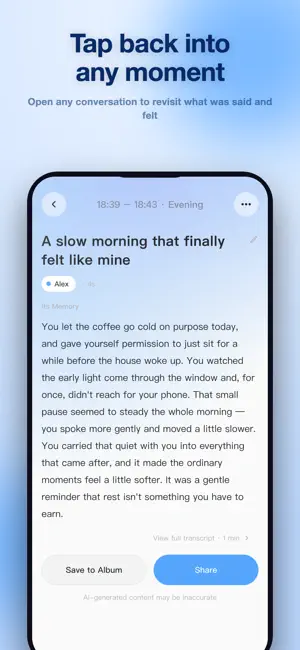
Memorion is a memory companion that listens to your day and writes it down for you. Record on your iPhone or Apple Watch, and Memorion transcribes what was said, sorts it into a timeline you can scroll back through, and turns it into a warm daily journal — not a dry meeting report. Over time it builds a long-term memory of what matters to you, so you can stop taking notes and just ask. WHAT MEMORION DOES A timeline of your day Every recording becomes a card with a full transcript, a summary and the feeling behind it. Tap any moment to revisit exactly what was said. A journal written for you At the end of the day, scattered conversations become a journal entry in your own voice — the kind you'd actually want to read again next year. The things you promised out loud Commitments you made during a conversation are pulled out as to-dos. You confirm the real ones and dismiss the rest. Ask anything "What did I promise Anna last week?" "When is the dentist?" Ask in plain language and Memorion searches your own conversations, memories, people and calendar to answer — with the original conversation attached, so you can always check. It learns who you are Facts worth keeping — your family, your work, how you like things done — become long-term memories. Review, edit or delete any of them at any time. People and voices Memorion learns to tell your voice apart from the others in the room, so summaries are written from your point of view. Name the people you talk with, and correct anything it got wrong. How your days felt See your mood across the week, and which conversations moved it. THREE WAYS TO RECORD iPhone — open the app and hit record. No accessories needed. Apple Watch — record straight from your wrist, even with your iPhone out of reach. Recordings sync automatically once it's back in range. Memorion wearable (optional) — pair the Memorion device over Bluetooth for hands-free capture, with battery and connection status in the app. LANGUAGES Full English and Chinese interface, with transcription in 100+ language. PRIVACY, PLAINLY Audio is uploaded to our servers and processed with cloud speech-to-text and AI models to produce your transcripts, summaries, journals and answers. Memorion asks for your consent in-app before any of that happens. Calendar access is read-only and Reminders access is write-only. Event titles, times and locations sync so Ask can reference your schedule; notes and attendees are never read. Export everything you've recorded, or delete your account and all of its data, from Privacy & Data in Settings. Turn off any source and Memorion stops using it. RECORDING RESPONSIBLY Memorion records real conversations with real people. Recording laws differ by country and by state — please make sure everyone present knows they're being recorded and agrees to it. Memorion shows a clear recording indicator on both iPhone and Apple Watch the whole time it's listening. Privacy Policy: https://memorion.me/privacy Terms of Service: https://memorion.me/terms-of-service
What’s new
Version 2.0.4 · Updated October 12, 2026
Brings new recorder support and more control over your conversations. - Added support for Soundcore Work and DingTalk A1 recorders, with recording sync and guided setup. Initial DingTalk A1 setup requires a Mac. - Improved recording transfers and uploads, with clearer progress, better recovery, and easier retries. - Share conversation summaries and transcripts through links, with expiration options and the ability to revoke access anytime. - Edit chapter titles and summaries directly from your timeline. Saved edits also update your shared content. - Added Starter and Pro plan options, with in-app subscription management and purchase restoration. - Improved transcript timing, recording continuity, sign-in reliability, and to-do updates.
App privacy
The developer, 培庆 肖, reported these privacy practices to Apple.
Data Linked to You
The following data, which may be collected and linked to your identity, may be used for the following purposes:
- Contact Info: Email Address
- User Content: Audio Data
- Identifiers: User ID
Used for: App Functionality
Data Not Linked to You
The following data, which may be collected but is not linked to your identity, may be used for the following purposes:
- Diagnostics: Crash Data, Performance Data
Used for: App Functionality
Alternatives to Memorion – AI Memory Recorder
Looking for apps like Memorion – AI Memory Recorder? Here are 6 similar apps on the App Store. The highest rated is How Many Sleeps: Countdown (5.0/5), and 4 of the 6 are free to download.
-
 OptimistPal: Meditation, Sleep
4.5
OptimistPal: Meditation, Sleep
4.5
-
 Rushi - Sutra Mala Meditation
-
 StickMe - Cute Life Tracker
-
 Waveful (Remove Ads)
3.5
Waveful (Remove Ads)
3.5
-
 How Many Sleeps: Countdown
5.0
How Many Sleeps: Countdown
5.0
-
 To My Lifetime - Memory Trace
| App | Rating | Price | Last updated | Compare |
|---|---|---|---|---|
| Memorion – AI Memory Recorder | – | Free | October 12, 2026 | |
| OptimistPal: Meditation, Sleep | 4.5 / 5 (8) | Free | Jul 30, 2026 | Compare |
| Rushi - Sutra Mala Meditation | – | Free | Jul 2, 2026 | Compare |
| StickMe - Cute Life Tracker | – | Free | Sep 30, 2026 | Compare |
| Waveful (Remove Ads) | 3.5 / 5 (2) | 1.99 USD | May 15, 2026 | Compare |
| How Many Sleeps: Countdown | 5.0 / 5 (2) | 0.99 USD | May 25, 2026 | Compare |
| To My Lifetime - Memory Trace | – | Free | Jun 12, 2026 | Compare |