

ScreenshotAI: Calendar Events
Native Utilities iPhoneiPadiPod touch
ScreenshotAI: Calendar Events is a free Utilities app for iPhone and iPad by Native. Requires iOS 26.0. Updated September 15, 2026.
- Price
- Free
- on the App Store
- Size
- 14 MB
- Age 4+
- Updated
- Sep 15
- 2026 · v1.0.3
Screenshots

About ScreenshotAI: Calendar Events
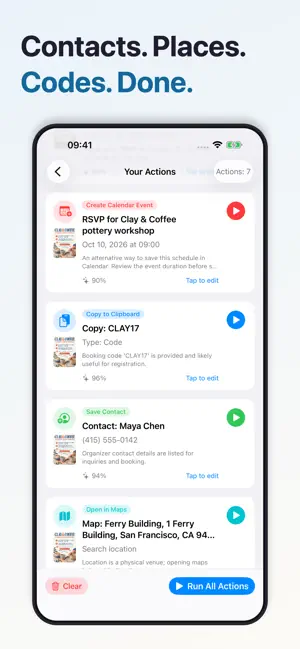
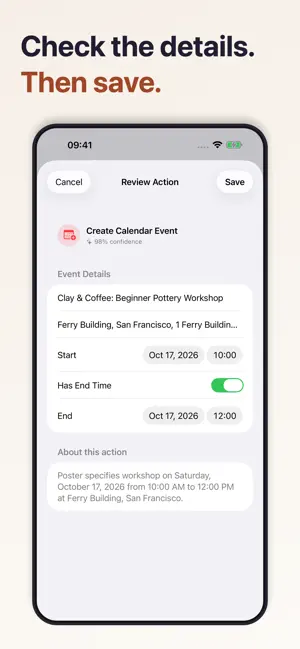
Turn screenshots into calendar events and reminders. Keep your iPhone. Skip the typing. A concert flyer. An appointment confirmation. A message with a time and place. ScreenshotAI finds the useful details in your screenshots and photos, then gives you actions to choose from. SMART SCREENSHOTS, INCLUDING ON OLDER iPHONES ScreenshotAI works on iPhones that support iOS 26, including iPhone 11, 12, 13, 14, and iPhone 15. Apple Intelligence hardware is not required. Image analysis uses an online AI service, so an internet connection is required. CALENDAR OR REMINDERS? YOU CHOOSE. For a recognized schedule with a date and time, see both a Calendar event and a Reminder option. Save either one or both. Review and edit the details before saving. FROM PICTURE TO ACTION 1. Choose pictures from your photo library, take a photo with camera input enabled, or share an image to ScreenshotAI. 2. Let AI extract dates, times, locations, and other useful details. 3. Choose the actions you want, check the details, and save. MORE THAN EVENTS Open an address in Maps, save contact information, or copy text and codes to your clipboard. Revisit recent results in your extraction history. FREE TO START Analyze one image selection per day for free. ScreenshotAI Pro includes unlimited extractions, up to 10 pictures per selection, and an ad-free experience. Choose a weekly, monthly, or yearly subscription. Eligible new subscribers can try monthly or yearly Pro free for 3 days. The selected plan's price and renewal period are shown before purchase. One introductory offer per subscription group. ScreenshotAI is an independent app. It does not enable Apple's Apple Intelligence system features. AI results can contain mistakes; review dates, times, and other details before saving. Payment is charged to your Apple ID at confirmation, or when an eligible free trial ends. Subscriptions renew automatically unless canceled at least 24 hours before the current period ends. Manage or cancel in your App Store account settings. Terms of Use: https://www.apple.com/legal/internet-services/itunes/dev/stdeula/
What’s new
Version 1.0.3 · Updated September 15, 2026
A clearer, simpler ScreenshotAI. • Added languages throughout the app, permissions, and share extension. • Choose pictures directly from your photo library, with better loading and error feedback. • Get both Calendar and Reminder options for recognized schedules. • Enjoy a refreshed home, onboarding, actions, and Pro experience. • Choose weekly, monthly, or yearly Pro. Eligible new subscribers can try monthly or yearly Pro free for 3 days. • Improved purchase reporting and restoration.
App privacy
The developer, Native, reported these privacy practices to Apple.
Data Used to Track You
The following data may be used to track you across apps and websites owned by other companies:
- Identifiers: Device ID
Data Not Linked to You
The following data, which may be collected but is not linked to your identity, may be used for the following purposes:
- Identifiers: Device ID, User ID
- Purchases: Purchase History
- Usage Data: Product Interaction
Used for: Third-Party Advertising, Analytics, App Functionality
Alternatives to ScreenshotAI: Calendar Events
Looking for apps like ScreenshotAI: Calendar Events? Here are 6 similar apps on the App Store. The highest rated is EventShot - Image To Calendar (5.0/5), and all 6 are free to download.
-
 品源百货
品源百货
-
 好品喵
好品喵
-
 Shieldly - Warranty Tracker
-
 AI Text to Calendar - JotCal
-
 EventShot - Image To Calendar
5.0
EventShot - Image To Calendar
5.0
-
 ScreenVault: AI Screenshot org
1.0
ScreenVault: AI Screenshot org
1.0
| App | Rating | Price | Last updated | Compare |
|---|---|---|---|---|
| ScreenshotAI: Calendar Events | – | Free | September 15, 2026 | |
| 品源百货 | – | Free | Jul 10, 2026 | Compare |
| 好品喵 | – | Free | Aug 1, 2026 | Compare |
| Shieldly - Warranty Tracker | – | Free | Aug 27, 2026 | Compare |
| AI Text to Calendar - JotCal | – | Free | Jul 14, 2026 | Compare |
| EventShot - Image To Calendar | 5.0 / 5 (3) | Free | Oct 8, 2025 | Compare |
| ScreenVault: AI Screenshot org | 1.0 / 5 (1) | Free | Jun 11, 2026 | Compare |