

Bank Statement Converter Parse
Format Partners LLC Utilities iPhoneiPadiPod touch
Bank Statement Converter Parse is a free Utilities app for iPhone and iPad by Format Partners LLC. Rated 4.0/5 from 4 ratings. Requires iOS 18.5.
- Rating
- 4.0
- 4 ratings
- Price
- Free
- on the App Store
- Size
- 45 MB
- Age 4+
- Updated
- Oct 16
- 2026 · v1.6
Screenshots
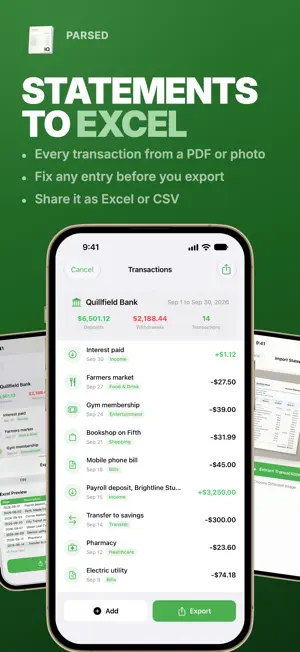


About Bank Statement Converter Parse
Turn a bank statement into a spreadsheet. Import the PDF from your bank or take a photo of a printed statement, and Parsed lists every transaction, ready to export as CSV or Excel. HOW IT WORKS 1. Import a statement: a PDF from Files, a photo from your library, or the camera. Pick the PDF pages you need. 2. Parsed's AI reads the statement: the bank, the period, the totals and every transaction. 3. Review the list, fix anything that needs it, and export. EVERY TRANSACTION, IN COLUMNS Date, description, amount, deposit or withdrawal, and a category for each line, with the statement's deposits, withdrawals and transaction count up top. FIX BEFORE YOU EXPORT Tap a transaction to edit its date, description, amount or category. Swipe to delete one, or add one that is missing. CSV OR EXCEL Preview the file, then share it to Files, Mail, AirDrop or your budgeting and bookkeeping apps. Every converted statement is saved in History. Available in English, German, French, Spanish, Italian, Portuguese and Japanese. Parsed requires a subscription to use premium features, plans detailed below: PREMIUM PLANS ($2.99/week, $9.99/month, $39.99/year): - More statement conversions The $39.99/year plan starts with a 3-day free trial. By downloading this app, you agree to our terms and conditions and privacy policy: Terms: apple.com/legal/internet-services/itunes/dev/stdeula Privacy: format.partners/parsed-privacy-policy Support: format.partners/support Contact: [email protected] Parsed uses AI to read statements, so check the exported figures against your statement. Parsed is not accounting or tax advice.
What’s new
Version 1.6 · Updated October 16, 2026
We've added new features and made the app better to use! If you have any ideas or suggestions, please email us. We've also fixed some bugs.
App privacy
The developer, Format Partners LLC, reported these privacy practices to Apple.
Data Used to Track You
The following data may be used to track you across apps and websites owned by other companies:
- Identifiers: Device ID
- Usage Data: Product Interaction, Advertising Data, Other Usage Data
- Diagnostics: Performance Data, Other Diagnostic Data
Data Not Linked to You
The following data, which may be collected but is not linked to your identity, may be used for the following purposes:
- Purchases: Purchase History
- User Content: Photos or Videos, Other User Content
- Identifiers: User ID, Device ID
- Usage Data: Product Interaction, Advertising Data, Other Usage Data
- Diagnostics: Crash Data, Performance Data, Other Diagnostic Data
Used for: Analytics, App Functionality
Alternatives to Bank Statement Converter Parse
Looking for apps like Bank Statement Converter Parse? Here are 6 similar apps on the App Store. The highest rated is Bank Statement Converter □ (5.0/5), and 5 of the 6 are free to download.
-
 Gas vs EV: Breakeven
-
 Bank Statement Converter □
5.0
-
 Scientific Calculator Elite
4.8
-
 Invoice Maker Offline PDF
-
 Content Generator App
1.0
-
 Billy - Split bills fairly
5.0
| App | Rating | Price | Last updated | Compare |
|---|---|---|---|---|
| Bank Statement Converter Parse | 4.0 / 5 (4 ratings) | Free | October 16, 2026 | |
| Gas vs EV: Breakeven | – | Free | Jun 2, 2026 | Compare |
| Bank Statement Converter □ | 5.0 / 5 (1) | Free | Aug 24, 2026 | Compare |
| Scientific Calculator Elite | 4.8 / 5 (55) | 4.99 USD | Oct 14, 2024 | Compare |
| Invoice Maker Offline PDF | – | Free | Apr 14, 2026 | Compare |
| Content Generator App | 1.0 / 5 (1) | Free | May 4, 2025 | Compare |
| Billy - Split bills fairly | 5.0 / 5 (7) | Free | Oct 11, 2026 | Compare |