

PictoTimer
William Tifft Utilities iPhoneiPadiPod touch
PictoTimer is a free Utilities app for iPhone and iPad by William Tifft. Requires iOS 17.0. Updated May 29, 2026.
- Price
- Free
- on the App Store
- Size
- 2 MB
- Age 4+
- Updated
- May 29
- 2026 · v1.1.2
Screenshots


About PictoTimer
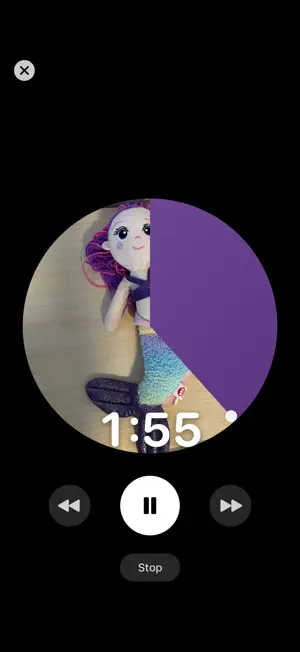
PictoTimer transforms countdown timers into a visual experience. Watch your photos gradually reveal as time passes, making waiting fun and engaging. PERFECT FOR: • Kids learning time management • Focus sessions and productivity • Cooking and meal prep • Exercise and workout routines • Study breaks and pomodoro sessions • Any activity where you want a visual countdown KEY FEATURES: Photo Timers Create personalized countdown timers using photos from your library or take new ones with your camera. Each timer is unique and meaningful to you. Multiple Reveal Styles Choose from four beautiful animation styles: • Photo Reveal - Watch your image gradually appear from top to bottom • Pixelate - Start with a pixelated image that becomes crystal clear • Puzzle - Assemble your photo piece by piece • Clock Face - Traditional clock hands move over your image Flexible Duration Set timers from seconds to 24 hours. Perfect for quick tasks or extended activities. Multiple Timers Create and save multiple timers for different activities. Organize your day with visual reminders. End Alerts Get notified when your timer completes with a clear sound alert. Live Activities & Widgets Stay on top of your timers with Live Activities on your Lock Screen and Dynamic Island, plus home screen widgets. Privacy First All your photos and timers are stored locally on your device. We don't collect, transmit, or share any of your data. Perfect for parents, students, professionals, and anyone who wants a more engaging way to track time. Make waiting fun with PictoTimer!
What’s new
Version 1.1.2 · Updated May 29, 2026
PictoTimer now fully supports iPad and landscape mode! • iPad Support – Runs beautifully on all iPad models with full support for Split View and Slide Over multitasking. The timer list automatically adapts to a card grid layout on larger screens. • Landscape Mode – Use PictoTimer in landscape on any device. The timer running view intelligently repositions controls for a comfortable landscape experience, with the circular photo reveal placed side-by-side with the timer controls. • Refined Detail View – The Start Timer button is always visible at the bottom of the screen, with a side-by-side photo and settings layout in landscape.
App privacy
The developer, William Tifft, reported these privacy practices to Apple.
Data Not Collected
The developer does not collect any data from this app.
Alternatives to PictoTimer
Looking for apps like PictoTimer? Here are 6 similar apps on the App Store. The highest rated is Multi Timer: Kitchen Timer Pro (5.0/5), and all 6 are free to download.
-
 EKtimer
-
 Quick Timer - Tap & Go
-
 Counter Smart | Tally Counter
-
 Multi Timer: Kitchen Timer Pro
5.0
Multi Timer: Kitchen Timer Pro
5.0
-
 Rubber Clock
1.0
Rubber Clock
1.0
-
 Shansan Super Timer
| App | Rating | Price | Last updated | Compare |
|---|---|---|---|---|
| PictoTimer | – | Free | May 29, 2026 | |
| EKtimer | – | Free | Aug 7, 2024 | Compare |
| Quick Timer - Tap & Go | – | Free | Sep 1, 2026 | Compare |
| Counter Smart | Tally Counter | – | Free | Feb 28, 2026 | Compare |
| Multi Timer: Kitchen Timer Pro | 5.0 / 5 (1) | Free | Aug 4, 2026 | Compare |
| Rubber Clock | 1.0 / 5 (1) | Free | Jul 30, 2026 | Compare |
| Shansan Super Timer | – | Free | Jun 23, 2025 | Compare |
Compare PictoTimer with the top alternatives: ratings, updates, ASO score and keyword gaps →