

Yavo: Voice Budget Tracker
Mykola Kipnyak Finance iPhoneiPadiPod touch
Yavo: Voice Budget Tracker is a free Finance app for iPhone and iPad by Mykola Kipnyak. Rated 3.0/5 from 2 ratings. Requires iOS 15.1.
- Rating
- 3.0
- 2 ratings
- Price
- Free
- on the App Store
- Size
- 72 MB
- Age 4+
- Updated
- Oct 21
- 2026 · v1.0.15
Screenshots


About Yavo: Voice Budget Tracker
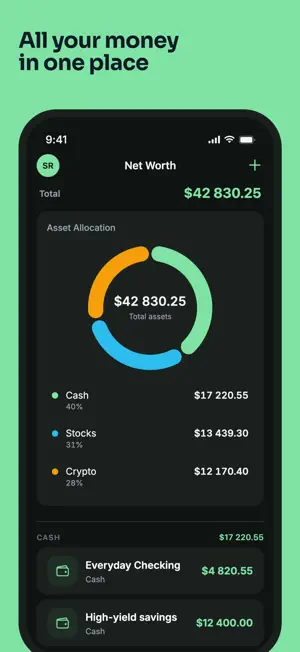
Yavo tracks your spending the way you actually live - by voice, receipt scan, or quick tap. Get AI-powered weekly reports that show exactly where your money goes. Start your 30-day free trial today. ADD EXPENSES YOUR WAY • Say it - voice input logs and auto-categorizes in seconds • Scan a receipt - total, tax, merchant, and items extracted • Type it - full manual entry with date, category, and notes • Works offline - log by voice, scan, or type without internet; syncs automatically when reconnected AI WEEKLY & MONTHLY REPORTS Every week and month, Yavo generates a financial report with spending insights and practical tips. See your top categories, trends, and budget health score - not just raw numbers. BUDGETS & SAVINGS GOALS • Monthly budget with daily pace tracker • Category spending limits with alerts • Savings goals with deadline and progress tracking DEBT & NET WORTH • Credit cards, loans, mortgages, auto loans • Payoff progress, due dates, and interest tracking • Net worth dashboard: cash, stocks & crypto - live prices, always up to date EXPORT YOUR DATA • PDF report: expenses by category with totals • CSV: full transaction list with items • Receipt images - all in one ZIP, sent to your email INCOME & CASH FLOW • Log income by source and category • Custom tax groups for income and expenses • Full cash flow view - income vs expenses in one place ORGANIZE YOUR FINANCES • Custom categories and payment methods • Recurring payments and subscriptions • Multi-currency support • Transfers between accounts • Biometric protection (Face ID/fingerprint) PREMIUM - 30-day free trial • Unlimited voice expenses • Unlimited receipt scanning • AI weekly and monthly reports • Full transaction history • Custom categories Save 40% with the annual plan. SUBSCRIPTION DETAILS Payment will be charged to your Apple ID account at confirmation of purchase. Subscription automatically renews unless it is canceled at least 24 hours before the end of the current period. Your account will be charged for renewal within 24 hours before the end of the current period. You can manage and cancel your subscriptions by going to your account settings on the App Store after purchase. Terms of Use (EULA): https://www.apple.com/legal/internet-services/itunes/dev/stdeula/ Privacy Policy: https://yavo-app.com/privacy
What’s new
Version 1.0.15 · Updated October 21, 2026
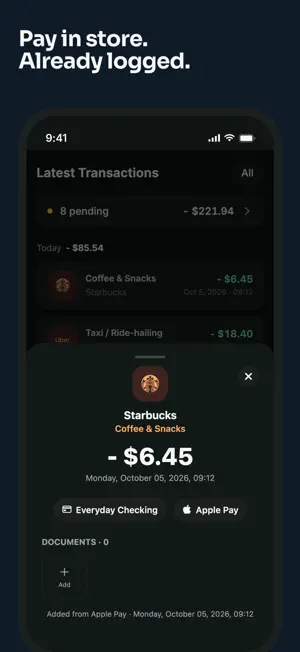
• New in Statistics: your spending pace against the previous week or month, top merchants, and fixed versus flexible spending. Plus a ring chart, a filter by card, spending by payment method, a short "what changed" line and Export at the top. • Transactions opens much faster from the Dashboard. • Apple Pay auto-import: set up one Shortcuts automation and every Apple Pay payment becomes an expense with a category (iOS 17 and later). • Import by email: send bank statements (CSV, XLSX, PDF) and receipts to your personal Yavo address. New senders need your approval. Recent emails shows an email as soon as it arrives and tells you when a file needs to be sent again. • Open the original receipt or statement (photo, PDF, CSV or XLSX) from the transaction it created. • Share receipt photos and screenshots to Yavo from any app. They upload in the background. • Review imported transactions in batches: set the payment method once, see possible duplicates, or delete a whole import. • Merchant suggestions match any part of the name, and picking one suggests the card you used last time. • New month: choose what happens to last month's leftover budget and review suggested limits. • Merchant logos on transactions, archived payment methods, an Add button when you have no payment methods yet, and a choice of where the money goes when you delete a goal. • Guided tours, a Dashboard you can rearrange, and confirming several expenses at once. • Fixed: Face ID locking you out after a quick app switch, shared receipts failing after a long break, imported drafts lost on a slow connection, and scrolling in long receipts.
App privacy
The developer, Mykola Kipnyak, reported these privacy practices to Apple.
Data Linked to You
The following data, which may be collected and linked to your identity, may be used for the following purposes:
- Financial Info: Other Financial Info
- User Content: Audio Data
- Contact Info: Email Address
- Identifiers: User ID, Device ID
Used for: Analytics, Product Personalization, App Functionality
Data Not Linked to You
The following data, which may be collected but is not linked to your identity, may be used for the following purposes:
- User Content: Other User Content
- Contact Info: Name
Used for: Product Personalization, App Functionality
Alternatives to Yavo: Voice Budget Tracker
Looking for apps like Yavo: Voice Budget Tracker? Here are 6 similar apps on the App Store. The highest rated is Expense Tracker: SpendVoice (5.0/5), and all 6 are free to download.
-
 Expense Tracker: SpendVoice
5.0
Expense Tracker: SpendVoice
5.0
-
 MoneyTurtle
-
 Recontrol: Personal Finance
-
 WalletWhisper: Voice Expense
-
 Waltro: Expense Budget Tracker
5.0
Waltro: Expense Budget Tracker
5.0
-
 Zuko: Subscription Reminder
5.0
Zuko: Subscription Reminder
5.0
| App | Rating | Price | Last updated | Compare |
|---|---|---|---|---|
| Yavo: Voice Budget Tracker | 3.0 / 5 (2 ratings) | Free | October 21, 2026 | |
| Expense Tracker: SpendVoice | 5.0 / 5 (1) | Free | Jun 24, 2026 | Compare |
| MoneyTurtle | – | Free | Oct 10, 2026 | Compare |
| Recontrol: Personal Finance | – | Free | Oct 19, 2026 | Compare |
| WalletWhisper: Voice Expense | – | Free | Jun 16, 2026 | Compare |
| Waltro: Expense Budget Tracker | 5.0 / 5 (1) | Free | Sep 19, 2026 | Compare |
| Zuko: Subscription Reminder | 5.0 / 5 (1) | Free | Jun 23, 2026 | Compare |