

Mic Test: Microphone Checker
Yunus Gunduz Utilities iPhoneiPadiPod touch
Mic Test: Microphone Checker is a free Utilities app for iPhone and iPad by Yunus Gunduz. Requires iOS 16.0. Updated October 21, 2026.
- Price
- Free
- on the App Store
- Size
- 7 MB
- Age 4+
- Updated
- Oct 21
- 2026 · v1.1.3
Screenshots


About Mic Test: Microphone Checker
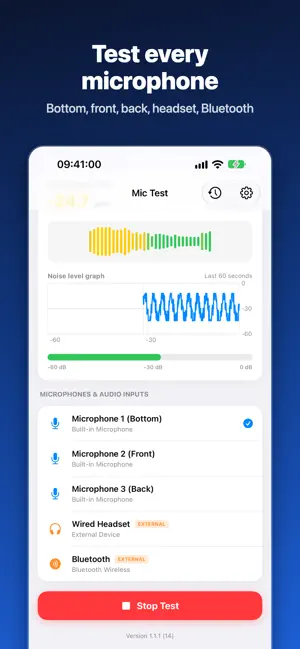
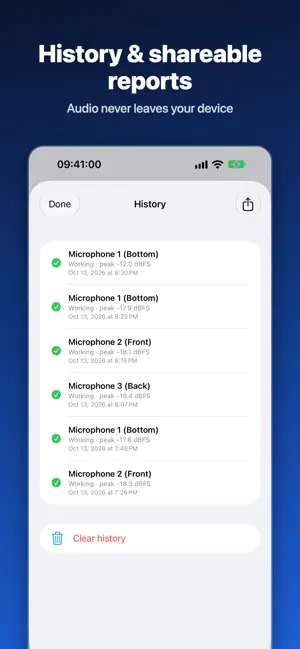
Is your microphone working? Find out in seconds. Mic Test shows your mic level live in dBFS and warns you when no sound reaches it. Buying a used or new iPhone or iPad? Calls cutting out, voice messages sounding muffled, or people can't hear you on video calls? Run a quick mic test before you trust the device or your headset. Free features: • Live level readout in dBFS • Silence warning when no sound reaches the mic • "Your microphone works" result after a quick test • Tests the built-in microphone Premium (one-time lifetime purchase, no subscription): • Test every mic: bottom, front, back, headset, Bluetooth and USB • Live waveform and peak level • dB noise graph: the last 60 seconds of your mic level • Test history: your last 20 tests, stored on your device only • Share a text test report with your device details and levels • No ads Who it is for: • Checking a used or new iPhone or iPad before you buy it • Troubleshooting calls, voice messages and video calls • Testing a wired headset or Bluetooth earbuds before you rely on them • Repair shops checking mics before and after a repair How to run a test: 1. Open the app and start a test. 2. Speak normally, then tap or speak close to the mic opening. 3. Watch the live level and read the result. Languages: English, Turkish, German, Spanish, Portuguese, Japanese, French, Arabic, Ukrainian and Russian. To change the language, open iOS Settings, scroll to Mic Test and choose Language. Privacy: Audio never leaves your device. Mic Test does not record, save or upload your voice. It only measures the sound level while the test is running. Good to know: Mic Test measures the sound your iPhone or iPad receives. It does not test speakers or the camera. Results depend on your device and its mics. The free version shows ads; Premium removes them. You can restore a previous purchase from the app's Settings. Questions or feedback? Visit https://yunusgunduz.com/contact.php?lang=en
What’s new
Version 1.1.3 · Updated October 21, 2026
New: watch a short video to try a Premium feature once (up to 3 a day). Premium is still a one-time purchase: every microphone, live waveform and peak level, dB noise graph, test history, report sharing and no ads.
App privacy
The developer, Yunus Gunduz, reported these privacy practices to Apple.
Data Used to Track You
The following data may be used to track you across apps and websites owned by other companies:
- Identifiers: Device ID
- Usage Data: Advertising Data
Data Not Linked to You
The following data, which may be collected but is not linked to your identity, may be used for the following purposes:
- Identifiers: Device ID
- Usage Data: Advertising Data
- Purchases: Purchase History
- Diagnostics: Crash Data
Used for: Third-Party Advertising, App Functionality
Alternatives to Mic Test: Microphone Checker
Looking for apps like Mic Test: Microphone Checker? Here are 6 similar apps on the App Store. The highest rated is GamePad Test (1.0/5), and 4 of the 6 are free to download.
-
 dBLevel – Decibel Meter
-
 Pearpair
-
 Voice Recorder Pro - Audio K
-
 GamePad Test
1.0
-
 CleanerX: AI Storage Cleanup
-
 MicCheck - Mic&Speaker Tester
| App | Rating | Price | Last updated | Compare |
|---|---|---|---|---|
| Mic Test: Microphone Checker | – | Free | October 21, 2026 | |
| dBLevel – Decibel Meter | – | 1.99 USD | Apr 18, 2026 | Compare |
| Pearpair | – | Free | Oct 21, 2026 | Compare |
| Voice Recorder Pro - Audio K | – | Free | Sep 1, 2026 | Compare |
| GamePad Test | 1.0 / 5 (1) | 0.49 USD | Aug 30, 2026 | Compare |
| CleanerX: AI Storage Cleanup | – | Free | May 28, 2026 | Compare |
| MicCheck - Mic&Speaker Tester | – | Free | Sep 9, 2026 | Compare |