

Timo Focus: Productive Time
Lucas Pereira Productivity iPhoneiPadiPod touch
Timo Focus: Productive Time is a free Productivity app for iPhone and iPad by Lucas Pereira. Requires iOS 17.0. Updated August 30, 2026.
- Price
- Free
- on the App Store
- Size
- 22 MB
- Age 4+
- Updated
- Aug 30
- 2026 · v1.0.5
Screenshots

About Timo Focus: Productive Time
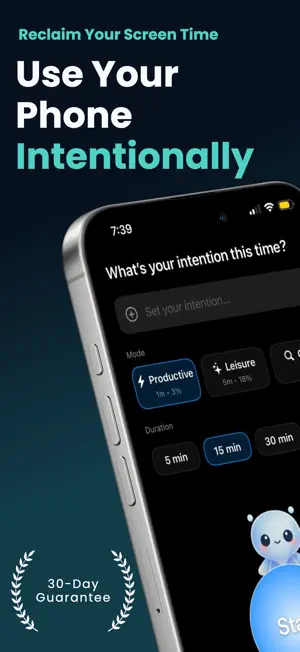
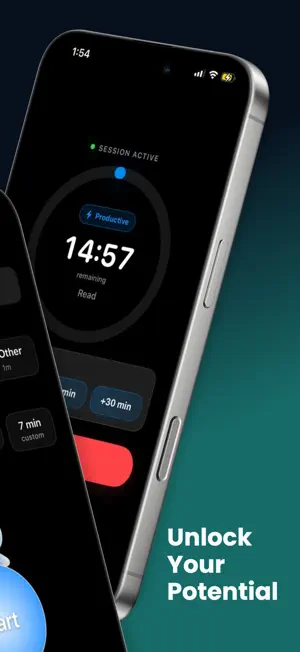
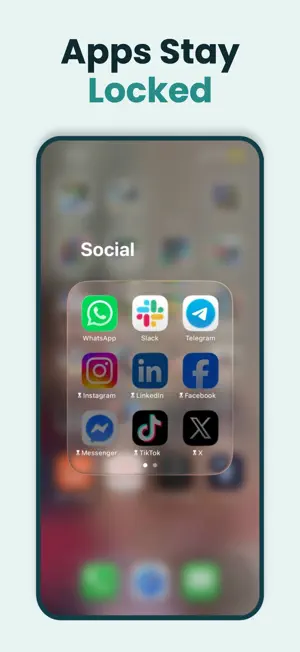
Make your screen time more intentional with Timo Focus, an app blocker, focus timer, and screen control tool designed to help you use your phone with purpose. Not all screen time is equal. Reading is different from scrolling. Planning is different from procrastinating. Messaging a friend is different from falling into a feed. Timo helps you make that distinction before selected apps open. Choose what you want to do, decide how long you need, and return to locked mode automatically when your session ends. HOW TIMO WORKS • Block distracting apps and websites Keep selected apps and websites locked by default, with a simple intentional step before access. • Keep essential apps available Create exceptions for messages, navigation, utilities, and anything else you want ready when you need it. • Start focused sessions Choose a purpose, set a timer, and write why you are opening your phone. • Launch routines with Quick Actions Save your favourite purpose, intention, and duration as a one-tap routine, then start a session instantly. • Return to locked mode automatically When your session ends, Timo restores your selected app and website restrictions without relying on willpower. • Track screen time with context Review sessions by category, follow your streak, and see how your phone habits change across days and months. • Set goals, limits, and alerts Make more room for the activities you value, reduce unwanted scrolling, and stay aware of your usage. BUILT FOR REAL LIFE Timo does not treat all screen time as bad. A long call, a good book, navigation, creative work, or planning your day can all be time well spent. The goal is not simply a lower Screen Time number. It is better screen control and phone use that matches what you intended to do. TIMO PRO Timo's app blocker, focus sessions, Quick Actions, goals, limits, and progress features require a paid Pro subscription. Pricing, billing periods, and any available offers are shown before purchase. Subscriptions renew automatically unless cancelled and can be managed through your Apple ID settings. TERMS, PRIVACY, AND SUPPORT Terms: https://timofocus.com/terms Privacy: https://timofocus.com/privacy EULA: https://www.apple.com/legal/internet-services/itunes/dev/stdeula/ Support: [email protected]
What’s new
Version 1.0.5 · Updated August 30, 2026
- Save your favorite routines with Quick Actions and start them in one tap with Timo Pro. - Set Daily Targets and choose a custom session length with Timo Pro. - Choose when you receive your session wrap-up reminder, from 5 to 60 seconds before the end. - Improved account syncing so your Session History, Quick Actions, targets, and preferences restore more reliably. - Refined Analytics and improved layouts throughout the app.
App privacy
The developer, Lucas Pereira, reported these privacy practices to Apple.
Data Not Collected
The developer does not collect any data from this app.
Alternatives to Timo Focus: Productive Time
Looking for apps like Timo Focus: Productive Time? Here are 6 similar apps on the App Store. The highest rated is Intentional - Earn Screen Time (4.4/5), and all 6 are free to download.
-
 Airzemo
-
 WhyOpen: Screen Time
-
 Roots - Habit & Streak Tracker
-
 EyeJolt: Nod-Off Alert & Nudge
-
 Intentional - Earn Screen Time
4.4
Intentional - Earn Screen Time
4.4
-
 ToDoRank
| App | Rating | Price | Last updated | Compare |
|---|---|---|---|---|
| Timo Focus: Productive Time | – | Free | August 30, 2026 | |
| Airzemo | – | Free | Sep 29, 2026 | Compare |
| WhyOpen: Screen Time | – | Free | Oct 7, 2026 | Compare |
| Roots - Habit & Streak Tracker | – | Free | Oct 18, 2025 | Compare |
| EyeJolt: Nod-Off Alert & Nudge | – | Free | Oct 15, 2026 | Compare |
| Intentional - Earn Screen Time | 4.4 / 5 (7) | Free | Jul 11, 2026 | Compare |
| ToDoRank | – | Free | Jun 13, 2025 | Compare |