

QuickCopy - Text Transfer
朋 李 Utilities iPhoneiPadiPod touch
QuickCopy - Text Transfer is a free Utilities app for iPhone and iPad by 朋 李. Requires iOS 13.0. Updated March 1, 2026.
- Price
- Free
- on the App Store
- Size
- 21 MB
- Age 4+
- Updated
- Mar 1
- 2026 · v1.1.0
Screenshots



About QuickCopy - Text Transfer
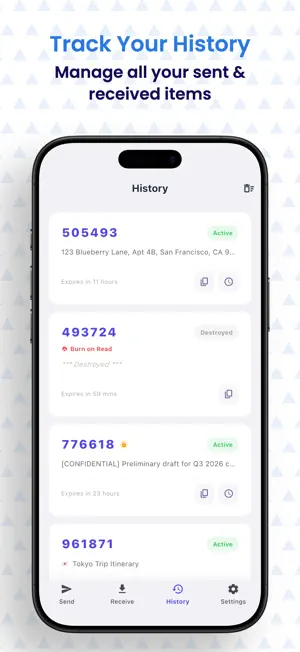
[ Introduction ] Say goodbye to clumsy chat file transfers and emailing yourself. QuickCopy is a minimalist, cross-device text relay hub built for productivity enthusiasts. With a single paste, generate a lightweight 6-digit extraction code. Whether between your phone, PC, or tablet, long texts, complex links, and confidential codes sync seamlessly in seconds. Embracing the "less is more" design philosophy, we deliver the purest, most secure clipboard sync experience. [ Core Features ] • Lightning Fast & Ephemeral: No tedious sign-ups or logins required. Paste your text to instantly generate a 6-digit code. Enter it on another device to retrieve your content, as smooth and natural as unlocking a personal vault. • Burn After Reading: Customize the expiration time. Once enabled, your data is permanently destroyed from the cloud the moment it is extracted or reaches its time limit, leaving absolute zero trace. • Password Protection: Add an exclusive "Secondary Password" for sensitive information (like account credentials or confidential drafts). Only those with both the extraction code and the password can unlock the content, providing bank-level protection for your privacy. • Native Aesthetics & Minimalism: Built with strictly pure UI design guidelines to eliminate visual noise. We solemnly promise: zero launch ads and zero push notifications, returning an absolutely quiet tool environment to you. [ High-Frequency Use Cases ] • Productivity & Office: Seamlessly hand off complex URLs or long meeting minutes found on your PC to your phone with a simple 6-digit code. • Developer & Geek: Securely transfer server configurations, temporary access tokens, or code snippets across devices. Lock them with a password and set them to auto-destroy. • Daily Sync: Effortlessly copy reading notes or long paragraphs across different screens and devices. [ Our Privacy Promise ] QuickCopy firmly believes that "your data belongs only to you." We act solely as an encrypted data relay channel, and all transferred content is strictly governed by an auto-destruction mechanism. We use a minimalist system permission strategy and will never request access to your photos, contacts, or other sensitive privacy data. Use it with complete peace of mind.
What’s new
Version 1.1.0 · Updated March 1, 2026
Visual Overhaul: Adopts a cleaner, native minimalist design language for a more immersive reading experience. Enhanced Privacy: Introduced"Burn After Reading" advanced settings to safeguard your data. Refined Interactions: Smarter history status tracking and added native haptic feedback for key operations.
App privacy
The developer, 朋 李, reported these privacy practices to Apple.
Data Linked to You
The following data, which may be collected and linked to your identity, may be used for the following purposes:
- User Content: Other User Content
- Identifiers: Device ID
Used for: App Functionality
Alternatives to QuickCopy - Text Transfer
Looking for apps like QuickCopy - Text Transfer? Here are 6 similar apps on the App Store.
-
 HeyDevice: Device Finder
-
 SafeConvert : HEIC Converter
-
 CryptoSeed
-
 ConvertOne – Units & Measures
-
 UpCheck Pro: UPC Digit Checker
-
 Voicenotes: AI Note Taker
| App | Rating | Price | Last updated | Compare |
|---|---|---|---|---|
| QuickCopy - Text Transfer | – | Free | March 1, 2026 | |
| HeyDevice: Device Finder | – | Free | Jun 3, 2026 | Compare |
| SafeConvert : HEIC Converter | – | Free | Mar 4, 2026 | Compare |
| CryptoSeed | – | Free | Jun 11, 2026 | Compare |
| ConvertOne – Units & Measures | – | Free | Feb 2, 2026 | Compare |
| UpCheck Pro: UPC Digit Checker | – | 0.99 USD | Feb 11, 2026 | Compare |
| Voicenotes: AI Note Taker | – | Free | Aug 18, 2026 | Compare |