

My Receipts: Expense Reports
Justin Keith Finance iPhoneiPadiPod touch
My Receipts: Expense Reports is a free Finance app for iPhone and iPad by Justin Keith. Rated 5.0/5 from 1 ratings. Requires iOS 26.0.
- Rating
- 5.0
- 1 ratings
- Price
- Free
- on the App Store
- Size
- 4 MB
- Age 4+
- Updated
- Nov 2
- 2026 · v1.2
Screenshots



About My Receipts: Expense Reports
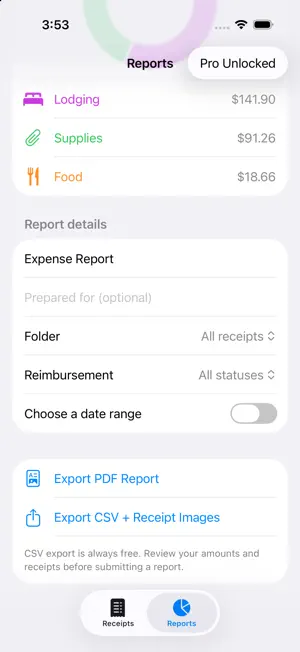
Keep the receipt. Skip the paperwork pile. My Receipts helps freelancers, contractors, and employees capture purchases and keep expense records ready for work. Scan a paper receipt, import receipt photos, or enter an expense yourself. Review the details, save it, and get back to your day. FREE RECEIPT TOOLS • Scan receipts with your camera or import up to 20 photos at a time. • Get suggested merchant, date, subtotal, tax, tip, and total details using on-device text recognition. • Review every receipt before saving. Scanned details may need correction. • See a warning when a receipt matches an existing merchant, date, and total. • Add categories and notes. Search your saved expenses. • View spending totals and category charts. • Export CSV files with receipt images for spreadsheets and recordkeeping. OPTIONAL PRO REPORTS One purchase adds tools for work expenses: • Organize receipts by trip, client, or project. • Track personal, reimbursable, submitted, and reimbursed expenses. • Build reports for a folder, date range, or reimbursement status. • Export PDF reports with expense totals, receipt images, and business notes. PRIVATE AND SIMPLE Your receipts are stored on your device. Receipt recognition runs on your device. No account is required, and there is no subscription. Basic receipt tools and CSV exports stay free. Amounts are recorded in U.S. dollars. This version does not convert currencies. Review your records before sending them to a client, employer, or bookkeeper. Pro Reports is an optional one-time in-app purchase; the price is shown before you buy.
What’s new
Version 1.2 · Updated November 2, 2026
• Added optional Pro Reports: trip, client, and project folders, reimbursement tracking, and PDF reports with receipt images. • Added receipt photo imports and review of every camera page. • Improved on-device recognition of dates and amounts, with editable review before saving. • Added possible duplicate warnings. • Improved CSV exports and corrected deletion from filtered results. • Basic receipt tools and CSV export remain free.
App privacy
The developer, Justin Keith, reported these privacy practices to Apple.
Data Not Collected
The developer does not collect any data from this app.
Alternatives to My Receipts: Expense Reports
Looking for apps like My Receipts: Expense Reports? Here are 6 similar apps on the App Store. The highest rated is Credit Card Tracker—ValueStack (5.0/5), and all 6 are free to download.
-
 ReceiptStorage
-
 Receipt Scanner - OnePress
-
 SendThatBread
-
 ReceiptZero: Receipt Scanner
1.0
-
 CryptoClarity
-
 Credit Card Tracker—ValueStack
5.0
| App | Rating | Price | Last updated | Compare |
|---|---|---|---|---|
| My Receipts: Expense Reports | 5.0 / 5 (1 rating) | Free | November 2, 2026 | |
| ReceiptStorage | – | Free | Jan 28, 2026 | Compare |
| Receipt Scanner - OnePress | – | Free | Oct 7, 2026 | Compare |
| SendThatBread | – | Free | Feb 5, 2026 | Compare |
| ReceiptZero: Receipt Scanner | 1.0 / 5 (1) | Free | Sep 8, 2026 | Compare |
| CryptoClarity | – | Free | Feb 10, 2026 | Compare |
| Credit Card Tracker—ValueStack | 5.0 / 5 (3) | Free | Oct 29, 2026 | Compare |