

Hoshi Reader
Manh-Hao Steffen Pham Book iPhoneiPadiPod touch
Hoshi Reader is a free Book app for iPhone and iPad by Manh-Hao Steffen Pham. Rated 5.0/5 from 23 ratings. Requires iOS 18.0. Updated August 22, 2026.
- Rating
- 5.0
- 23 ratings
- Price
- Free
- on the App Store
- Size
- 9 MB
- Age 4+
- Updated
- Aug 22
- 2026 · v1.4.0
Screenshots


About Hoshi Reader
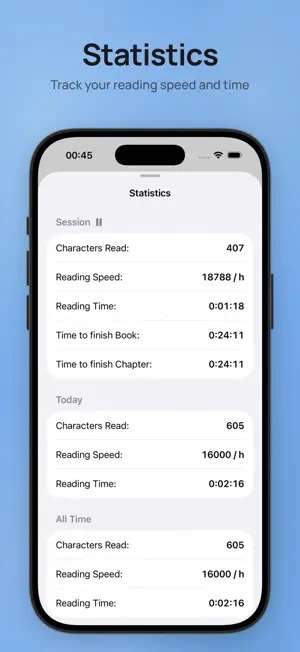
Hoshi Reader is a lightweight Japanese EPUB reader with a built-in pop-up dictionary and Anki mining support, made for immersion learning. Main Features: - Vertical (縦書き) and horizontal (横書き) reading modes - Yomitan-like pop-up dictionary with proper deinflection support - Support for all Yomitan term, frequency and pitch dictionaries - Dictionary audio support - AnkiMobile mining support - Fully configurable Anki card format, with most handlebars targeting Lapis implemented - Sasayaki (Audiobooks): Sync audiobooks to book text to read along - Reading statistics - ッツ Reader sync - Bookshelves to organize your library - Customizable theme, font and layout
Ratings & reviews
5.0
23 ratings
What’s new
Version 1.4.0 · Updated August 22, 2026
Statistics: - Added a new statistics tab - See an overview of your reading time or set a daily goal and build up a streak - Book statistics can be edited from the overview at the bottom - Statistics are archived when a book is deleted and still count towards statistics unless manually deleted - Daily reset time can be configured Sasayaki: - New control bar for playback, which can be placed on the right or left side - On new matches, playback can now pause on images for a configurable amount of time - Increased speed and delay ranges - Fixed issues with matching and auto scroll Dictionary and Anki: - Added support for kanji dictionaries - Added support for more pitch accent dictionaries - Added the option to create more than one card format - Added a button to search for the card in the card browser - Added the ability to categorize dictionaries into bilingual or monolingual and mine those into dedicated handlebars - You can choose a specific frequency dictionary to sort entries by now - In the dictionary tab, the entire search text is now shown so you can quickly look up a different part of e.g. a sentence - Long pressing the speaker icon now enables you to choose the audio source - Handlebars can also work in the tags field now General: - Added a gallery overview to quickly scroll through the images of a book - Chapters, highlights and gallery are now grouped into a new "Contents" option to reduce clutter - Added book search to find text in a book - Added the option to show separate chapter progress - Fixed the chapter overview for some books and fixed related chapter finish time calculation - Furigana can now be set to toggle and dimmed in addition to hide option - Book covers in the library can be blurred or hidden entirely now - Highlights now keep their furigana - Newly imported dictionaries can now be up to 50% smaller - Fixed an issue where text couldn't be selected in some cases - Fixed several crashes and issues, and improved general performance and stability
App privacy
The developer, Manh-Hao Steffen Pham, reported these privacy practices to Apple.
Data Linked to You
The following data, which may be collected and linked to your identity, may be used for the following purposes:
- User Content: Other User Content
Used for: App Functionality
Alternatives to Hoshi Reader
Looking for apps like Hoshi Reader? Here are 6 similar apps on the App Store. The highest rated is kotori: Japanese Novel Reader (5.0/5), and all 6 are free to download.
-
 Shiori Reader
4.9
Shiori Reader
4.9
-
 kotori: Japanese Novel Reader
5.0
kotori: Japanese Novel Reader
5.0
-
 Yom! Aozora Bunko
5.0
Yom! Aozora Bunko
5.0
-
 SORARI
4.8
SORARI
4.8
-
 Koodo Reader
4.3
Koodo Reader
4.3
-
 Readest - eBook Reader
4.5
Readest - eBook Reader
4.5
| App | Rating | Price | Last updated | Compare |
|---|---|---|---|---|
| Hoshi Reader | 5.0 / 5 (23 ratings) | Free | August 22, 2026 | |
| Shiori Reader | 4.9 / 5 (14) | Free | Mar 30, 2026 | Compare |
| kotori: Japanese Novel Reader | 5.0 / 5 (1) | Free | Oct 20, 2026 | Compare |
| Yom! Aozora Bunko | 5.0 / 5 (1) | Free | Oct 23, 2026 | Compare |
| SORARI | 4.8 / 5 (39) | Free | Oct 5, 2024 | Compare |
| Koodo Reader | 4.3 / 5 (9) | Free | Oct 11, 2026 | Compare |
| Readest - eBook Reader | 4.5 / 5 (195) | Free | Oct 14, 2026 | Compare |
Compare Hoshi Reader with the top alternatives: ratings, updates, ASO score and keyword gaps →