

AI Email Writer: Reply & Edit
婉媚 邵 Productivity iPhoneiPadiPod touch
AI Email Writer: Reply & Edit is a free Productivity app for iPhone and iPad by 婉媚 邵. Requires iOS 15.1. Updated February 12, 2026.
- Price
- Free
- on the App Store
- Size
- 18 MB
- Age 4+
- Updated
- Feb 12
- 2026 · v1.1
Screenshots
About AI Email Writer: Reply & Edit
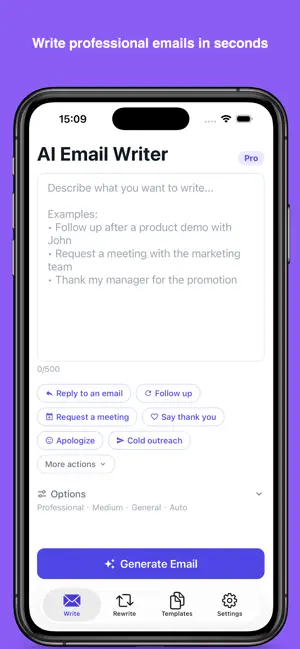
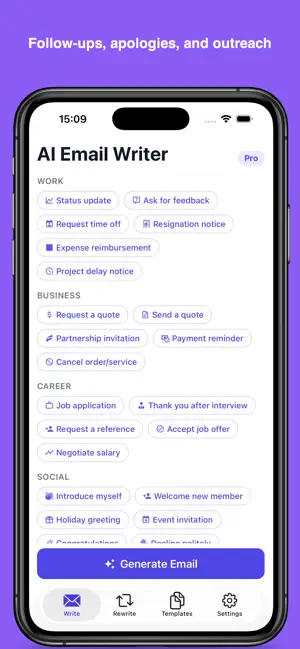
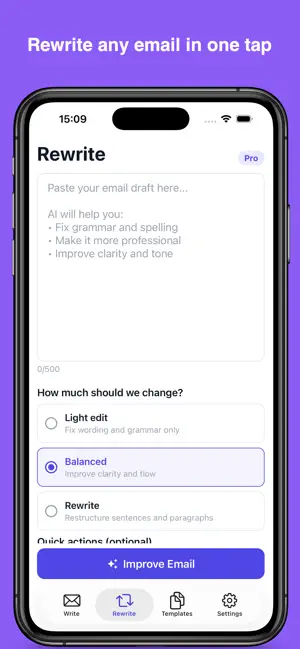
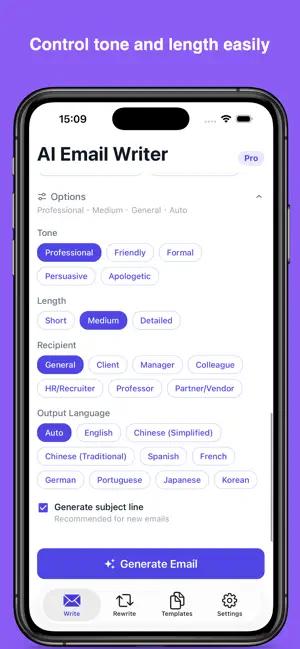
AI Email Writer — Write Better Emails Faster A smart AI-powered email assistant that helps you compose professional emails in seconds. Whether you're writing business correspondence, follow-ups, or personal messages — get it done effortlessly. Compose Emails with AI • Describe what you want to say, AI writes it for you • Choose from multiple tones: professional, friendly, formal, casual • Adjust length and style to fit your needs • Generate multiple versions to pick the best one Rewrite & Improve • Paste any email and let AI enhance it • Fix grammar and spelling errors • Adjust tone while keeping your message • Make emails more concise or detailed Email Templates • Ready-to-use templates for common scenarios • Business, follow-up, thank you, apology, and more • Customize templates to match your style • Save time on repetitive emails Smart Features • Add your signature to every email • Save favorite emails for reuse • View history of all generated emails • Copy and share with one tap Multilingual Support • Write emails in multiple languages • Translate and adapt your message • Perfect for international communication Privacy Focused • No account required to start • Your data stays on your device • Works offline for saved content Whether you need to write a quick reply, craft a formal business proposal, or polish an existing draft — AI Email Writer helps you communicate with confidence. Payment will be charged to iTunes Account at confirmation of purchase. Subscription automatically renews unless auto-renew is turned off at least 24-hours before the end of the current period. Account will be charged for renewal within 24-hours prior to the end of the current period, and identify the cost of the renewal. Subscriptions may be managed by the user and auto-renewal may be turned off by going to the user's Account Settings after purchase. Any unused portion of a free trial period, if offered, will be forfeited when the user purchases a subscription to that publication, where applicable. Terms of use https://septudio.com/terms-of-use and privacy policy https://septudio.com/privacy-policy
What’s new
Version 1.1 · Updated February 12, 2026
Bug fixes and stability improvements.
App privacy
The developer, 婉媚 邵, reported these privacy practices to Apple.
Data Not Collected
The developer does not collect any data from this app.
Alternatives to AI Email Writer: Reply & Edit
Looking for apps like AI Email Writer: Reply & Edit? Here are 6 similar apps on the App Store. The highest rated is Desktop Journey (5.0/5), and all 6 are free to download.
-
 AI Resume Builder & CV: Curriq
4.0
AI Resume Builder & CV: Curriq
4.0
-
 Useless Notes
-
 KaoklaHome
-
 Daily Tasks | Reminder
-
 Golu: AI & Media Tools
-
 Desktop Journey
5.0
Desktop Journey
5.0
| App | Rating | Price | Last updated | Compare |
|---|---|---|---|---|
| AI Email Writer: Reply & Edit | – | Free | February 12, 2026 | |
| AI Resume Builder & CV: Curriq | 4.0 / 5 (1) | Free | Aug 5, 2026 | Compare |
| Useless Notes | – | Free | Feb 2, 2026 | Compare |
| KaoklaHome | – | Free | Jul 26, 2026 | Compare |
| Daily Tasks | Reminder | – | Free | Jan 31, 2024 | Compare |
| Golu: AI & Media Tools | – | Free | Sep 2, 2026 | Compare |
| Desktop Journey | 5.0 / 5 (1) | Free | Nov 14, 2024 | Compare |