

TILT: ADHD Focus & Study Timer
AVE ROYD SANTIAGO Productivity iPhoneiPadiPod touchApple Watch
TILT: ADHD Focus & Study Timer is a free Productivity app for iPhone and iPad by AVE ROYD SANTIAGO. Requires iOS 17.6. Updated October 11, 2026.
- Price
- Free
- on the App Store
- Size
- 30 MB
- Age 4+
- Updated
- Oct 11
- 2026 · v2.0
Screenshots

About TILT: ADHD Focus & Study Timer
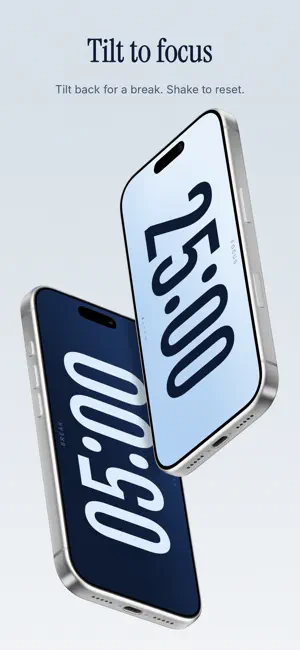
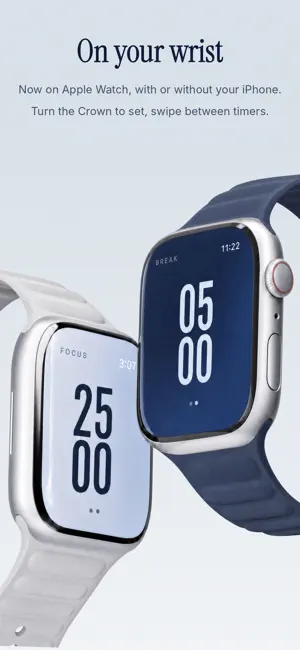
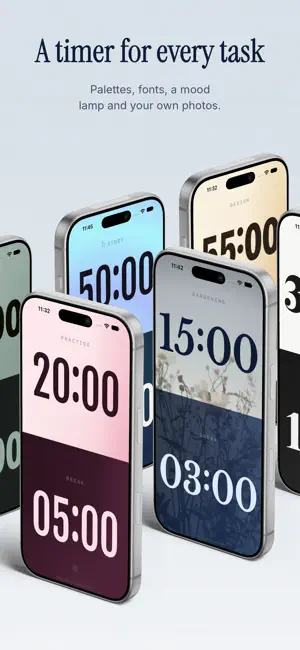
A focus timer you tilt, not tap. No buttons and no setup between you and the work. TILT TO FOCUS The screen splits into a FOCUS timer and a BREAK timer. Turn your phone LEFT and FOCUS starts. Turn it RIGHT for a break. SHAKE to reset. Your phone becomes the timer. BUILT FOR BRAINS THAT STRUGGLE TO START Starting is the hard part, so TILT removes every step between deciding and doing. Begin with intention: one slow breath and one clear task before every session. A reminder can nudge you at the time you usually begin. BLOCK DISTRACTIONS Pick the apps and sites that steal your attention. TILT blocks them while you focus and unblocks them during your breaks. KEEP GOING Continuous mode rolls focus into a break and back again, with a longer break every few sessions. Tap the dots to add a session or stretch the long break. ON YOUR WRIST TILT on Apple Watch works with simple, intuitive gestures: turn the Crown to set the time, tap to start, swipe to switch. It runs on its own or stays in step with your iPhone, and complications and the Smart Stack keep the time left in view. ON YOUR LOCK SCREEN A live countdown on the Lock Screen and in the Dynamic Island, so you never have to open the app to check the time. Widgets for the Home Screen and Lock Screen show today's focus, your week and your deep work. Tap Start on a widget and a focus session begins. SOUNDSPACES Set the mood with rain, forest, ocean, café, deep calm, singing bowls or ASMR, or play a playlist, album or song from Apple Music. Pick a different sound for focus and for break. SEE YOUR DEEP WORK Insights tracks your deep work: every focus session of 20 minutes or more. Set a weekly goal, get a Monday recap, find the session length you actually finish and the times of day you focus best, and see where your hours go across labels like STUDY and WORK. MAKE IT YOURS Save a preset for each kind of work, with its own label, length, colors and sound. Make a palette from any two colors, use your own photos, or choose Aura, a mesmerizing gradient that drifts while you work. Then pick a timer font. PRIVATE BY DESIGN No accounts. No ads. No tracking. Everything stays on your iPhone and Apple Watch. ACCESSIBLE Touch mode lets you tap to start and swipe to switch when tilting isn't handy. VoiceOver, Reduce Motion and high-contrast palettes are supported too. FREE, WITH TILT PLUS WHEN YOU WANT MORE TILT is free with 25-minute focus and 5-minute break sessions, touch mode, the Apple Watch app, the Today widgets, the Live Activity and reminders. TILT Plus adds sessions up to 120 minutes, continuous mode, the App Blocker, Insights, soundspaces and Apple Music, the start ritual, every palette, font and photo, plus presets and labels. Try Annual free for 7 days, or pay once for Lifetime. Prices are shown in the app. Privacy Policy: https://code.roydsantiago.com/tilt/privacy/ Terms of Use: https://www.apple.com/legal/internet-services/itunes/dev/stdeula/
What’s new
Version 2.0 · Updated October 11, 2026
TILT 2.0 is the biggest update yet, and TILT is now on Apple Watch. Thank you to our early supporters. We've listened to your feedback and improved TILT to make it a delight to use. • Apple Watch: TILT on your wrist, with intuitive gestures. Turn the Crown to set the time, tap to start, swipe to switch. It works on its own and stays in step with your iPhone, with complications and the Smart Stack for the time left. • Make it yours: presets, palettes in any two colors, your own photos and Aura. Plus new timer fonts and a fresh onboarding. • App Blocker: distracting apps stay blocked while you focus and unblock during your breaks. • Soundspaces: set the mood with rain, café, forest and more, or play your own playlists from Apple Music. • Begin with intention: one slow breath and one clear task before every session. • Insights: your deep work, a weekly goal and the hours you focus best. • Widgets: today, your week and deep work on the Home Screen and Lock Screen. Tap Start on a widget and a focus session begins. The Live Activity keeps the countdown on the Lock Screen and in the Dynamic Island. • Continuous mode: focus and breaks roll on, with a long break every few. Tap the dots to change a round. • Touch mode: tap and swipe instead of tilting, for a phone on a stand or when you're lying down. • Reminders: a nudge to start, an evening wrap-up and a Monday recap. Soundspaces, the start ritual, Insights, the App Blocker and continuous mode come with TILT Plus, and one purchase unlocks iPhone and Apple Watch. Try Annual free for 7 days. If TILT helps you focus, a rating or review means the world, and you can send us feedback anytime from Settings.
App privacy
The developer, AVE ROYD SANTIAGO, reported these privacy practices to Apple.
Data Not Collected
The developer does not collect any data from this app.
Alternatives to TILT: ADHD Focus & Study Timer
Looking for apps like TILT: ADHD Focus & Study Timer? Here are 6 similar apps on the App Store. The highest rated is Ember Pomodoro (5.0/5), and all 6 are free to download.
-
 Ember Pomodoro
5.0
Ember Pomodoro
5.0
-
 Quiet IQ: ADHD Focus Timer
5.0
Quiet IQ: ADHD Focus Timer
5.0
-
 Buw: Focus Timer & Pomodoro
-
 Focus Dots: Focus Timer
-
 JustStart: ADHD Planner
-
 Timora: Focus & Tasks
| App | Rating | Price | Last updated | Compare |
|---|---|---|---|---|
| TILT: ADHD Focus & Study Timer | – | Free | October 11, 2026 | |
| Ember Pomodoro | 5.0 / 5 (1) | Free | Apr 20, 2026 | Compare |
| Quiet IQ: ADHD Focus Timer | 5.0 / 5 (1) | Free | Aug 11, 2026 | Compare |
| Buw: Focus Timer & Pomodoro | – | Free | Sep 2, 2026 | Compare |
| Focus Dots: Focus Timer | – | Free | Feb 19, 2026 | Compare |
| JustStart: ADHD Planner | – | Free | Mar 27, 2026 | Compare |
| Timora: Focus & Tasks | – | Free | Oct 18, 2025 | Compare |