

geodb field
Aqua Terra Geoscientists LLC Productivity iPhoneiPadiPod touch
geodb field is a free Productivity app for iPhone and iPad by Aqua Terra Geoscientists LLC. Requires iOS 15.1. Updated August 26, 2026.
- Price
- Free
- on the App Store
- Size
- 48 MB
- Age 4+
- Updated
- Aug 26
- 2026 · v1.1.1
Screenshots



About geodb field
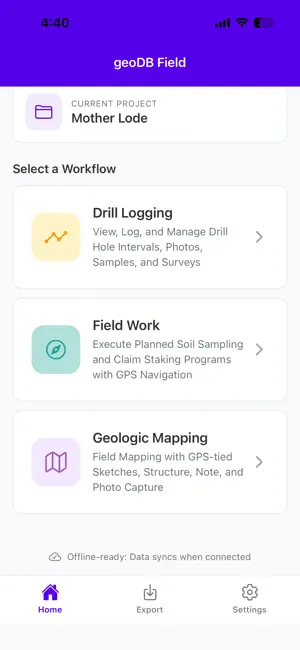
geoDB Field — offline data collection for mineral exploration Log drill holes, collect soil and rock samples, and map geology in the field — online or off. Built for geologists and field crews who need their data captured accurately the first time, without cell signal. Three workflows, one app Drill Logging — Record collars, lithology, alteration, structure, mineralization, and samples against a downloaded drill hole, with GPS surveys and 4K core photos. Everything queues locally and syncs when you're back in range. Field Work — Execute planned soil sampling and claim staking programs with GPS navigation. Quality-control bags (standards, blanks, duplicates) download to your device and fill by scanning a barcode — no more writing bag numbers by hand. Stations that still owe a field duplicate are marked right on the map. If a project runs more than one sampling program, pick which one you're working and the station list, map, and QC queue all narrow to match. Geologic Mapping — GPS-tied sketches, structure measurements, field notes, and photo capture, with your drill holes, samples, and claims rendered as reference layers underneath. Built for the field, not the office Full offline support — every workflow works with zero signal, syncs automatically once you're connected. Dark mode throughout, for early starts and late nights in camp. A live compass overlay for structural measurements (strike/dip). Configurable coordinate formats and high-accuracy GPS. View your other projects on the map as read-only reference context. Free to use — no subscription required. Create an account to protect your data and sync across devices; local-only projects work without one. Part of the geoDB platform — the same data your field crews collect syncs straight to your team's geoDB web account for QA/QC, reporting, and 3D visualization.
What’s new
Version 1.1.1 · Updated August 26, 2026
• Sign in with an emailed code — no password needed. • New drill holes added on the web now appear on your phone automatically; no reinstall required. • "Download Recent" pre-caches just the holes you're working on for offline logging, with progress and a Stop button. • Point-sample forms remember your last sample; custom fields filter by sample type. • Search bar on the company/project picker. • Fixes: stuck photo uploads, a map freeze when the last claimed point was collected, the compass draining the battery on the geologic map, and sign-in errors that read as success.
App privacy
The developer, Aqua Terra Geoscientists LLC, reported these privacy practices to Apple.
Data Linked to You
The following data, which may be collected and linked to your identity, may be used for the following purposes:
- Location: Precise Location
- Contact Info: Email Address
- User Content: Photos or Videos, Other User Content
- Identifiers: User ID
- Diagnostics: Crash Data, Other Diagnostic Data
- Surroundings: Environment Scanning
- Other Data: Other Data Types
Used for: App Functionality, Other Purposes
Alternatives to geodb field
Looking for apps like geodb field? Here are 6 similar apps on the App Store. The highest rated is Color Palette Finder (4.2/5), and 5 of the 6 are free to download.
-
 Color Palette Finder
4.2
Color Palette Finder
4.2
-
 SimTunnel Lite
-
 LetsGeo
-
 EzCareers AI: Resume&ATS Check
-
 GeoKit: Field Data Collector
2.5
GeoKit: Field Data Collector
2.5
-
 ASPIRE LUX
| App | Rating | Price | Last updated | Compare |
|---|---|---|---|---|
| geodb field | – | Free | August 26, 2026 | |
| Color Palette Finder | 4.2 / 5 (5) | 7.99 USD | Jun 28, 2024 | Compare |
| SimTunnel Lite | – | Free | Sep 14, 2026 | Compare |
| LetsGeo | – | Free | Aug 17, 2026 | Compare |
| EzCareers AI: Resume&ATS Check | – | Free | Oct 14, 2025 | Compare |
| GeoKit: Field Data Collector | 2.5 / 5 (2) | Free | Aug 11, 2026 | Compare |
| ASPIRE LUX | – | Free | Aug 3, 2026 | Compare |
Compare geodb field with the top alternatives: ratings, updates, ASO score and keyword gaps →