

Maestro - A melody composer
Geovanni Fuentes Music iPhoneiPadiPod touch
Maestro - A melody composer is a free Music app for iPhone and iPad by Geovanni Fuentes. Rated 5.0/5 from 2 ratings. Requires iOS 17.6.
- Rating
- 5.0
- 2 ratings
- Price
- Free
- on the App Store
- Size
- 44 MB
- Age 4+
- Updated
- Mar 15
- 2026 · v1.5
Screenshots



About Maestro - A melody composer
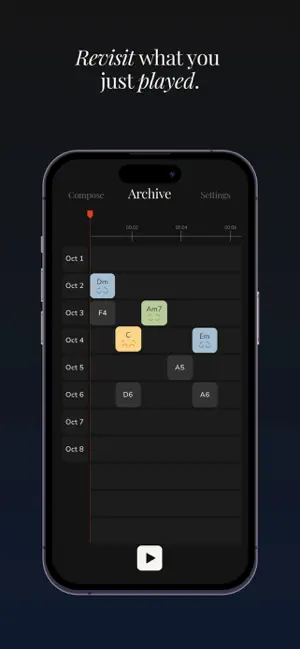
Maestro is a music sketchbook built around chords. Open it and start playing right away! Choose a chord, tap keys, and shape a progression that feels good. Make small musical sketches that sound coherent from the start. Maestro keeps the experience focused: chords, keys, and a clean layout that helps your hands find something musical quickly. Catch what you just played. Your Archive keeps the last 60 seconds, so you can replay the moment, revisit a progression, and refine the idea. If you want a simple way to sketch harmony and find melodies, Maestro is your place to start!
What’s new
Version 1.5 · Updated March 15, 2026
Bug fixes and visual improvements.
App privacy
The developer, Geovanni Fuentes, reported these privacy practices to Apple.
Data Not Linked to You
The following data, which may be collected but is not linked to your identity, may be used for the following purposes:
- Identifiers: Device ID
- Usage Data: Product Interaction
- Diagnostics: Crash Data
Used for: Analytics, App Functionality
Alternatives to Maestro - A melody composer
Looking for apps like Maestro - A melody composer? Here are 6 similar apps on the App Store. The highest rated is Modsync (5.0/5), and 4 of the 6 are free to download.
-
 Modsync
5.0
Modsync
5.0
-
 Hexatonics - Triad Pairs To Go
5.0
Hexatonics - Triad Pairs To Go
5.0
-
 Pentatonics - Take Five
-
 ArchersPlayer
4.6
ArchersPlayer
4.6
-
 Tailsync
-
 Resona Audio
5.0
Resona Audio
5.0
| App | Rating | Price | Last updated | Compare |
|---|---|---|---|---|
| Maestro - A melody composer | 5.0 / 5 (2 ratings) | Free | March 15, 2026 | |
| Modsync | 5.0 / 5 (1) | Free | Feb 20, 2026 | Compare |
| Hexatonics - Triad Pairs To Go | 5.0 / 5 (1) | 0.99 USD | Jan 12, 2026 | Compare |
| Pentatonics - Take Five | – | 0.99 USD | Jan 20, 2026 | Compare |
| ArchersPlayer | 4.6 / 5 (8) | Free | Mar 23, 2026 | Compare |
| Tailsync | – | Free | Feb 3, 2026 | Compare |
| Resona Audio | 5.0 / 5 (6) | Free | Feb 16, 2026 | Compare |