

Cardinal Bible
Jed Bridges Education iPhoneiPadiPod touchApple Watch
Cardinal Bible is a free Education app for iPhone and iPad by Jed Bridges. Rated 5.0/5 from 14 ratings. Requires iOS 17.0. Updated October 5, 2026.
- Rating
- 5.0
- 14 ratings
- Price
- Free
- on the App Store
- Size
- 94 MB
- Age 9+
- Updated
- Oct 5
- 2026 · v2.75.0
Screenshots


About Cardinal Bible
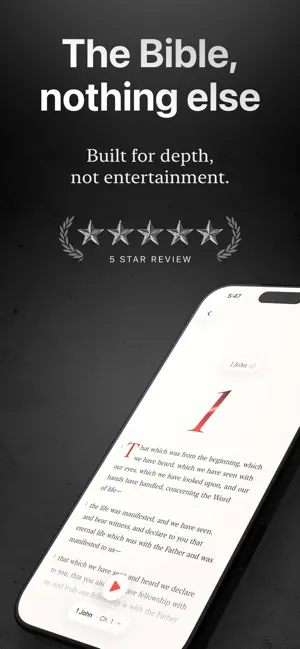
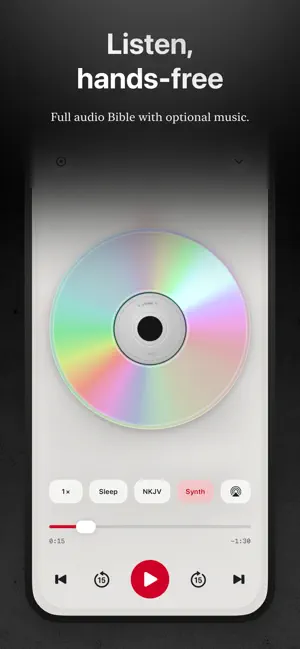
Bible apps have become social platforms, full of feeds and features that distract you from simply reading the Bible. Cardinal is different. Just you, God and Scripture. No noise. Read Cardinal opens on the Berean Standard Bible, plain modern English. Thirteen translations are free and always will be; eight read fully offline, including the King James, World English and Majority Standard. Reading Scripture never requires a subscription. Long-press and drag to highlight exactly the words you chose, not the whole verse. Save favorites and write in the margins. Listen Hear Scripture read aloud, the words lighting up in time and the page following on its own. Six narrators, a sleep timer, adjustable pace, AirPlay, and it keeps playing on the lock screen. Ask Read a passage and think, "What does that actually mean?" Ask, and get an answer drawn from the verse in front of you: cross-references, word studies, context. Thirty of the biggest questions about Christianity are answered in full, free, plus three of your own each month. Beyond that, Ask is Cardinal Pro. More Translations The NKJV, NASB, CSB and NLT come with Cardinal Pro, each with a free day to try. Read two side by side and see where they differ. Their licenses do not allow storing the text, so these four always need a connection. Quiet Time: Your Daily Time Set Apart One guided sitting a day. Pause, read, reflect, apply, pray, close. Each day is fifteen to twenty-five verses, a whole scene rather than a chapter. After seven in the evening a shorter sitting appears. Your archive is searchable and private, and what you pray for goes to a list you can mark answered. Nine curated paths, from the Story of Jesus in John to the whole Bible in a year. Or describe what you are facing and Cardinal builds a path around it, free, with every day shown before you begin. No streaks. No badges. No missed-day guilt. Just time set apart. Scripture Memorization Practice two ways: first-letter hints, or hidden words, which blanks more of the verse each pass until you can say it from the reference. Verses you are still learning come back sooner, under "Ready to come back" rather than a streak you broke. Notes: For Sermons You Hear and Sermons You Give A sermon note is for when someone else preaches. It opens with Scripture and notes; big idea, main points with their verses, Living It Out and action steps get added when you want them. Group them by series. Studies is for when you are the one teaching (Cardinal Pro). Name a passage, say what it is about, and Cardinal offers the cross-references, places, key verses and original-language words it holds, each with a line on why it belongs. It finds them on your phone from bundled data, so it cannot cite what it cannot point at, and nothing is added until you tick it. It gathers; it never writes your message. Podium mode is what you preach from: read-only, lectern-sized type, every passage loaded before you stand up. Editing a study needs Pro; reading, exporting as Markdown and preaching from one never do. Threads: Someone Has Been Where You Are Twenty-four lives of Scripture, found by what they are about, not by name: fear, grief, shame, waiting. Each told as the few moments that made it, plotted across the whole Bible. A hundred and forty moments, free. Journeys: Walk Where It Happened Paul's voyages, Abraham's road, the Exodus and Passion Week, flown place to place over 3D satellite maps. Each stop tells what happened there, reads aloud, and shares as a card. Seventeen journeys, free for everyone. Widgets and Watch Pin a Verse of the Day, today's Quiet Time passage, or Memorize progress. The Apple Watch app works with no phone near. Works Offline Memorize, study, highlight and take notes anywhere. Only audio, Ask and the four licensed translations need a connection. Why Cardinal? Cardinal is for people who want to read Scripture, sit with it, and talk to God. That's it. Terms of Use: https://cardinalbible.app/terms-of-use.html
Ratings & reviews
5.0
14 ratings
What’s new
Version 2.75.0 · Updated October 5, 2026
The Bible reader is quieter and quicker. The controls slip away while you read and come back the moment you scroll up. Section headings now mark the passages in the BSB, WEB and KJV. Jumping to a chapter or following a cross-reference fades you to the verse instead of cutting, and a small pill brings you back to where you were. The reading menu is down to what you change while reading: translation, text size, light or dark, and auto-scroll. Bold text now follows your iPhone's Bold Text setting.
App privacy
The developer, Jed Bridges, reported these privacy practices to Apple.
Data Not Linked to You
The following data, which may be collected but is not linked to your identity, may be used for the following purposes:
- Usage Data: Product Interaction
Used for: Analytics
Alternatives to Cardinal Bible
Looking for apps like Cardinal Bible? Here are 6 similar apps on the App Store. The highest rated is Selah Daily Bible (5.0/5), and all 6 are free to download.
-
 Selah Daily Bible
5.0
Selah Daily Bible
5.0
-
 Velora: Bible & Sermon Notes
4.7
Velora: Bible & Sermon Notes
4.7
-
 Mere Bible
4.6
Mere Bible
4.6
-
 Desiring God ft. Solid Joys
5.0
Desiring God ft. Solid Joys
5.0
-
 bible.ai - Chat about Anything
4.2
bible.ai - Chat about Anything
4.2
-
 Bible Companion: Chat Study
4.7
Bible Companion: Chat Study
4.7
| App | Rating | Price | Last updated | Compare |
|---|---|---|---|---|
| Cardinal Bible | 5.0 / 5 (14 ratings) | Free | October 5, 2026 | |
| Selah Daily Bible | 5.0 / 5 (8) | Free | Sep 14, 2026 | Compare |
| Velora: Bible & Sermon Notes | 4.7 / 5 (41) | Free | Oct 3, 2026 | Compare |
| Mere Bible | 4.6 / 5 (528) | Free | Apr 16, 2026 | Compare |
| Desiring God ft. Solid Joys | 5.0 / 5 (20) | Free | Sep 3, 2026 | Compare |
| bible.ai - Chat about Anything | 4.2 / 5 (57) | Free | Jun 27, 2025 | Compare |
| Bible Companion: Chat Study | 4.7 / 5 (298) | Free | Sep 7, 2026 | Compare |
Compare Cardinal Bible with the top alternatives: ratings, updates, ASO score and keyword gaps →