

Komodo Go - Server Manager
Jan Lennartz Productivity iPhoneiPadiPod touch
Komodo Go - Server Manager is a free Productivity app for iPhone and iPad by Jan Lennartz. Requires iOS 15.0. Updated October 23, 2026.
- Price
- Free
- on the App Store
- Size
- 30 MB
- Age 4+
- Updated
- Oct 23
- 2026 · v0.7.0
Screenshots


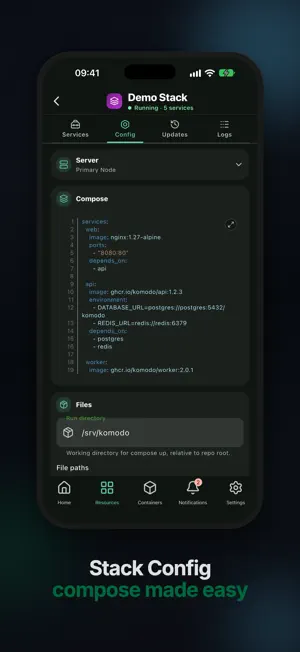
About Komodo Go - Server Manager
Komodo Go is an independent mobile client for the Komodo infrastructure management platform (komo.do). Monitor and manage your self-hosted servers, Docker containers, stacks, deployments, builds, repositories, and automation from iPhone or iPad. Connect to your Komodo instance with API credentials, or explore the built-in demo before adding a server. Use Komodo Go to: • See server health, CPU, memory, disk, and container activity in a focused dashboard • Browse servers, containers, stacks, deployments, builds, and repositories • Start, stop, restart, pause, and redeploy workloads • Inspect container, stack, deployment, and build logs • Review alerts, procedures, actions, syncs, providers, tags, and variables • Manage multiple Komodo connections and app preferences Designed for self-hosted infrastructure, DevOps monitoring, Docker management, and remote operations, Komodo Go helps you check status and respond without opening the full web interface. Requires access to a self-hosted or hosted Komodo instance. Feature availability depends on your Komodo version and permissions. Komodo Go is a third-party app and is not affiliated with the Komodo project. It covers many common workflows but is not feature-complete compared with the Komodo web UI.
What’s new
Version 0.7.0 · Updated October 23, 2026
Komodo Go 0.7.0 is built around what needs your attention: a smarter dashboard, redesigned resource screens, and an app that uses less data and battery. New • See what needs your attention on the dashboard, with one tap to the failing server, build, or deployment, or "All clear" when everything is healthy. • Redesigned detail screens show a clear status header, put the most relevant action up front, and group settings into tabs and collapsible sections. • Lists show problems first, and you can filter them by state and server. • A new log viewer follows output live, opens fullscreen, and offers a raw text mode for selecting and copying any part of a log. • Stop, Destroy, Cancel, and Run Action ask for confirmation, and you're warned before leaving a screen with unsaved changes. Improved • Uses less data and battery: refreshes pause in the background, on hidden screens, and while you're offline, and slow down on cellular. • The Resources overview groups your resources and shows at a glance which ones are failing. • Notifications are easier to scan, with an Alerts and Updates switch, filter counts, and compact rows. • Container cards show CPU, memory, network, and disk at a glance, with shorter image names. • Procedures show their stages as a timeline. • Animations are smoother and consistent, and respect your device's Reduce Motion setting. • Signing in is easier: paste your API key and secret together, and enter your server URL in any common format. Requires iOS 15 or later. Some operations depend on your Komodo version and permissions.
App privacy
The developer, Jan Lennartz, reported these privacy practices to Apple.
Data Not Collected
The developer does not collect any data from this app.
Alternatives to Komodo Go - Server Manager
Looking for apps like Komodo Go - Server Manager? Here are 6 similar apps on the App Store. The highest rated is Paperparrot (5.0/5), and 5 of the 6 are free to download.
-
 Linkwarden
4.2
Linkwarden
4.2
-
 Conduit: Open WebUI & AI
4.2
Conduit: Open WebUI & AI
4.2
-
 Donetick: Shared Chore Chart
4.3
Donetick: Shared Chore Chart
4.3
-
 Paperparrot
5.0
Paperparrot
5.0
-
 Moe Memos
4.1
Moe Memos
4.1
-
 Swift Paperless
4.9
Swift Paperless
4.9
| App | Rating | Price | Last updated | Compare |
|---|---|---|---|---|
| Komodo Go - Server Manager | – | Free | October 23, 2026 | |
| Linkwarden | 4.2 / 5 (14) | Free | Oct 12, 2026 | Compare |
| Conduit: Open WebUI & AI | 4.2 / 5 (90) | 3.99 USD | Oct 17, 2026 | Compare |
| Donetick: Shared Chore Chart | 4.3 / 5 (11) | Free | Oct 18, 2026 | Compare |
| Paperparrot | 5.0 / 5 (17) | Free | Oct 8, 2026 | Compare |
| Moe Memos | 4.1 / 5 (47) | Free | Oct 22, 2026 | Compare |
| Swift Paperless | 4.9 / 5 (75) | Free | Oct 20, 2026 | Compare |