

momoChef: Recipes & Meals
Tristin Jon Finch Food & Drink iPhoneiPadiPod touch
momoChef: Recipes & Meals is a free Food & Drink app for iPhone and iPad by Tristin Jon Finch. Rated 5.0/5 from 4 ratings. Requires iOS 17.0.
- Rating
- 5.0
- 4 ratings
- Price
- Free
- on the App Store
- Size
- 175 MB
- Age 17+
- Updated
- Oct 12
- 2026 · v1.69
Screenshots


About momoChef: Recipes & Meals
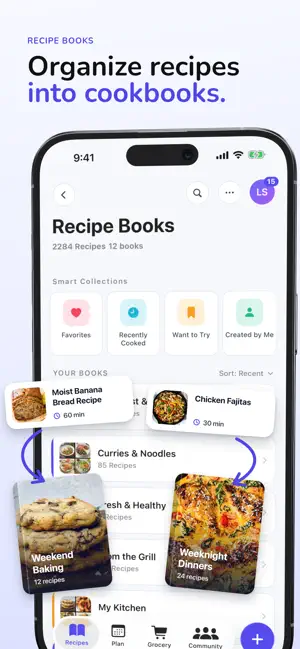
Save any recipe — from a TikTok, a blog, or a photo of a handwritten card — and cook it step by step with built-in timers. momoChef keeps your recipes, meal plans, and grocery lists in one place. Build your personal recipe collection with custom recipe books, favorites, ratings, notes, and photos. Import from website links, pasted text, files, photos, and supported social shares, then review and clean everything up before saving. When it’s time to cook, use a focused step-by-step cooking mode with built-in timers, ingredient checkoffs, and recipe scaling so you can adjust servings without doing the math yourself. Plan meals, create grocery lists, and keep track of pantry items to make everyday cooking easier. momoChef also includes community features so you can discover shared recipes and save the ones you want to try later. Premium features unlock advanced AI-powered tools, collaborative cooking sessions, and meal planning assistance. Key Features - Save and organize recipes in custom recipe books - Import recipes from URLs, photos, text, files, and social shares - Edit ingredients, directions, notes, times, servings, and photos - Cook step by step with timers and progress tracking - Scale recipes for different serving sizes - Plan meals and generate grocery lists - Track pantry items alongside your shopping workflow - Discover and save community recipes - Access your recipes with offline support and sync Whether you collect family recipes, save favorites from the web, or plan meals for the week, momoChef keeps everything in one place so cooking feels simpler. Terms of Use: https://www.apple.com/legal/internet-services/itunes/dev/stdeula/ Privacy Policy: https://www.momochef.com/privacy
What’s new
Version 1.69 · Updated October 12, 2026
Creator profiles Tap a creator's name on any recipe to see their profile: their books, their recipes, and links to where they post. One recipe, many books File a recipe in as many books as you like. When you drag a recipe into a book, choose Move or Keep Both. The recipe editor lets you pick several books at once. Save posts for later Shared an Instagram or Facebook post that doesn't have a recipe yet? Save it to a book anyway. You'll find it under Saved posts, where you can add the recipe whenever you're ready. Plan with this book Pick several recipes from a cookbook and add them to your meal plan in one go. Better imports - Instagram and Facebook captions that only list ingredients now import as a recipe, free. - Smarter recipe detection in captions, including step lists and "link in bio" posts. - Cleaner ingredient lists: fewer stray nutrition numbers, and prep notes like "trimmed and chopped" are kept separate from the ingredient name. - No more empty recipes saved from posts that don't contain one. Browse and search - Community search now finds people as well as recipes. - Filter by group. - Search opens right where you are instead of on a separate screen. Recipe pages Tags and diet labels are tidied into a compact row. Tap it to see all of them. Privacy and safety - Clipboard import is now fully opt-in. momoChef asks for clipboard access only once. If you allow it, recipes you copy can be imported automatically. If not, you can turn it on any time in Settings > momoChef > Paste from Other Apps. - New privacy and safety controls for community features and the AI assistant. Fixes and polish - Meal plans now sync correctly in every time zone, and recipes added from a book land on the right day. - Changes to your books made offline are saved and sync when you're back online. - The import preview no longer gets stuck on "Preparing recipe preview…". - Importing recipes from websites works on more pages. - Translations are completed across all supported languages, and error messages in the share extension now appear in your language.
App privacy
The developer, Tristin Jon Finch, reported these privacy practices to Apple.
Data Linked to You
The following data, which may be collected and linked to your identity, may be used for the following purposes:
- Purchases: Purchase History
- Identifiers: User ID, Device ID
- Usage Data: Product Interaction
- Contact Info: Email Address, Name
- Diagnostics: Crash Data, Performance Data, Other Diagnostic Data
- Health & Fitness: Health
- User Content: Other User Content, Emails or Text Messages, Photos or Videos, Customer Support
- Contacts: Contacts
- Search History: Search History
- Browsing History: Browsing History
Used for: Developer’s Advertising or Marketing, Analytics, Product Personalization, App Functionality, Other Purposes
Alternatives to momoChef: Recipes & Meals
Looking for apps like momoChef: Recipes & Meals? Here are 6 similar apps on the App Store. The highest rated is Nom Nom Joy (5.0/5), and all 6 are free to download.
-
 Nom Nom Joy
5.0
Nom Nom Joy
5.0
-
 PlansMeal
-
 Let Him Cook - Recipe Saver
5.0
Let Him Cook - Recipe Saver
5.0
-
 Fameal AI: Family Meal Planner
-
 HappySpoon: Easy Meal Planning
5.0
HappySpoon: Easy Meal Planning
5.0
-
 Glutt: Recipes & AI Chef
| App | Rating | Price | Last updated | Compare |
|---|---|---|---|---|
| momoChef: Recipes & Meals | 5.0 / 5 (4 ratings) | Free | October 12, 2026 | |
| Nom Nom Joy | 5.0 / 5 (1) | Free | Jul 21, 2026 | Compare |
| PlansMeal | – | Free | Sep 15, 2026 | Compare |
| Let Him Cook - Recipe Saver | 5.0 / 5 (5) | Free | Sep 29, 2026 | Compare |
| Fameal AI: Family Meal Planner | – | Free | Aug 28, 2026 | Compare |
| HappySpoon: Easy Meal Planning | 5.0 / 5 (3) | Free | Jul 30, 2026 | Compare |
| Glutt: Recipes & AI Chef | – | Free | Sep 7, 2026 | Compare |