

Darwin: Swipe to Prioritize
Phoenix Strategies LLC Productivity iPhoneiPadiPod touch
Darwin: Swipe to Prioritize is a free Productivity app for iPhone and iPad by Phoenix Strategies LLC. Requires iOS 15.1. Updated October 24, 2026.
- Price
- Free
- on the App Store
- Size
- 84 MB
- Age 4+
- Updated
- Oct 24
- 2026 · v1.0.529
Screenshots


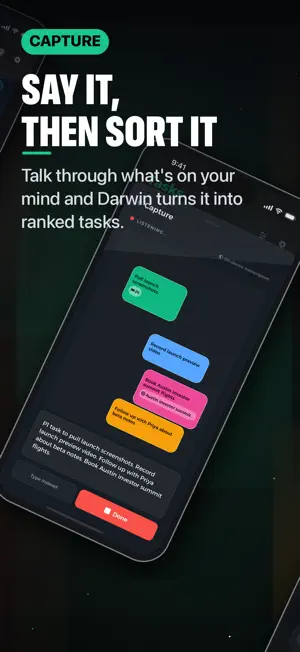

About Darwin: Swipe to Prioritize
You do not need a more complicated to-do list. You need a clearer answer to one question: what should I do next? Darwin is a task prioritizer for people with a messy list, too many important things, and no obvious next step. Instead of asking you to manually sort everything, Darwin shows you two tasks at a time. Pick the one that matters more right now. Darwin uses those choices to build a ranked task list, so your priorities get clearer as you go. COMPARE, THEN RANK Turn an overwhelming list into small decisions. Swipe through task pairs, mark urgent work, move someday items to the Icebox, and let your priority order update after each comparison. CAPTURE THE MESS Add tasks manually, import from Apple Reminders, upload CSV when you need a reset, or talk through what's on your mind. Voice capture is transcribed on your device, and Darwin turns a spoken or typed brain dump into editable tasks before they enter your list. FOCUS THE FOLLOW-THROUGH Use Focus to start a timed block from high-priority work. Plan your week around the tasks that matter, not the ones that happened to be added last. GOALS WITH TEETH Connect tasks to outcomes so work has a reason behind it. Rank within a goal or across everything when you need a wider view. SEE WHAT CHANGED Insights show completion, focus, priority movement, ranking confidence, and cleanup signals so you can see how your list is evolving. FEATURES - Swipe-based task prioritization - Pairwise task comparisons instead of manual sorting - Ranked task list with inbox, priority, urgent, done, and Icebox views - Goals with progress - Focus timer and focus planning - Insights for priority movement, completion, and ranking confidence - Task notes, links, timing, urgency, and goal assignment - Voice and typed task capture with on-device transcription - Apple Reminders import - CSV import and export - On-device AI assist for Ask, capture, and cleanup (Darwin Pro) - Apple, Google, email, and guest sign-in - Cloud sync for signed-in accounts - Dark mode, haptics, and fast swipe interactions FREE AND PRO The core prioritizer is free with no limits: capture, comparisons, ranked views, Focus, Goals, 7-day Insights, and task-data Ask answers. Darwin Pro — an optional subscription or one-time lifetime purchase — adds on-device AI narration and extended 30/90-day Insights history. Darwin is for the moment after you write everything down, when the real work is deciding what deserves your attention first. Darwin Pro is an auto-renewable subscription (monthly or annual) or a one-time lifetime purchase. Subscriptions renew automatically unless cancelled at least 24 hours before the end of the current period; manage or cancel anytime in your App Store account settings. Terms of Use (EULA): https://darwin.phoenixstrategies.ai/terms Privacy Policy: https://darwin.phoenixstrategies.ai/privacy
What’s new
Version 1.0.529 · Updated October 24, 2026
Darwin is ready for iPhone Duo. Unfold into a wider workspace with side navigation, a task capture panel, side-by-side prioritization, a two-pane Focus setup, a Goals grid, and expanded Insights. Fold back to a compact layout while keeping your current task, draft, or focus session.
App privacy
The developer, Phoenix Strategies LLC, reported these privacy practices to Apple.
Data Linked to You
The following data, which may be collected and linked to your identity, may be used for the following purposes:
- Identifiers: User ID, Device ID
- Usage Data: Product Interaction
- Diagnostics: Performance Data, Crash Data, Other Diagnostic Data
- Purchases: Purchase History
- Contact Info: Email Address, Name
- User Content: Photos or Videos, Customer Support, Other User Content
Used for: Analytics, App Functionality
Alternatives to Darwin: Swipe to Prioritize
Looking for apps like Darwin: Swipe to Prioritize? Here are 6 similar apps on the App Store. The highest rated is Peek Message (4.6/5), and all 6 are free to download.
-
 Tiger Fast VPN
3.7
Tiger Fast VPN
3.7
-
 Peek Message
4.6
Peek Message
4.6
-
 VPN Connect - Fast VPN Hotspot
4.5
VPN Connect - Fast VPN Hotspot
4.5
-
 VPN - Fastest VPN Hotspot Pro
4.4
VPN - Fastest VPN Hotspot Pro
4.4
-
 VPN Super Proxy by RedVPN
4.4
VPN Super Proxy by RedVPN
4.4
-
 Swiss VPN: Fast & Secure Proxy
4.6
Swiss VPN: Fast & Secure Proxy
4.6
| App | Rating | Price | Last updated | Compare |
|---|---|---|---|---|
| Darwin: Swipe to Prioritize | – | Free | October 24, 2026 | |
| Tiger Fast VPN | 3.7 / 5 (3) | Free | Oct 22, 2026 | Compare |
| Peek Message | 4.6 / 5 (234) | Free | Oct 19, 2026 | Compare |
| VPN Connect - Fast VPN Hotspot | 4.5 / 5 (1,171) | Free | Mar 18, 2026 | Compare |
| VPN - Fastest VPN Hotspot Pro | 4.4 / 5 (1,048) | Free | May 6, 2024 | Compare |
| VPN Super Proxy by RedVPN | 4.4 / 5 (251) | Free | Oct 17, 2026 | Compare |
| Swiss VPN: Fast & Secure Proxy | 4.6 / 5 (2,282) | Free | Oct 2, 2026 | Compare |