

HabitUnlock: Screen Time
Tyrian Horton Health & Fitness iPhoneiPadiPod touch
HabitUnlock: Screen Time is a free Health & Fitness app for iPhone and iPad by Tyrian Horton. Rated 4.7/5 from 3 ratings. Requires iOS 17.0.
- Rating
- 4.7
- 3 ratings
- Price
- Free
- on the App Store
- Size
- 27 MB
- Age 4+
- Updated
- Oct 19
- 2026 · v1.9.8
Screenshots


About HabitUnlock: Screen Time
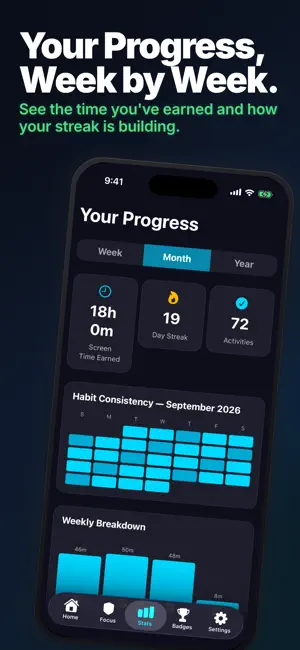
A free app blocker that unlocks with movement: block 1 app or category, then walk or do push-ups to open it. No account, no ads. FREE: block an app or category behind real movement · blocking schedules (up to 8) · streak tracking with a monthly freeze. No account, no ads. HOW IT WORKS • Choose which apps or categories to block • Pick how you will earn them back: Walking, Push-Ups, or Guided Breathing • Complete the activity to unlock your apps • Build streaks and earn achievements Unlike screen time apps that just block your phone and rely on willpower, HabitUnlock turns the problem into a game. Want to scroll? Earn it first. Every unlock starts with movement — and that small shift changes everything. THE THREE WAYS TO UNLOCK • Walking — step-based, counted automatically • Push-Ups — timer-based, with live progress • Guided Breathing — a short breathing exercise when movement is not an option Three activities you will finish beat a long menu you never open. SMART BLOCKING • Block specific apps or entire categories • Up to 8 blocking schedules for focus time • Deep Lock mode for maximum commitment — no one-tap ignore • Emergency override with limited weekly uses APPLE HEALTH • Reads your step count so Walking completes on its own • Step data is processed on your device • Optional — decline it and the other activities still work BUILT FOR BRAINS THAT NEED STRUCTURE Many people who struggle with phone habits find external structure easier than willpower — and that is what HabitUnlock provides. Instead of fighting the urge to scroll, channel it: your phone becomes a reward for movement, not a source of guilt. STREAKS & ACHIEVEMENTS • Daily streaks with fire animations • Achievement badges for milestones • Share cards to show your progress WIDGETS & LIVE ACTIVITIES • Home screen widgets show your progress • Live Activity during activities • Dynamic Island countdown WHO IT'S FOR • Doom scrollers who want to break the cycle • Students who need to focus during exam season • People with ADHD looking for structure and accountability • Professionals who want to reclaim productive hours • Parents who want to control their own screen time PRIVACY • No ads. Your data is never sold. • Usage analytics can be turned off any time in Settings • Step data read from Apple Health is processed on your device • No account required — ever FREQUENTLY ASKED QUESTIONS Q: Is HabitUnlock free? A: Core features are free — block 1 app and set up to 3 daily habits. Upgrade to Pro for unlimited habits, unlimited blocked apps, and Deep Lock mode. Q: Which activities can I use? A: Walking, Push-Ups, and Guided Breathing. Q: Does it track my fitness data? A: HabitUnlock reads your step count from Apple Health so Walking can complete automatically. That step data is processed on your device. Q: Does it work without internet? A: Yes. Blocking, activity tracking, and unlocking work offline. Internet is only needed for subscription management. Replace mindless scrolling with movement. Build habits that stick. HABITUNLOCK PRO • Unlimited habits • Unlimited blocked apps • Deep Lock mode • Streak freezes to protect your progress • Priority support HabitUnlock Pro is an auto-renewing subscription with a 7-day free trial. The available plans and the current price in your currency are shown in the app before you confirm. Payment charged to your Apple ID at confirmation. Subscriptions auto-renew unless canceled 24 hours before the period ends. Manage in Settings > Apple ID. Privacy Policy: https://www.habbitunlock.com/privacy Terms of Use: https://www.habbitunlock.com/terms
What’s new
Version 1.9.8 · Updated October 19, 2026
Reliability and stability improvements.
App privacy
The developer, Tyrian Horton, reported these privacy practices to Apple.
Data Not Linked to You
The following data, which may be collected but is not linked to your identity, may be used for the following purposes:
- Usage Data: Product Interaction
- Diagnostics: Performance Data, Crash Data
- Purchases: Purchase History
- Identifiers: Device ID
Used for: Analytics, App Functionality
Alternatives to HabitUnlock: Screen Time
Looking for apps like HabitUnlock: Screen Time? Here are 6 similar apps on the App Store. The highest rated is Grindlocker: Earn Screen Time (4.7/5), and all 6 are free to download.
-
 PushPal - Screen Time Control
4.4
PushPal - Screen Time Control
4.4
-
 Push to Unlock: Screentime
4.5
Push to Unlock: Screentime
4.5
-
 Fit to Scroll: App Blocker
4.4
Fit to Scroll: App Blocker
4.4
-
 Grindlocker: Earn Screen Time
4.7
Grindlocker: Earn Screen Time
4.7
-
 LockFit: App Blocker
4.7
LockFit: App Blocker
4.7
-
 Fitlock: Earn Your Screen Time
4.1
Fitlock: Earn Your Screen Time
4.1
| App | Rating | Price | Last updated | Compare |
|---|---|---|---|---|
| HabitUnlock: Screen Time | 4.7 / 5 (3 ratings) | Free | October 19, 2026 | |
| PushPal - Screen Time Control | 4.4 / 5 (38) | Free | May 15, 2026 | Compare |
| Push to Unlock: Screentime | 4.5 / 5 (63) | Free | Sep 16, 2026 | Compare |
| Fit to Scroll: App Blocker | 4.4 / 5 (83) | Free | Sep 11, 2026 | Compare |
| Grindlocker: Earn Screen Time | 4.7 / 5 (117) | Free | Sep 28, 2026 | Compare |
| LockFit: App Blocker | 4.7 / 5 (555) | Free | Oct 13, 2026 | Compare |
| Fitlock: Earn Your Screen Time | 4.1 / 5 (61) | Free | Oct 16, 2026 | Compare |