

2FA Authenticator Verification
Textile of three Ltd Productivity iPhoneiPadiPod touch
2FA Authenticator Verification is a free Productivity app for iPhone and iPad by Textile of three Ltd. Requires iOS 17.0. Updated July 23, 2026.
- Price
- Free
- on the App Store
- Size
- 8 MB
- Age 4+
- Updated
- Jul 23
- 2026 · v1.0.2
Screenshots

About 2FA Authenticator Verification
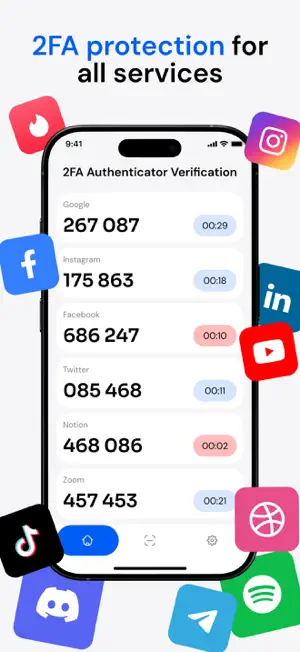
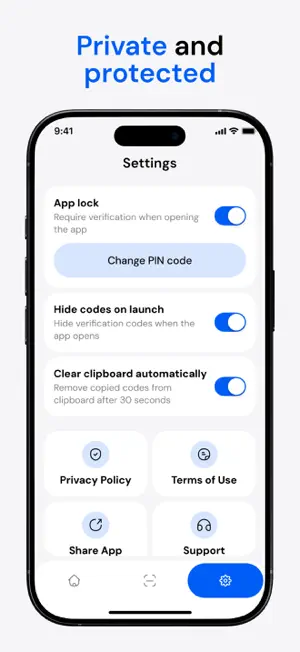
2FA Authenticator Verification is a secure app for storing and displaying verification codes used to sign in to various online services such as email, social platforms, and work tools. CORE FUNCTIONALITY: QUICK ACCESS TO CODES All connected services are shown in a single list. For each service, the app displays the current six-digit code, a visual timer indicating when the code will refresh, and a copy action. Codes refresh approximately every 30 seconds. Tapping a code copies it to the clipboard and confirms the action with a short message. SIMPLE SERVICE SETUP New services can be added in two ways: • Scan a QR code provided during account setup • Enter details manually by specifying the service name and secret key SERVICE MANAGEMENT Any added service can be removed from the list. Deletion always requires confirmation and completely removes the service from the app. APP PROTECTION Access to app can be protected with a PIN code. When enabled, the app locks automatically after being minimized. Available settings include: • App lock on/off • Change PIN code CODE VISIBILITY ON LAUNCH You can enable a mode where verification codes are hidden when the app is opened. Codes become visible only after user confirmation, such as unlocking the app or tapping a "Show" button. When this option is disabled, codes are displayed immediately. CLIPBOARD CLEANUP When enabled, copied codes are removed from the clipboard after a short time (30 seconds), without requiring any action from the user. When disabled, copied content remains in the clipboard until it is replaced. FREE AND PREMIUM FREE VERSION - Add up to 5 services - Verification codes are visible immediately when the app is opened - Copied codes remain in the clipboard until replaced - App protection with PIN is available PREMIUM VERSION - Unlimited services - Option to hide verification codes on app launch - Automatic removal of copied codes from the clipboard after a short time - Extended privacy controls 2FA Authenticator Verification is designed for clear, secure, and straightforward management of verification codes. Privacy Policy: https://docs.google.com/document/d/1AQMksurO4vWQ4RbFMfLZJ6Eusd6Nay9pxKxWIkz4BHs/edit?usp=sharing Terms & Conditions: https://docs.google.com/document/d/1yxLdyX8kgc8W9tl_QrlAtrLJJl8dvpwdwT1P_ZTelSY/edit?usp=sharing
What’s new
Version 1.0.2 · Updated July 23, 2026
Optimized verification code handling
App privacy
The developer, Textile of three Ltd, reported these privacy practices to Apple.
Data Not Collected
The developer does not collect any data from this app.
Alternatives to 2FA Authenticator Verification
Looking for apps like 2FA Authenticator Verification? Here are 6 similar apps on the App Store. The highest rated is 2FA Authenticator App - TOTP (3.0/5), and all 6 are free to download.
-
 PingID Authenticator
1.8
PingID Authenticator
1.8
-
 Authenticator – Authkey 2FA
-
 2FA Authenticator App - TOTP
3.0
2FA Authenticator App - TOTP
3.0
-
 Livramax
-
 AIna: Content Coach
-
 Reserver
| App | Rating | Price | Last updated | Compare |
|---|---|---|---|---|
| 2FA Authenticator Verification | – | Free | July 23, 2026 | |
| PingID Authenticator | 1.8 / 5 (5) | Free | Oct 15, 2026 | Compare |
| Authenticator – Authkey 2FA | – | Free | Jan 11, 2026 | Compare |
| 2FA Authenticator App - TOTP | 3.0 / 5 (1) | Free | Mar 17, 2024 | Compare |
| Livramax | – | Free | Mar 11, 2026 | Compare |
| AIna: Content Coach | – | Free | Sep 26, 2026 | Compare |
| Reserver | – | Free | Jan 21, 2026 | Compare |