

Image to PDF: Photo Scanner
Paul Smith Productivity iPhoneiPadiPod touch
Image to PDF: Photo Scanner is a free Productivity app for iPhone and iPad by Paul Smith. Requires iOS 14.0. Updated February 9, 2026.
- Price
- Free
- on the App Store
- Size
- 69 MB
- Age 4+
- Updated
- Feb 9
- 2026 · v1.0.0
Screenshots


About Image to PDF: Photo Scanner
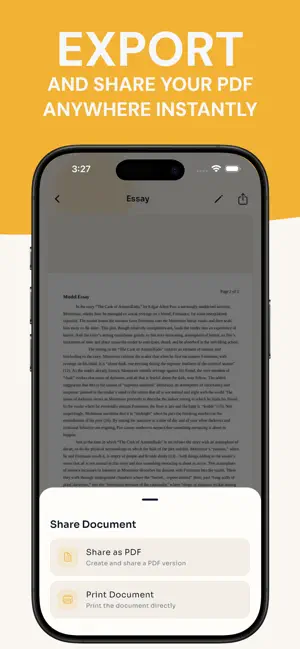
Create PDFs in seconds from your camera, gallery, files, or a URL. Image to PDF: Photo Scanner helps you turn images into a single PDF fast. Import photos or PDFs, organise pages, and export a clean PDF when you are ready. Create and import - Capture multiple photos with the built-in camera, preview them, remove any you do not want, then create a document - Import multiple images from your gallery - Import from Files to merge multiple images into one document - Merge one or multiple PDFs into one document - Import a single PDF or image from a URL and open it once it is ready Organise documents - View your library with a thumbnail preview, page count, and file size - Search by name, rename documents, and sort by name, date, or size - See a preparing state while pages finish processing Edit pages - Navigate pages with left and right controls and a page count indicator - Add pages from camera, gallery, or files - Reorder pages with drag and drop - Delete multiple pages at once - Save changes to update the preview and page count Protect privacy - Add an optional password to protect a document - Protected documents require a password to open - A badge appears in your library for protected documents Export and share - Export as PDF - Share using the system share sheet - Print using the system print dialog - Export features are available with premium If you need image to pdf for receipts, forms, homework, or work documents, Image to PDF: Photo Scanner keeps the process simple: scan, merge, and export. Terms of Use (EULA): https://www.apple.com/legal/internet-services/itunes/dev/stdeula/
App privacy
The developer, Paul Smith, reported these privacy practices to Apple.
Data Not Linked to You
The following data, which may be collected but is not linked to your identity, may be used for the following purposes:
- Usage Data: Product Interaction
- Purchases: Purchase History
- Identifiers: User ID, Device ID
Used for: Analytics, App Functionality
Alternatives to Image to PDF: Photo Scanner
Looking for apps like Image to PDF: Photo Scanner? Here are 6 similar apps on the App Store. The highest rated is PDF Scan and Sign Pro (5.0/5), and all 6 are free to download.
-
 Image to PDF Converter Offline
-
 Image to PDF: Photo Converter
-
 Notes AI: Note Taking App
-
 PDF Scan and Sign Pro
5.0
-
 PDFShare
-
 Didja - Make It Happen
5.0
| App | Rating | Price | Last updated | Compare |
|---|---|---|---|---|
| Image to PDF: Photo Scanner | – | Free | February 9, 2026 | |
| Image to PDF Converter Offline | – | Free | Jan 31, 2026 | Compare |
| Image to PDF: Photo Converter | – | Free | May 28, 2026 | Compare |
| Notes AI: Note Taking App | – | Free | Oct 9, 2026 | Compare |
| PDF Scan and Sign Pro | 5.0 / 5 (1) | Free | Jan 26, 2026 | Compare |
| PDFShare | – | Free | Dec 3, 2023 | Compare |
| Didja - Make It Happen | 5.0 / 5 (5) | Free | Jan 2, 2025 | Compare |