

Auto Clicker Tap Automation
Appsy Digital Utilities iPhoneiPadiPod touch
Auto Clicker Tap Automation is a free Utilities app for iPhone and iPad by Appsy Digital. Rated 4.4/5 from 199 ratings. Requires iOS 26.2.
- Rating
- 4.4
- 199 ratings
- Price
- Free
- on the App Store
- Size
- 25 MB
- Age 4+
- Updated
- Nov 1
- 2026 · v1.3.5
Screenshots


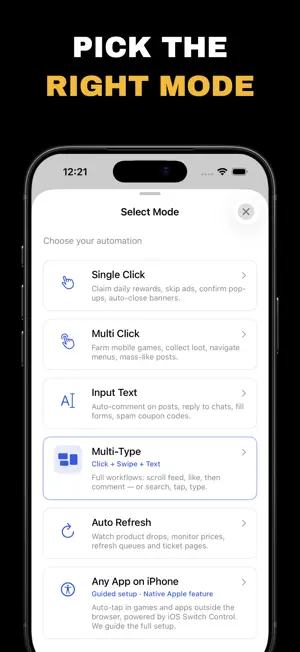

About Auto Clicker Tap Automation
Auto-tap in any app or game with the auto clicker built into your iPhone. Auto Click Tap guides you step by step through Apple's accessibility setup, and records taps, swipes and text in its own browser. Tired of tapping the same spot over and over in idle games or repetitive tasks? Set it up once and let your iPhone do the tapping. Why choose Auto Click Tap? - Auto-tap in any app or game: a step-by-step guide turns on your iPhone's built-in accessibility tapping - Record and replay: capture taps, swipes and text in the app's browser, then replay them with one tap - Custom interval: choose the delay between taps, from slow to rapid - Multiple points: place several tap targets and run them in order - Save your scripts: keep favorite sites, modes and intervals for instant replay - Auto refresh: reload a page on a schedule Simple setup 1. Open Auto Click Tap and tap Auto Tap in Any App 2. Follow the guide to add a switch and record your tap in Apple's accessibility settings 3. Start tapping in any app or game, and stop any time with the shortcut from the guide Premium Automation Suite (Premium): unlock unlimited tap targets, advanced macro sequences and saved scripts with an auto renewing subscription. Manage or cancel it in your account settings. Free to use with ads. See the Privacy Policy for how data and ads are handled. Download Auto Click Tap and say goodbye to tedious tapping. ========= Privacy: https://br-appsydigital-auto-click-tap.freeprivacypolicy.app/privacy-policy Terms: https://br-appsydigital-auto-click-tap.freeprivacypolicy.app/terms-of-service
Ratings & reviews
4.4
199 ratings
What’s new
Version 1.3.5 · Updated November 1, 2026
New in this version: - Auto-tap in any app or game: a step-by-step guide sets up your iPhone's built-in accessibility tapping. - A new home screen that puts Any App first. - A quick shortcut to turn it on and off in one tap. - Improvements and fixes.
App privacy
The developer, Appsy Digital, reported these privacy practices to Apple.
Data Used to Track You
The following data may be used to track you across apps and websites owned by other companies:
- Identifiers: Device ID
Data Not Linked to You
The following data, which may be collected but is not linked to your identity, may be used for the following purposes:
- Identifiers: Device ID
Used for: Developer’s Advertising or Marketing
Alternatives to Auto Clicker Tap Automation
Looking for apps like Auto Clicker Tap Automation? Here are 6 similar apps on the App Store. The highest rated is Auto Clicker - Automatic Tap Q (4.5/5), and all 6 are free to download.
-
 AutoClicker - Auto Scroll: OP
4.4
-
 OP Auto Clicker: Automatic Tap
4.3
-
 Auto Clicker+ Automatic Tap
1.0
-
 Auto Clicker - Automatic Tap Q
4.5
-
 Auto Clicker: Super Fast Click
4.2
-
 Auto Clicker - Auto Click AI
4.1
| App | Rating | Price | Last updated | Compare |
|---|---|---|---|---|
| Auto Clicker Tap Automation | 4.4 / 5 (199 ratings) | Free | November 1, 2026 | |
| AutoClicker - Auto Scroll: OP | 4.4 / 5 (3,044) | Free | Oct 27, 2026 | Compare |
| OP Auto Clicker: Automatic Tap | 4.3 / 5 (1,607) | Free | Jun 8, 2026 | Compare |
| Auto Clicker+ Automatic Tap | 1.0 / 5 (3) | Free | Oct 27, 2026 | Compare |
| Auto Clicker - Automatic Tap Q | 4.5 / 5 (2,744) | Free | Apr 10, 2026 | Compare |
| Auto Clicker: Super Fast Click | 4.2 / 5 (300) | Free | Feb 12, 2026 | Compare |
| Auto Clicker - Auto Click AI | 4.1 / 5 (17) | Free | Oct 28, 2026 | Compare |