

Color Picker from photos
Miyuki Kikuchi Graphics & Design iPhoneiPadiPod touch
Color Picker from photos is a free Graphics & Design app for iPhone and iPad by Miyuki Kikuchi. Rated 5.0/5 from 1 ratings. Requires iOS 18.6.
- Rating
- 5.0
- 1 ratings
- Price
- Free
- on the App Store
- Size
- 6 MB
- Age 4+
- Updated
- Aug 10
- 2026 · v1.5
Screenshots

About Color Picker from photos
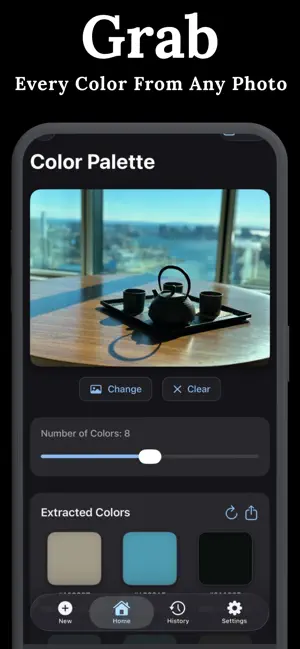
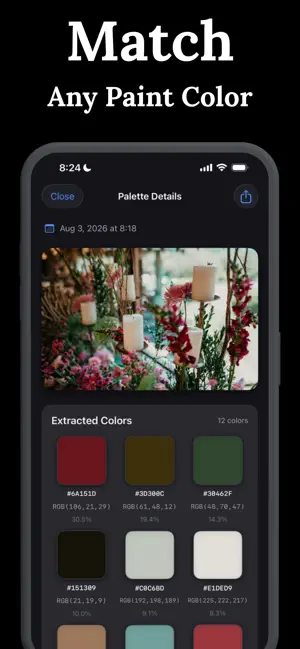
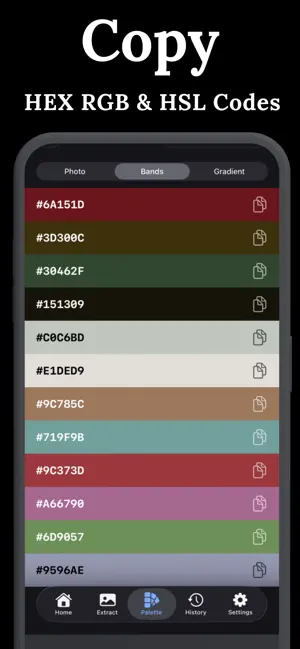
Color Picker from Photos — extract stunning color palettes from any image on your iPhone or iPad. POWERFUL COLOR EXTRACTION Our advanced algorithm analyzes your photos and extracts up to 12 distinct colors, identifying dominant hues and subtle accents alike. Each color shows its coverage percentage, so you know exactly how prominent each shade is in your image. Adjust the slider to extract 2–12 colors. NEW: PALETTE TAB See your colors the way designers do — in a dedicated Palette tab with three views: - Photo: your image with its swatches side by side - Bands: a beautiful full-screen palette wall - Gradient: build gradients from your photo's colors Shuffle and reorder colors until the combination feels right, and switch codes between HEX, RGB, and HSL. COMPLETE COLOR CODES - HEX codes for web design and digital projects - RGB values for precise color matching - HSL values for understanding color relationships - SwiftUI and CSS code snippets for developers Tap any color to view details and copy codes instantly. No more manual transcription. SHADE EXPLORER Discover lighter and darker variations of any extracted color. Slide through shades to find the perfect tone, with HEX and RGB codes updating in real time. GRADIENT BUILDER Turn any two palette colors into a gradient — or blend toward lighter, darker, complementary, or fully custom colors. Copy ready-to-paste CSS and SwiftUI gradient code in one tap. COLOR HARMONY BUILT IN Six harmony rules — complementary, analogous, triadic and more — generated from your photo's colors. SHARE & SAVE EVERYTHING One Share button sends your palette as image, color codes, and CSS file together. Save palettes straight to Files and iCloud Drive with automatic date-based names. Generate professional palette images perfect for mood boards, client presentations, or social media. YOUR PALETTE LIBRARY Every extraction is saved automatically. Name and search your palettes, reopen them from Home, History, or Palette Studio, and keep everything in sync across your devices with iCloud. EASY TO USE 1. Choose a photo from your library or take one with your camera 2. Colors are extracted automatically in seconds 3. Tap any color to explore shades and copy codes 4. Open Palette Studio to refine, build gradients, and compare 5. Share or save the entire palette with one tap IDEAL FOR - Graphic designers creating brand identities - Interior designers matching room colors - Fashion designers building seasonal palettes - Web developers extracting colors from mockups - iOS developers needing SwiftUI color code - Digital artists seeking color inspiration - Photographers analyzing image tones - Anyone who works with color ELEGANT & PRIVATE Light and dark modes adapt to your preference. All processing happens on your device — we don't upload or store your photos. No account required. No sign-up. Just pick colors. PRO SUBSCRIPTION Free to use with daily extractions and up to 4 colors per palette — watch a short video to unlock 2 bonus colors. Upgrade to Color Picker Pro for unlimited extractions, all 12 colors in every view, SwiftUI & CSS code export, custom gradient colors, unlimited synced history, and an ad-free experience. Pro is available as an auto-renewing weekly subscription with a 3-day free trial, monthly or yearly subscriptions, or a one-time lifetime purchase. Payment will be charged to your Apple ID account at confirmation of purchase. Subscriptions automatically renew unless canceled at least 24 hours before the end of the current period. Manage or cancel anytime in your App Store account settings. Terms of Use (EULA): https://www.apple.com/legal/internet-services/itunes/dev/stdeula/ Privacy Policy: https://color-picker-everydayapp.netlify.app/
What’s new
Version 1.5 · Updated August 10, 2026
- See your extracted colors as a beautiful full-screen palette - Three views: Photo, Bands, and Gradient — swipe between them NEW GRADIENT BUILDER - Create gradients from your photo's colors SIMPLER SHARING - One Share button sends image, codes, and CSS file together - Save palettes directly to Files and iCloud Drive MORE IMPROVEMENTS - Recent palettes on the Home screen - Open any palette from History with one tap Love the update? A rating helps more than you know!
App privacy
The developer, Miyuki Kikuchi, reported these privacy practices to Apple.
Data Used to Track You
The following data may be used to track you across apps and websites owned by other companies:
- Identifiers: Device ID
Data Linked to You
The following data, which may be collected and linked to your identity, may be used for the following purposes:
- Location: Coarse Location
Used for: Third-Party Advertising
Data Not Linked to You
The following data, which may be collected but is not linked to your identity, may be used for the following purposes:
- Identifiers: Device ID
- Usage Data: Product Interaction
- Diagnostics: Crash Data, Performance Data
Used for: Third-Party Advertising, Analytics
Alternatives to Color Picker from photos
Looking for apps like Color Picker from photos? Here are 6 similar apps on the App Store. The highest rated is Color Picker & Generator (3.0/5), and all 6 are free to download.
-
 Color Mate – Color Picker
-
 Color Picker: Eye Dropper Cam
-
 ColorAudit: Color Picker
-
 Color Picker - Identifier
-
 TetoColor: Palette Picker
-
 Color Picker & Generator
3.0
Color Picker & Generator
3.0
| App | Rating | Price | Last updated | Compare |
|---|---|---|---|---|
| Color Picker from photos | 5.0 / 5 (1 rating) | Free | August 10, 2026 | |
| Color Mate – Color Picker | – | Free | May 4, 2026 | Compare |
| Color Picker: Eye Dropper Cam | – | Free | Aug 14, 2026 | Compare |
| ColorAudit: Color Picker | – | Free | Jun 24, 2026 | Compare |
| Color Picker - Identifier | – | Free | Dec 11, 2025 | Compare |
| TetoColor: Palette Picker | – | Free | Oct 28, 2026 | Compare |
| Color Picker & Generator | 3.0 / 5 (2) | Free | Sep 19, 2026 | Compare |