

C (shutter) Camera
Satomi Nakaoka Photo & Video iPhoneiPadiPod touch
C (shutter) Camera is a free Photo & Video app for iPhone and iPad by Satomi Nakaoka. Requires iOS 18.6. Updated October 7, 2026.
- Price
- Free
- on the App Store
- Size
- 4 MB
- Age 4+
- Updated
- Oct 7
- 2026 · v1.5
Screenshots


About C (shutter) Camera
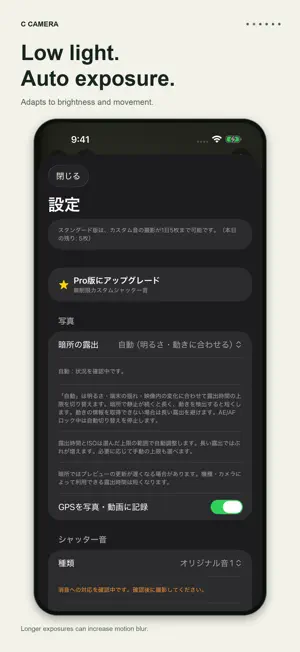
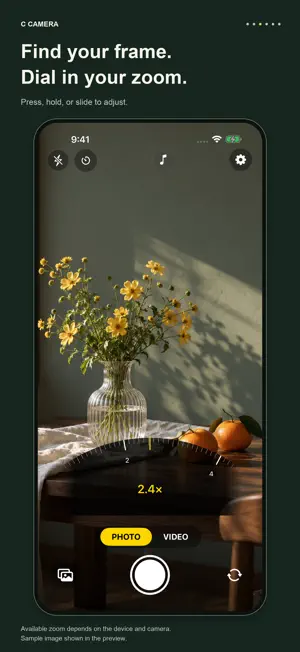
Give your shutter a sound of its own. C Camera lets you choose the sound you hear when taking photos, with simple photo and video controls for iPhone and iPad. MAKE YOUR SHUTTER SOUND YOUR OWN Record a voice or sound with the microphone, or import an audio file from your device. Audio is trimmed to a maximum of three seconds. You can also choose built-in sounds or the standard iOS shutter sound. Take up to five photos per day with a custom sound for free. Upgrade to Pro to remove the daily limit. AUTOMATIC LOW-LIGHT EXPOSURE Automatic mode changes the maximum exposure time based on brightness, device movement, and changes in the preview. It allows longer exposures when a dark scene stays still and shorter exposures when movement is detected. It avoids long exposures when movement information is unavailable. You can also choose Motion, Handheld, or Low Light / Still limits manually. Longer exposures can blur camera movement or moving subjects. INTUITIVE ZOOM AND FOCUS Tap a magnification button, or press and hold or slide sideways to open the arc-shaped zoom dial. Pinch zoom is also supported. Tap the preview to focus and expose. Press and hold for AE/AF lock. Available zoom ranges and focus controls depend on the device and camera. QUIET PHOTO CAPTURE WITH PRO On supported devices, OS versions, and environments, this mode suppresses the system shutter sound while using the photo capture pipeline. App sounds, timer sounds, vibration, and flash are also disabled in this mode. Quiet capture is not available on every device or in every region. Unsupported environments show a message and stop the capture. UP TO 4K AT 60 FPS Choose 4K or 1080p video at 30 or 60 fps. Supported configurations also offer 10-bit HDR video in HLG. Resolution, frame rate, and HDR availability depend on the device and camera configuration. LOCATION AND PHOTO TIMER Choose whether to record GPS location in photos and videos. Use a three- or ten-second timer for photos. ABOUT PHOTO CAPTURE Photos taken with custom or built-in sounds are saved from video frames. Their resolution and image quality may differ from standard-sound photos or supported quiet photos. Sound customization applies to photos; changing video start and stop sounds is not supported. Requires iOS or iPadOS 18.6 or later. The current in-app controls are displayed in Japanese; these English descriptions explain their functions. Please respect people around you and the rules of the place where you take photos.
What’s new
Version 1.5 · Updated October 7, 2026
• Improved the quality of photos taken with a custom shutter sound. Several consecutive frames are combined to reduce noise, and the photo is saved as a 10-bit HEIC. • Photos taken in low light are now finished slightly brighter. • A progress indicator now appears while a custom-sound photo is being saved. In low light, the app also reminds you to hold the camera still. •Fixed an unnecessary camera interruption message when reopening the app.
App privacy
The developer, Satomi Nakaoka, reported these privacy practices to Apple.
Data Not Collected
The developer does not collect any data from this app.
Alternatives to C (shutter) Camera
Looking for apps like C (shutter) Camera? Here are 6 similar apps on the App Store.
-
 Lumio — Fast Camera
-
 Custom Camera: Shutter Sounds
-
 DistractCam
-
 HyperSharp Camera
-
 Photo Light(色味を選べる自撮りライト)
-
 roll of film
| App | Rating | Price | Last updated | Compare |
|---|---|---|---|---|
| C (shutter) Camera | – | Free | October 7, 2026 | |
| Lumio — Fast Camera | – | Free | Jun 24, 2026 | Compare |
| Custom Camera: Shutter Sounds | – | Free | Aug 13, 2026 | Compare |
| DistractCam | – | Free | Mar 25, 2026 | Compare |
| HyperSharp Camera | – | Free | Sep 20, 2026 | Compare |
| Photo Light(色味を選べる自撮りライト) | – | Free | May 28, 2026 | Compare |
| roll of film | – | Free | Jul 31, 2026 | Compare |
Compare C (shutter) Camera with the top alternatives: ratings, updates, ASO score and keyword gaps →