

Sparkle: AI Dictation Keyboard
EIRINI PAPAKONSTANTINOU Utilities iPhoneiPadiPod touch
Sparkle: AI Dictation Keyboard is a free Utilities app for iPhone and iPad by EIRINI PAPAKONSTANTINOU. Rated 3.0/5 from 2 ratings. Requires iOS 17.6.
- Rating
- 3.0
- 2 ratings
- Price
- Free
- on the App Store
- Size
- 4 MB
- Age 4+
- Updated
- Aug 15
- 2026 · v1.2.0
Screenshots


About Sparkle: AI Dictation Keyboard
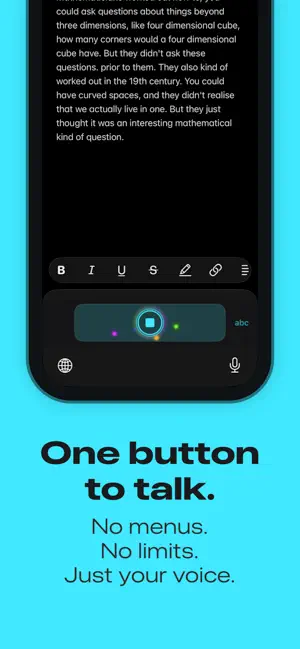
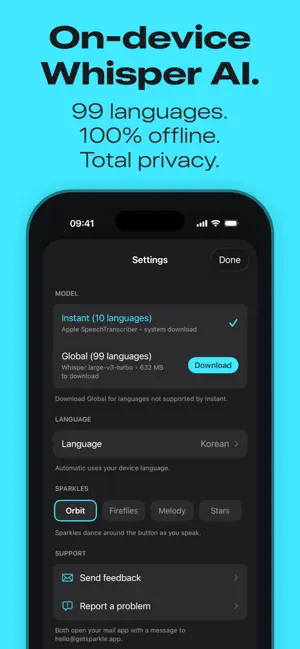
Sparkle is a voice-to-text keyboard that runs entirely on your phone. WORKS WITH VOICEOVER Audio coming out of your speaker gets filtered out of the recording. Only your words get written. Every control is labeled and tested with VoiceOver. When VoiceOver is on, there's a new Echo Cancellation setting in the app. PAUSE TO THINK Most dictation cuts you off after a second of silence. Sparkle keeps listening while you think, so you can pause for as long as you like. BUILT FOR LONG THOUGHTS Notes, emails, journal entries, a long prompt. Whatever it is, say the whole thing instead of typing it. ONE BUTTON TO TALK Tap to record, tap again to stop. That's the whole idea. Swipe left to delete words, swipe right for Enter. NOW IT TYPES, TOO There's a simple letters keyboard for the quick stuff, like typing an app name or a search term. It's English only for now, and it doesn't autocorrect. WORKS EVERYWHERE If it has a keyboard, Sparkle works there. Messages, mail, notes, browsers, chat apps. PICK YOUR MODEL Two ways to turn speech into text. On iOS 26 there's Apple's built-in speech recognition (Instant): nothing big to download, it just starts. And there's Whisper (Global): 99 languages, one 632MB download, then it works offline forever. KEEPS YOUR HEADPHONES QUIET Other apps pipe ambient noise through your AirPods while you dictate. Sparkle uses your iPhone's mic directly. Your noise cancellation stays on, no weird echo. WORKS IN BACKGROUND Most dictation stops recording the moment you switch apps. Sparkle keeps going: check a reference, copy a link, come back. The mic stays on the whole time. NO TIME LIMITS Speak for as long as you need. Sparkle transcribes in chunks as you go, saving each piece to disk immediately. No "recording limit reached" nonsense. NEVER LOSE A WORD Phone call interrupts? Saved. Siri pops up? Saved. App crashes? Saved. Your words are written to disk as you speak, and your last 20 transcriptions are backed up to History. Because losing a 20-minute voice memo is unacceptable. PRIVATE BY DESIGN No accounts. No analytics. No tracking. Everything happens on your phone. We literally cannot see your transcriptions.
What’s new
Version 1.2.0 · Updated August 15, 2026
VOICEOVER SUPPORT You asked for it, and it became the heart of this release. Audio coming out of your speaker gets filtered out of the recording, so only your words get written. When VoiceOver is on, there's an Echo Cancellation setting in the app. Every control is labeled and tested with VoiceOver. Delete word and new line are available as VoiceOver actions. A NEW MODEL On iOS 26 you can pick Instant, built on the speech recognition that ships with your iPhone. It's the fastest way to use Sparkle: nothing big to download, and it starts transcribing the moment you pick it. The accuracy keeps up with the speed. A LITTLE KEYBOARD Sometimes you just need to type a word or two. There's now a simple letters keyboard, English only for now, and it doesn't autocorrect. ALSO IN THIS UPDATE • Smarter spacing: dictated text is inserted the way Apple's dictation does it • If a recording can't be transcribed, the audio is kept so you can listen and retry from History • A model manager in Settings: see what's on your phone, download or free up space • Fixed: when storage ran low, iOS could quietly delete a downloaded model. Models now live where that can't happen.
App privacy
The developer, EIRINI PAPAKONSTANTINOU, reported these privacy practices to Apple.
Data Not Collected
The developer does not collect any data from this app.
Alternatives to Sparkle: AI Dictation Keyboard
Looking for apps like Sparkle: AI Dictation Keyboard? Here are 6 similar apps on the App Store. The highest rated is Smart Stitch - Long Screenshot (5.0/5), and 5 of the 6 are free to download.
-
 Smart Stitch - Long Screenshot
5.0
Smart Stitch - Long Screenshot
5.0
-
 AI Cleaner: Photo Cleanup Kit
5.0
AI Cleaner: Photo Cleanup Kit
5.0
-
 Plain Text Paste
4.3
Plain Text Paste
4.3
-
 AI Actions - Shortcut AI
-
 DR.MOTOR
5.0
DR.MOTOR
5.0
-
 AudioCut
2.0
AudioCut
2.0
| App | Rating | Price | Last updated | Compare |
|---|---|---|---|---|
| Sparkle: AI Dictation Keyboard | 3.0 / 5 (2 ratings) | Free | August 15, 2026 | |
| Smart Stitch - Long Screenshot | 5.0 / 5 (1) | Free | Sep 9, 2026 | Compare |
| AI Cleaner: Photo Cleanup Kit | 5.0 / 5 (3) | Free | Mar 18, 2026 | Compare |
| Plain Text Paste | 4.3 / 5 (26) | 2.99 USD | Apr 24, 2026 | Compare |
| AI Actions - Shortcut AI | – | Free | Oct 26, 2026 | Compare |
| DR.MOTOR | 5.0 / 5 (1) | Free | Sep 17, 2026 | Compare |
| AudioCut | 2.0 / 5 (1) | Free | Sep 21, 2026 | Compare |