

Retro File Manager
Dmitrii Chuprov Utilities iPhoneiPadiPod touch
Retro File Manager is a free Utilities app for iPhone and iPad by Dmitrii Chuprov. Requires iOS 18.5. Updated July 28, 2026.
- Price
- Free
- on the App Store
- Size
- 27 MB
- Age 4+
- Updated
- Jul 28
- 2026 · v1.1.0
Screenshots


About Retro File Manager
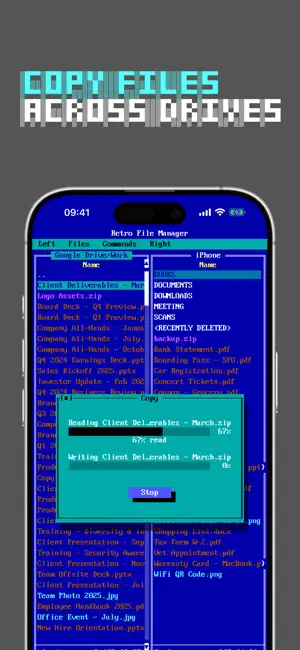
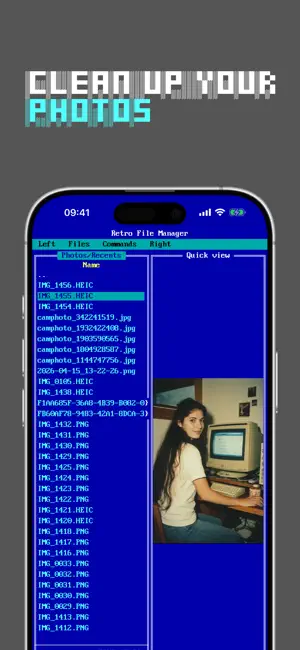
Remember Norton Commander? The dual-panel file manager is back — now on your iPhone and iPad. Try the full app free for 7 days. DUAL-PANEL NAVIGATION Two panels side by side, just like the classics. Browse your device and your cloud drives at the same time. The efficiency that power users have loved since the DOS era. DOCUMENT FORMATS Open PDF, EPUB, FB2, DjVu, Microsoft Office, images, and more. Dark mode for comfortable reading. Your reading position is saved automatically — pick up right where you left off. CLOUD INTEGRATION Connect Google Drive and Yandex Disk. Browse cloud files in the same familiar dual-panel interface. FILE OPERATIONS Copy files between panels with F5, move with F6 — just like the original. Select several files with a long-press and drag, then copy, move, or delete them as a batch. Share multiple files at once with F10. Create folders with F7. KEYBOARD SHORTCUTS Connect an external keyboard and use classic shortcuts. F1 for help, F3 to view, F5 to copy, F6 to move, F7 to create folder, F8 to delete, F10 to share. On iPad, use number keys 1–0. PRIVACY FIRST No tracking. No ads. Your files stay private. TRY EVERYTHING FOR 7 DAYS Every feature is unlocked from the moment you install — try it on your own files: • Dual-panel browsing of your photos and the folders you add from the Files app • Google Drive and Yandex Disk • Copy, move, share and batch operations (F5 / F6 / F10) • PDF, EPUB, FB2, DjVu and Office document viewer Start your free week today. Terms of Use (EULA): https://www.apple.com/legal/internet-services/itunes/dev/stdeula/
What’s new
Version 1.1.0 · Updated July 28, 2026
A FREE WEEK OF EVERYTHING What used to be locked is now open for 7 days — Photos, your Files app folders, Google Drive and Yandex Disk. If you never got round to trying them, this is the moment. BOOKS You can now scroll straight from the cover into the text, and back out of the endnotes — the book used to stop scrolling there and had to be closed and reopened. Books now open on the cover, and jumping to a section or a percentage lands where you asked. PHOTOS Copying and moving now keep Live Photos, RAW files and metadata intact, and edited photos are exported exactly as you see them. A move checks the copy against the original before it finishes. SOMETHING GETTING IN THE WAY? Commands → Feedback opens our public board — tell us what didn't work. Also: fixed dialog layout in landscape and a few sizing glitches.
App privacy
The developer, Dmitrii Chuprov, reported these privacy practices to Apple.
Data Linked to You
The following data, which may be collected and linked to your identity, may be used for the following purposes:
- Contact Info: Email Address
- Identifiers: User ID
Used for: App Functionality
Data Not Linked to You
The following data, which may be collected but is not linked to your identity, may be used for the following purposes:
- Purchases: Purchase History
- Usage Data: Product Interaction
Used for: Analytics, App Functionality
Alternatives to Retro File Manager
Looking for apps like Retro File Manager? Here are 6 similar apps on the App Store. The highest rated is PhotoCleaner - Clean Space. (5.0/5), and 5 of the 6 are free to download.
-
 Domain Monitor
-
 NetTerminal
-
 PocketTerm SSH
-
 AnyPlay Drive
-
 PhotoCleaner - Clean Space.
5.0
PhotoCleaner - Clean Space.
5.0
-
 XPS Viewer · XPS to PDF
| App | Rating | Price | Last updated | Compare |
|---|---|---|---|---|
| Retro File Manager | – | Free | July 28, 2026 | |
| Domain Monitor | – | Free | Oct 4, 2026 | Compare |
| NetTerminal | – | Free | May 11, 2026 | Compare |
| PocketTerm SSH | – | Free | Aug 6, 2026 | Compare |
| AnyPlay Drive | – | 0.99 USD | Oct 17, 2026 | Compare |
| PhotoCleaner - Clean Space. | 5.0 / 5 (2) | Free | Dec 24, 2025 | Compare |
| XPS Viewer · XPS to PDF | – | Free | Sep 27, 2026 | Compare |
Compare Retro File Manager with the top alternatives: ratings, updates, ASO score and keyword gaps →