

ToneFit: Color Analysis
Uniation Software Co.,Ltd. Lifestyle iPhoneiPadiPod touch
ToneFit: Color Analysis is a free Lifestyle app for iPhone and iPad by Uniation Software Co.,Ltd. Requires iOS 17.0. Updated October 13, 2026.
- Price
- Free
- on the App Store
- Size
- 6 MB
- Age 4+
- Updated
- Oct 13
- 2026 · v5.0.0
Screenshots


About ToneFit: Color Analysis
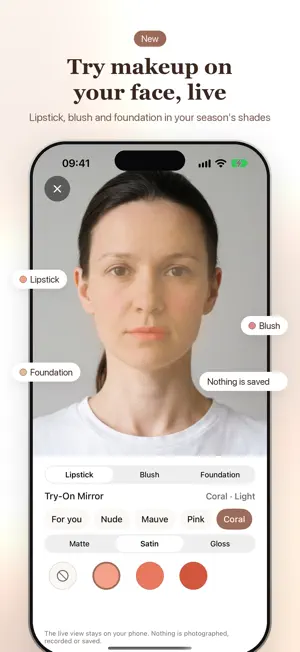
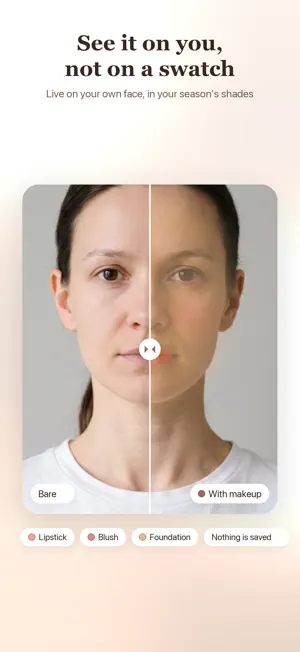
ToneFit tells you which of the 12 color seasons you are — Light Spring, Cool Winter, Soft Autumn — and turns that name into colors you can actually wear. You don't have to take it on faith: the reasoning is visible, and you can hold the colors up to your own face to check. TWO STEPS, TWELVE SEASONS Photograph your wrist, then your face. ToneFit reads warmth, depth and clarity and places you in one of the 12 seasons. Three sliders show where you land on each axis — "slightly warm", "deep" — and you can override the result if you disagree. DRAPE IT ON YOURSELF Pick a photo, hold two colors up beside your face, and see which one makes your skin look clearer. That's what a color consultant does with fabric. The photo stays on your device and is never saved. YOUR OWN COLOR PALETTE Colors that suit you, colors that lift you, colors to skip — plus whether gold or silver sits better on you. Five occasions (everyday, work, travel, date, festive) each shift the palette. TRY-ON MIRROR Try lipstick, blush and foundation live on your own face with the front camera, and stack them to see the whole look. Nine lipstick families in matte, satin or gloss, and 15 foundation shades. Your season's safe shades are free to try; colors that clash are marked "!". The live view stays on your phone — nothing is photographed, recorded or saved. MADE FOR iPHONE DUO Half-fold your iPhone Duo and it becomes a makeup mirror: the mirror sits above the crease and your shades below. The layout follows the fold, and the tab bar moves to the side where the system calls for it. MATCH WHAT YOU ALREADY OWN Photograph a garment and ToneFit reads its real color, then judges it against your season's palette: great match, workable, or skip. Every check is saved so you can look back before you shop. CHECK COLORS IN THE STORE, OR FROM ANY PHOTO Point the camera at a garment in the store and see right away whether it suits you. ToneFit only reads the live view — nothing is photographed or saved. Spot a piece in Safari or Photos? Share the image to ToneFit and get the verdict on the spot. HOME SCREEN AND LOCK SCREEN WIDGETS The Color of the Day widget puts today's suggested color on your Home Screen and Lock Screen, so one glance before you leave tells you what to wear. COMPARE TWO COLORS SIDE BY SIDE Torn between two shirts? Put the colors head to head and get a clear verdict — along with the reasoning behind it. SAVE AND SHARE Keep favorite colors in one list, and turn your result into a clean summary card. The card never includes your photos. PRIVATE BY DESIGN Everything is analyzed on your iPhone. No photo ever leaves your device, no account is required, and original photos are never saved. ToneFit keeps only the structured result — and you can erase all of it in two taps. Available in English, Simplified Chinese, Traditional Chinese, Japanese, Korean, French, Spanish and German.
What’s new
Version 5.0.0 · Updated October 13, 2026
• New Try-On Mirror: try lipstick, blush and foundation live on your own face with the front camera, and stack them to see the whole look before you buy • Lipstick in 9 shade families with matte, satin and gloss finishes; foundation in 15 shades. Your season's safe shades are free to try, and colors that clash are marked "!" • Nothing is photographed, recorded or saved: the live view stays on your phone • iPhone Duo: half-fold it and the mirror sits above the crease with your shades below, just like a makeup mirror. The layout follows the fold, and the tab bar moves to the side where the system calls for it • Redesigned scan home page, with the mirror one tap away from your scan result • Many fixes, plus accessibility and small-screen improvements
App privacy
The developer, Uniation Software Co.,Ltd., reported these privacy practices to Apple.
Data Not Linked to You
The following data, which may be collected but is not linked to your identity, may be used for the following purposes:
- Usage Data: Product Interaction
Used for: Analytics
Alternatives to ToneFit: Color Analysis
Looking for apps like ToneFit: Color Analysis? Here are 6 similar apps on the App Store. The highest rated is Patterns: Create Wallpapers (5.0/5), and all 6 are free to download.
-
 Patterns: Create Wallpapers
5.0
Patterns: Create Wallpapers
5.0
-
 PetMemo+
5.0
PetMemo+
5.0
-
 Joni - Baby Tracker (4d761d)
-
 MyLog: Diary Journal Notes
5.0
MyLog: Diary Journal Notes
5.0
-
 Reflection App - Reflectric
-
 Polly.ai
5.0
Polly.ai
5.0
| App | Rating | Price | Last updated | Compare |
|---|---|---|---|---|
| ToneFit: Color Analysis | – | Free | October 13, 2026 | |
| Patterns: Create Wallpapers | 5.0 / 5 (1) | Free | Sep 12, 2026 | Compare |
| PetMemo+ | 5.0 / 5 (1) | Free | Apr 3, 2026 | Compare |
| Joni - Baby Tracker (4d761d) | – | Free | Sep 29, 2026 | Compare |
| MyLog: Diary Journal Notes | 5.0 / 5 (1) | Free | Oct 4, 2026 | Compare |
| Reflection App - Reflectric | – | Free | Jan 27, 2026 | Compare |
| Polly.ai | 5.0 / 5 (2) | Free | Mar 30, 2026 | Compare |