
SoloPen Notes
Ahmed Omar Productivity iPad
SoloPen Notes is a free Productivity app for iPad by Ahmed Omar. Rated 4.8/5 from 4 ratings. Requires iOS 26.0. Updated October 5, 2026.
- Rating
- 4.8
- 4 ratings
- Price
- Free
- on the App Store
- Size
- 20 MB
- Age 4+
- Updated
- Oct 5
- 2026 · v5.0.5
Screenshots
About SoloPen Notes
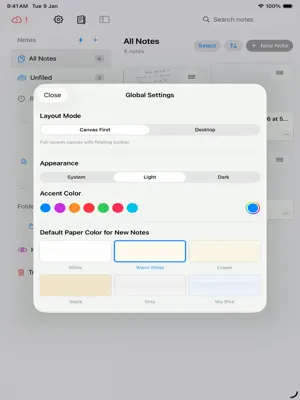
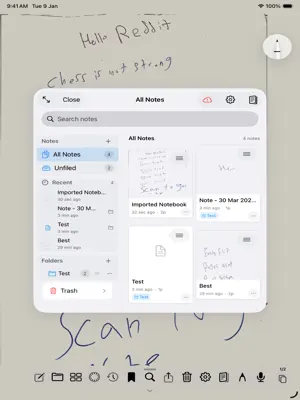
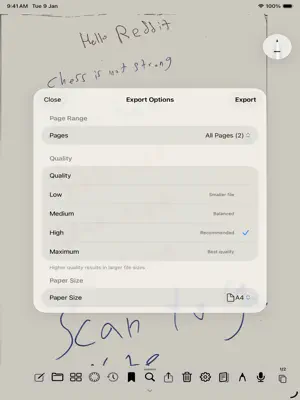
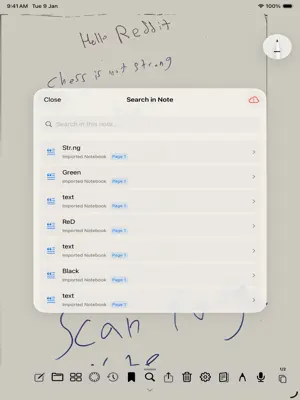
SoloPen Notes is a minimal handwriting app for iPad. No clutter. No distractions. Just you, your Apple Pencil, and endless pages. Wide range of features that will assist you, mainly: Core Writing & Canvas - Apple Pencil Writing : Full pressure-sensitive drawing with PencilKit - Page Flip with Pencil : Swipe to flip pages using pencil gestures - Two-Page Spread : Side-by-side pages in landscape mode like a real book - Tool Picker : iOS 26 native PencilKit tool picker for pens, pencils, markers, eraser Page Templates Mainly - Blank : Clean empty page - Lined : Horizontal lines for writing - Grid : Square grid pattern Paper Themes - White : Pure white background - Warm White : Slightly warm, easy on eyes - Cream : Cream colored paper - Sepia : Vintage sepia tone - Gray : Light gray background - Dark : Dark mode paper with white ink Stroke History & Recall - Stroke Journal : Records every stroke add, remove, transform, mask - Stroke Fingerprints : Unique identity for each stroke (path + ink hash) - Global Recall : Timeline scrubbing across all pages with ghost strokes - Ghost Strokes : Deleted strokes shown at low opacity during recall - Stroke Replay : Procreate-like time-lapse playback of drawing Bookmarks - Stroke Bookmarks : Bookmark selected strokes with tags - Bookmark Groups : Grouped by page - Lasso Selection : Two-finger gesture to select strokes for bookmarking Search & OCR - Handwriting Recognition : OCR via Vision framework - Full-Text Search : Search across all notes and pages - Search Highlighting : Matches highlighted on canvas with bounding boxes - Page-Grouped Results : Shows which pages contain matches PDF Features - PDF Import : Import PDFs as note pages with background images - PDF Annotation : Draw on top of imported PDFs - PDF Export : Export notes Organization - Folders : Hierarchical folder structure - Note Icons : Emoji and SF Symbol icons - Note Titles : Auto-recognized from first line or custom - Thumbnails : Visual grid of all pages - Restore from Trash : Recover deleted notes - Permanent Delete : Empty trash permanently Sync & Cloud - iCloud Sync : Automatic CloudKit sync across devices
What’s new
Version 5.0.5 · Updated October 5, 2026
enhancements, and local backup files added
App privacy
The developer, Ahmed Omar, reported these privacy practices to Apple.
Data Not Collected
The developer does not collect any data from this app.
Alternatives to SoloPen Notes
Looking for apps like SoloPen Notes? Here are 6 similar apps on the App Store. The highest rated is Archium: document organizer (5.0/5), and all 6 are free to download.
-
 Archium: document organizer
5.0
Archium: document organizer
5.0
-
 Perenne Note. Digital Notebook
3.8
Perenne Note. Digital Notebook
3.8
-
 Simplify Notes: PDF Notebook
5.0
Simplify Notes: PDF Notebook
5.0
-
 Cosy Notes
4.8
Cosy Notes
4.8
-
 OpenNotes: Notes & PDF Markup
4.4
OpenNotes: Notes & PDF Markup
4.4
-
 ScribblePad: Notes & PDF
5.0
ScribblePad: Notes & PDF
5.0
| App | Rating | Price | Last updated | Compare |
|---|---|---|---|---|
| SoloPen Notes | 4.8 / 5 (4 ratings) | Free | October 5, 2026 | |
| Archium: document organizer | 5.0 / 5 (1) | Free | Jul 28, 2026 | Compare |
| Perenne Note. Digital Notebook | 3.8 / 5 (5) | Free | Oct 7, 2026 | Compare |
| Simplify Notes: PDF Notebook | 5.0 / 5 (1) | Free | Sep 25, 2026 | Compare |
| Cosy Notes | 4.8 / 5 (8) | Free | Aug 4, 2026 | Compare |
| OpenNotes: Notes & PDF Markup | 4.4 / 5 (27) | Free | Oct 3, 2026 | Compare |
| ScribblePad: Notes & PDF | 5.0 / 5 (3) | Free | Sep 7, 2026 | Compare |
Compare SoloPen Notes with the top alternatives: ratings, updates, ASO score and keyword gaps →