

Key Capture: Piano Visualizer
Mobile Tech Media, LLC Music iPhoneiPadiPod touch
Key Capture: Piano Visualizer is a free Music app for iPhone and iPad by Mobile Tech Media, LLC. Requires iOS 17.0. Updated November 9, 2026.
- Price
- Free
- on the App Store
- Size
- 35 MB
- Age 4+
- Updated
- Nov 9
- 2026 · v3.3
Screenshots
Save to Pinterest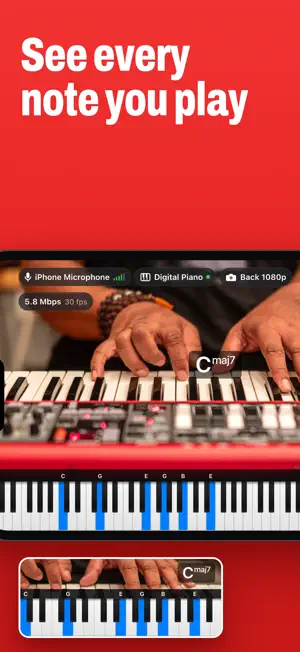


About Key Capture: Piano Visualizer
SEE EVERY NOTE YOU PLAY. Key Capture films you with your iPhone or iPad camera and adds a live 88-key piano overlay that lights up each key as you press it. Connect your MIDI keyboard or digital piano, then go live or record. No computer, OBS or capture card needed. WHO IT'S FOR - Pianists and keyboard players sharing performances - Piano teachers recording lessons so students can see which keys are played - Creators making piano videos with a visible keyboard LIVE STREAMING Sign in with YouTube or Facebook and go live from the app. Or enter an RTMP server URL and stream key to stream to another platform or your own server. RECORDING Record your playing with the overlay and save the video to your Photos library, ready to edit and share. MIDI CONNECTION Connect a MIDI keyboard or digital piano over Bluetooth MIDI or with a USB adapter. The keys you play appear on the 88-key overlay along the bottom of the video. VIDEO SETTINGS Choose 720p, 1080p or 4K at 30 or 60 fps, depending on your device. On-screen stats show frame rate, connection status, recording time and viewer count. Key Capture works in landscape. PRICING Key Capture is free to download. Free streams and recordings run up to 5 minutes each. The Unlimited subscription, monthly or yearly, removes the time limit. Payment is charged to your Apple Account. Subscriptions renew automatically unless canceled at least 24 hours before the end of the current period. Manage or cancel in your Apple Account settings. SUPPORT Questions? Email [email protected] Privacy Policy: https://keycapture.app/privacy Terms of Use: https://keycapture.app/terms
What’s new
Version 3.3 · Updated November 9, 2026
New setup with live sound checks and a quick iPhone studio guide. Improved layouts for larger text, camera permission recovery, and sound meters.
App privacy
The developer, Mobile Tech Media, LLC, reported these privacy practices to Apple.
Data Used to Track You
The following data may be used to track you across apps and websites owned by other companies:
- Identifiers: User ID, Device ID
- Usage Data: Product Interaction
- Diagnostics: Crash Data
- Other Data: Other Data Types
Data Linked to You
The following data, which may be collected and linked to your identity, may be used for the following purposes:
- Identifiers: User ID, Device ID
- Usage Data: Product Interaction, Other Usage Data
- Other Data: Other Data Types
Used for: Third-Party Advertising, Analytics, Product Personalization, App Functionality
Data Not Linked to You
The following data, which may be collected but is not linked to your identity, may be used for the following purposes:
- Diagnostics: Crash Data, Other Diagnostic Data
Used for: Analytics, App Functionality
Alternatives to Key Capture: Piano Visualizer
Looking for apps like Key Capture: Piano Visualizer? Here are 6 similar apps on the App Store. The highest rated is KeyCam (5.0/5), and 5 of the 6 are free to download.
-
 KeyCam
5.0
-
 MIDI Recorder with E.Piano
4.6
-
 Pianoteq 9
4.9
-
 MIDITrail
3.2
-
 KeyPad MIDI Controller
4.8
-
 SeeMusic
3.9
| App | Rating | Price | Last updated | Compare |
|---|---|---|---|---|
| Key Capture: Piano Visualizer | – | Free | November 9, 2026 | |
| KeyCam | 5.0 / 5 (2) | 5.99 USD | Sep 4, 2026 | Compare |
| MIDI Recorder with E.Piano | 4.6 / 5 (65) | Free | Nov 5, 2026 | Compare |
| Pianoteq 9 | 4.9 / 5 (63) | Free | Nov 3, 2026 | Compare |
| MIDITrail | 3.2 / 5 (82) | Free | Sep 2, 2026 | Compare |
| KeyPad MIDI Controller | 4.8 / 5 (18) | Free | Oct 2, 2026 | Compare |
| SeeMusic | 3.9 / 5 (234) | Free | Nov 13, 2026 | Compare |