

Genius Budget
WhatsAd Market Limited Productivity iPhoneiPadiPod touch
Genius Budget is a free Productivity app for iPhone and iPad by WhatsAd Market Limited. Requires iOS 15.0. Updated September 25, 2026.
- Price
- Free
- on the App Store
- Size
- 87 MB
- Age 17+
- Updated
- Sep 25
- 2026 · v2.4.24
Screenshots



About Genius Budget
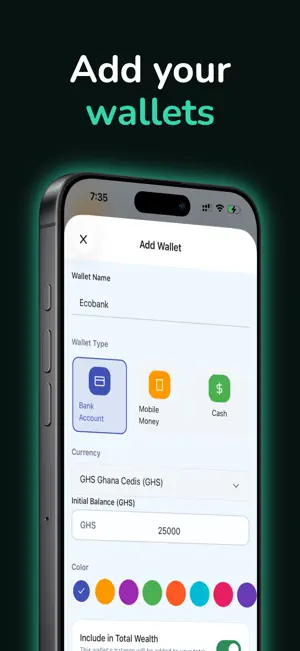
Take control of your money with Genius Budget – the intuitive expense tracker designed to help you understand your spending, stick to your budgets, and achieve your financial goals. Whether you're saving for a dream vacation, paying off debt, or simply want to know where your money goes each month, Genius Budget gives you the clarity and tools you need to make smarter financial decisions. TRACK EVERY TRANSACTION - Log expenses and income in seconds - Organize with custom categories and labels you create - Add notes to remember transaction details - Schedule recurring transactions for bills and subscriptions - Transfer money between wallets with ease MULTIPLE WALLETS, ONE VIEW - Create unlimited wallets for bank accounts, cash, and savings - See your total wealth at a glance across all accounts - Track each wallet's balance and transaction history - Hide wallets you don't want included in totals SMART BUDGETS THAT WORK - Set weekly, monthly, or yearly budgets - Track spending by category or across all expenses - Visual progress bars show exactly where you stand - Get alerts when you're approaching your limit - Never overspend again with real-time tracking POWERFUL INSIGHTS - Beautiful charts show income vs expenses over time - Spending overview breaks down where your money goes - Timeline view groups transactions by date - Search and filter to find any transaction instantly EXPORT YOUR DATA - Export transactions to CSV for spreadsheets - Generate PDF reports with charts and summaries (Premium) Premium Subscription Monthly Premium ($2.99) - Renews Monthly Yearly Premium ($29.99) - Renews Yearly Premium Benefits - Unlimited Wallets - Unlimited Budgets - Unlimited Custom Categories - Unlimited Labels - CSV Export - PDF Export Terms of service: https://www.apple.com/legal/internet-services/itunes/dev/stdeula/ Privacy policy: https://www.geniustechhub.com/privacy-policy
What’s new
Version 2.4.24 · Updated September 25, 2026
- Introducing Scheduled transactions: You can now schedule a transaction to automatically be added at a future date - Introducing Shared Wallets: You can give access and share your wallet with someone. Both of you can add transactions to the wallet and track at the same time - Redesigned Home, Wallets and Budgets screens. Renamed "Timeline" screen to "Home" and "More" screen to "Settings" - You can now re-arrange the order of your wallets on the wallets screen - You can now filter your wealth to see the trend for the past 30 days, 60 days or all time - Redesigned Spending Overview page to be more concise but informative: See a breakdown of your spending by categories and labels - When adding a new transaction, you can create a new category. No need to create new categories from the settings page anymore.
App privacy
The developer, WhatsAd Market Limited, reported these privacy practices to Apple.
Data Not Linked to You
The following data, which may be collected but is not linked to your identity, may be used for the following purposes:
- Contact Info: Email Address, Name
- Usage Data: Other Usage Data
- Diagnostics: Crash Data, Other Diagnostic Data
- Identifiers: User ID
- Financial Info: Other Financial Info
Used for: Developer’s Advertising or Marketing, Analytics, Product Personalization, App Functionality
Alternatives to Genius Budget
Looking for apps like Genius Budget? Here are 6 similar apps on the App Store. The highest rated is Offeline: Private AI Assistant (5.0/5), and all 6 are free to download.
-
 MotiveTask
-
 Readable - Stories with AI
-
 Class Timetables
-
 HabitMirror - Photo Journal
3.0
HabitMirror - Photo Journal
3.0
-
 LohiaCorp
-
 Offeline: Private AI Assistant
5.0
Offeline: Private AI Assistant
5.0
| App | Rating | Price | Last updated | Compare |
|---|---|---|---|---|
| Genius Budget | – | Free | September 25, 2026 | |
| MotiveTask | – | Free | Jan 7, 2026 | Compare |
| Readable - Stories with AI | – | Free | Jul 11, 2025 | Compare |
| Class Timetables | – | Free | Sep 28, 2026 | Compare |
| HabitMirror - Photo Journal | 3.0 / 5 (3) | Free | Oct 16, 2025 | Compare |
| LohiaCorp | – | Free | Sep 30, 2024 | Compare |
| Offeline: Private AI Assistant | 5.0 / 5 (2) | Free | Aug 9, 2026 | Compare |
Compare Genius Budget with the top alternatives: ratings, updates, ASO score and keyword gaps →