

Phonetic Formatter: English
聪 陈 Utilities iPhoneiPadiPod touch
Phonetic Formatter: English is a free Utilities app for iPhone and iPad by 聪 陈. Requires iOS 15.0. Updated October 17, 2026.
- Price
- Free
- on the App Store
- Size
- 16 MB
- Age 4+
- Updated
- Oct 17
- 2026 · v1.9
Screenshots


About Phonetic Formatter: English
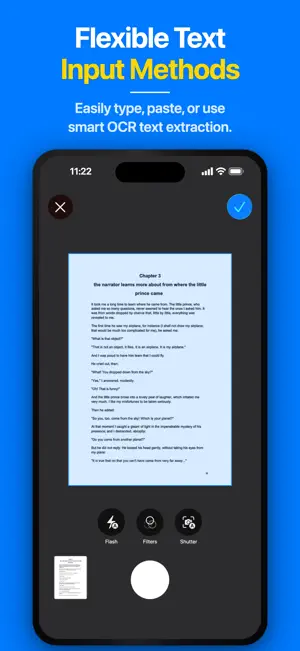
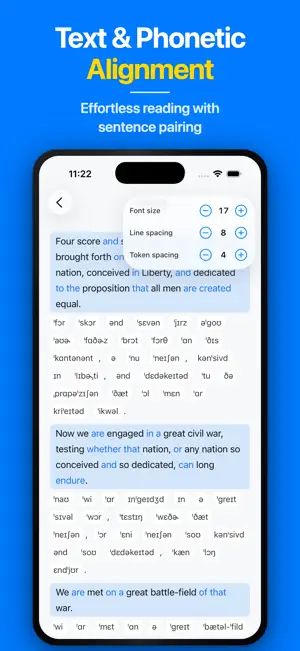
Professional English-to-IPA Transcription for Teachers, Students, and Researchers. Phonetic Formatter is a high-precision linguistic tool for clean, consistent IPA conversion of English text. Powered by the CMU Pronouncing Dictionary for North American English, it helps you prepare classroom handouts, study complex literature, or master pronunciation—processing extensive text with unmatched precision. >>> What You Can Do Versatile Text Input Methods * Flexible Input Options: Type or paste extensive texts directly into the workspace for instant processing. * Share from Other Apps: Import English text from Safari, Notes, Mail, and more via the iOS Share menu. * On-Device OCR & Scanning: Instantly scan physical books, worksheets, or documents to extract text. Convert Text to IPA * Long-Form Support: Optimized to process entire articles, essays, and lesson chapters in seconds—eliminating manual dictionary lookups. * Custom Logic: Automatically handles punctuation, contractions, and proper nouns for natural sentence flow, with proprietary algorithms for stress marking, sentence rhythm, and smart symbol wrapping. Professional Layout * Sentence-Level Format: A clean, alternating layout where original sentences and their phonetic blocks appear in sequence. * Word-by-Word Format: Displays each sentence followed by a detailed, line-by-line breakdown of every word and its corresponding IPA. * IPA Only Format: A streamlined, distraction-free display that hides the original English text for focused phonetic reading and practice. * Phonetic Variants: Tap any highlighted blue word to explore alternative pronunciations and choose which one to use when reading, copying, or exporting results. Enhanced Reading View * Full-screen reading view with adjustable font sizes, line spacing, and token spacing to match how you read best. Flexible Output Options * Copy to Clipboard: One tap to copy formatted results for seamless integration into your workflow. * Export to TXT, DOCX, and PDF: Save your results for printing, handouts, and study guides. >>> Access & Privacy * Dark Mode for comfortable reading. * Available on iPhone and iPad. * IPA conversion runs on your device, and the text you enter is not uploaded to our servers. >>> Free vs Pro Included for Free • Sentence transcription • IPA-only format • Full-screen reading view • Copy results • View alternative pronunciations Pro Features (Monthly subscription or one-time lifetime purchase.) • Unlimited daily transcriptions • Ad-free experience • Up to 6,000 words per text • Word-by-word transcription • Scan & import text (OCR) • Export to TXT, DOCX, and PDF • Choose the pronunciation for each word Privacy Policy: https://louisbuilds.me/phoneticformatter/privacy.html Terms of Service: https://louisbuilds.me/phoneticformatter/terms.html
What’s new
Version 1.9 · Updated October 17, 2026
What's New in V1.9 Earn +1 Daily Conversion: Hit your free daily limit? Watch a quick rewarded video to get 1 extra conversion per day (once daily). Ad-Free Pro Experience: Upgrade to Pro to completely remove all in-app ads for an uninterrupted workflow.
App privacy
The developer, 聪 陈, reported these privacy practices to Apple.
Data Used to Track You
The following data may be used to track you across apps and websites owned by other companies:
- Identifiers: Device ID
Data Linked to You
The following data, which may be collected and linked to your identity, may be used for the following purposes:
- Location: Coarse Location
- Identifiers: Device ID
- Usage Data: Product Interaction, Advertising Data
Used for: Third-Party Advertising, Developer’s Advertising or Marketing, Analytics, App Functionality
Data Not Linked to You
The following data, which may be collected but is not linked to your identity, may be used for the following purposes:
- Diagnostics: Performance Data, Other Diagnostic Data, Crash Data
Used for: Third-Party Advertising, Developer’s Advertising or Marketing, Analytics, App Functionality
Alternatives to Phonetic Formatter: English
Looking for apps like Phonetic Formatter: English? Here are 6 similar apps on the App Store. The highest rated is CrewLink Manager (4.5/5), and 5 of the 6 are free to download.
-
 TP Phonetic Keyboard
-
 CrewLink Manager
4.5
-
 PadPub: Ad Blocker & DNS
-
 E Go Africa
-
 Vocatim: Offline Transcription
-
 Paper Free Scanner
1.0
| App | Rating | Price | Last updated | Compare |
|---|---|---|---|---|
| Phonetic Formatter: English | – | Free | October 17, 2026 | |
| TP Phonetic Keyboard | – | Free | Feb 16, 2025 | Compare |
| CrewLink Manager | 4.5 / 5 (4) | 13.99 USD | Jan 12, 2026 | Compare |
| PadPub: Ad Blocker & DNS | – | Free | Oct 18, 2026 | Compare |
| E Go Africa | – | Free | Oct 14, 2026 | Compare |
| Vocatim: Offline Transcription | – | Free | Oct 13, 2026 | Compare |
| Paper Free Scanner | 1.0 / 5 (1) | Free | Apr 21, 2026 | Compare |