

Analog - Screen Time Habits
Analog Wellbeing Inc. Health & Fitness iPhoneiPadiPod touch
Analog - Screen Time Habits is a free Health & Fitness app for iPhone and iPad by Analog Wellbeing Inc. Rated 5.0/5 from 2 ratings. Requires iOS 18.0.
- Rating
- 5.0
- 2 ratings
- Price
- Free
- on the App Store
- Size
- 42 MB
- Age 17+
- Updated
- Oct 14
- 2026 · v3.0
Screenshots



About Analog - Screen Time Habits
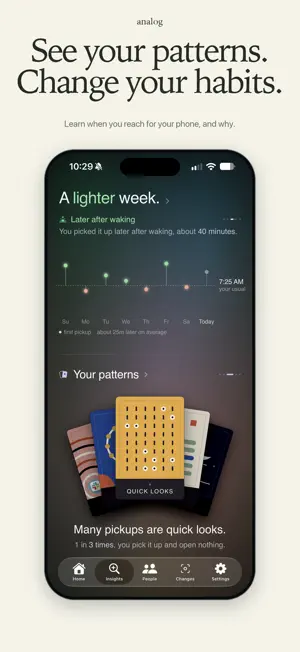
Analog scores how you use your phone, shows you the patterns you can't see yourself, and gives you limits to change them. We've tried every screen time app, and none of them got us there. So we built Analog. YOUR SCORE A daily 0 to 100 across four parts of your phone life: how much of your day goes to your screen, how often you reach for it and how often that pickup goes nowhere, how much time goes to apps you use to escape, and how you handle the hours around sleep. YOUR DAILY REPORT Every morning at nine you get a report on the day before. It shows your score, the hours you were on your phone, what you spent that time on, and one thing worth knowing about it. It opens on its own once a day, and it stays on your home page if you want to go back to it. INSIGHTS The app reads the last 30 days of your data and writes what keeps happening in plain sentences: - "Reddit is the last app you used before sleep 4 nights this week." - "About a third of your pickups don't open anything. You're just checking the screen." - "Your longest Instagram sessions happen between 9 and 11 PM. 8 of the last 14 days." The patterns that stick around become a set of cards you hold, and Analog names one of them as your tendency for the week. Connect Apple Health and you also see how your phone is shaping your body: - "On heavier phone days, you slept 38 minutes less." - "On nights you used your phone more after 9 PM, your morning HRV was 8% lower." - "After nights you slept less, you spent 42 more minutes on your phone." When you're doing a good job, you see that too. GOALS Pick what you want to change: use your phone less, calmer mornings, focus at work, stop doomscrolling, be present on weekends, or sleep better. Set your number, and Analog counts it from that day. Each week shows how many days you hit it, and how much time you have won back since Day 1. A goal can run three ways. Just track the number. Set a limit yourself. Or let Analog set the limit and lower it a step at a time. LIMITS Block apps, websites, or whole categories of either. - Scheduled blocks for work hours, evenings, or bedtime - Always-on blocks for apps you don't want to drift into - Daily limits for the ones you want to keep but not lose hours to - Limits that only apply between certain hours You decide how many times a day you can snooze past a limit. Zero is the default, and it means there's no way past it. BINGE GUARD Analog watches the apps you use to escape. When you've been in one long enough that it reads as a sitting rather than a glance, it asks whether you want them locked for an hour. You can also set it to lock them without asking. PEOPLE See where you stand against everyone else using Analog, on your score overall and on each part of it. Add friends and compare your weeks. Or start a group with the people you actually want to do this with. PRIVACY Your scores and insights are computed on your device. You sign in with Apple, and Analog stores the summaries your account, comparisons, and Friends need. Apple Health data stays on your device. You can turn syncing off, export your data, or delete your account in Privacy Center. ANALOG ONE Analog is free to use. Analog One opens up your full history, as many limits as you want, every tendency you hold, comparisons on every metric and by app, sharing your week with a friend, iPad and Mac, and your own pick of escape apps. Terms of Use (EULA): https://www.apple.com/legal/internet-services/itunes/dev/stdeula/
What’s new
Version 3.0 · Updated October 14, 2026
- Set goals to change your phone habits. - New look for Home, Insights, People and Settings. - Limits is now Changes, with your goals and limits on one page. - Making a limit now goes step by step. - Block adult websites from Changes, next to Binge Guard. - Block Google searches for a word. - Your patterns now come as a deck of cards. - The morning report shows how your goals went, plus a short fact each day. - The companion has been retired.
App privacy
The developer, Analog Wellbeing Inc., reported these privacy practices to Apple.
Data Linked to You
The following data, which may be collected and linked to your identity, may be used for the following purposes:
- Usage Data: Product Interaction, Other Usage Data
- User Content: Other User Content
- Browsing History: Browsing History
- Identifiers: User ID
Used for: Analytics, App Functionality
Data Not Linked to You
The following data, which may be collected but is not linked to your identity, may be used for the following purposes:
- Diagnostics: Crash Data, Performance Data, Other Diagnostic Data
Used for: App Functionality
Alternatives to Analog - Screen Time Habits
Looking for apps like Analog - Screen Time Habits? Here are 6 similar apps on the App Store. The highest rated is Screen Time: Another24 (5.0/5), and all 6 are free to download.
-
 Detox Meld - Screen Time
-
 BODIES.
-
 Rebirth - Dopamine Detox
-
 Screen Time: Another24
5.0
Screen Time: Another24
5.0
-
 InstaClinic
-
 Byte+
Byte+
| App | Rating | Price | Last updated | Compare |
|---|---|---|---|---|
| Analog - Screen Time Habits | 5.0 / 5 (2 ratings) | Free | October 14, 2026 | |
| Detox Meld - Screen Time | – | Free | Sep 24, 2026 | Compare |
| BODIES. | – | Free | Oct 18, 2025 | Compare |
| Rebirth - Dopamine Detox | – | Free | Mar 31, 2026 | Compare |
| Screen Time: Another24 | 5.0 / 5 (4) | Free | Jun 29, 2026 | Compare |
| InstaClinic | – | Free | Aug 6, 2026 | Compare |
| Byte+ | – | Free | Oct 18, 2026 | Compare |