

QR Code Scanner・Scan Barcode・
Tarun Paliwal Utilities iPhoneiPadiPod touch
QR Code Scanner・Scan Barcode・ is a free Utilities app for iPhone and iPad by Tarun Paliwal. Requires iOS 15.5. Updated June 30, 2026.
- Price
- Free
- on the App Store
- Size
- 45 MB
- Age 4+
- Updated
- Jun 30
- 2026 · v1.0.5
Screenshots

About QR Code Scanner・Scan Barcode・
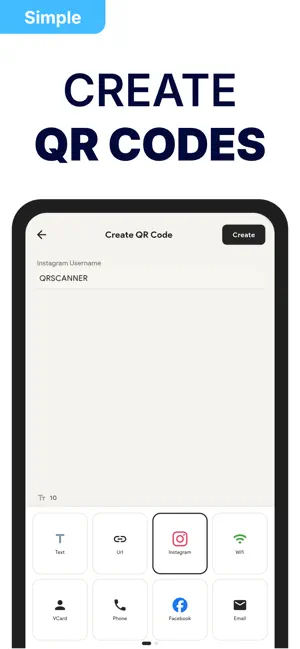
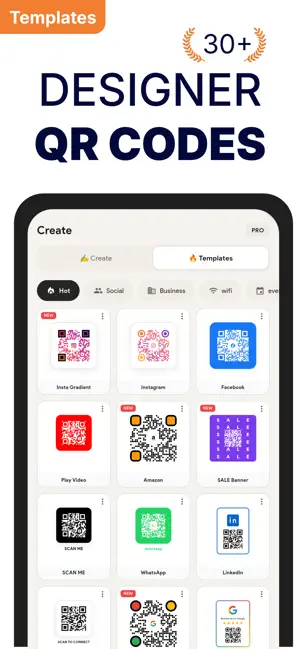
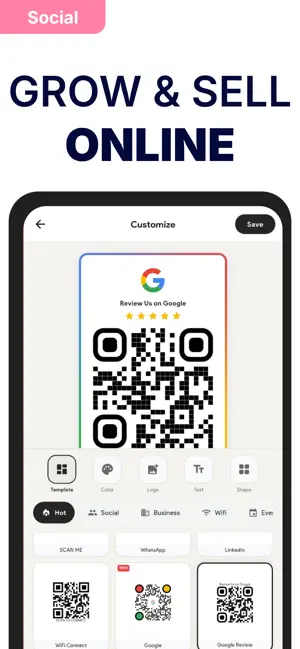
The only QR code scanner that works 100% offline — no internet, no account, no tracking. Fast, private, and packed with features other scanners charge for. INSTANT QR CODE SCANNING Point your camera at any QR code or barcode. The scanner detects and reads codes automatically with instant results. No buttons to press — just point and scan. Supported formats: - QR Code - EAN-13 & EAN-8 - UPC-A & UPC-E - Code 128, Code 39, Code 93 - Data Matrix - PDF417 - Aztec Smart recognition shows relevant actions instantly. Scan a URL and open it directly. Scan a WiFi code and connect with one tap. Scan a contact and save it to your phone. QR CODE GENERATOR Create your own QR codes and share them with anyone: - WiFi — Share your network without typing passwords - Website URL — Link to any webpage - Contact Card — Share your info as vCard - Email — Pre-filled email address - Phone — Tap-to-call number - SMS — Pre-filled text message - Plain Text — Any custom text Your created codes are saved in "My Codes" for easy access anytime. POWERFUL SCANNING FEATURES - Flashlight — Scan in dark environments - Zoom Control — Adjustable slider for distance scanning - Gallery Import — Scan QR codes from saved photos - Manual Entry — Type barcodes with the keypad - Tap to Focus — Touch screen to focus camera - Auto-Detect — Recognizes URLs, WiFi, contacts, events, locations, and emails automatically HISTORY & ORGANIZATION Every scan is saved automatically with the date and time. Your scan history lets you: - Search — Find any previous scan instantly - Favorites — Star important codes for quick access - Edit Titles — Add custom names to your scans - Copy — One tap to copy any scanned content - Share — Send scans via Messages, Mail, or any app - Delete — Remove scans you no longer need Filter between all scans and favorites. Never lose an important QR code again. CUSTOMIZE YOUR SCANNER - Beep Sound — Audio confirmation on successful scan - Vibration — Haptic feedback when code detected - Auto-Open Links — Automatically launch URLs after scanning - Save History — Toggle history recording on/off PRIVACY FIRST Your privacy is not optional — it's the default. QR Code Scanner works entirely offline. Your scan history stays on your device and nowhere else. We never collect, upload, or access your data. No account. No tracking. No cloud. No exceptions. Unlike most QR scanners that harvest your data, this app respects your privacy from day one. PRO FEATURES Upgrade to Pro and unlock the full experience: BATCH SCANNING Scan multiple QR codes rapidly without stopping. Perfect for inventory, events, or processing many codes at once. Each code saves automatically while you keep scanning. DUPLICATE DETECTION Automatically skip codes you've already scanned. No more accidentally saving the same code twice — the scanner remembers what you've already captured. MANUAL CONFIRMATION Review each scan before taking action. Prevents accidentally opening unknown or suspicious links. You stay in control of what happens after every scan. PREMIUM QR CODE TYPES Create QR codes for: - Calendar Events — Date, time, location, description - WhatsApp — Direct message link with pre-filled text - Instagram — Profile link - Facebook — Profile link - Twitter/X — Profile link - Spotify — Song, album, or playlist link - Viber — Contact link AD-FREE EXPERIENCE No banner ads. No pop-ups. No interruptions. Just a clean, fast scanner that gets out of your way. START YOUR FREE TRIAL Try every Pro feature free for 3 days. No commitment. Cancel anytime. Subscription Options: - Weekly: $6.99/week - Monthly: $9.99/Month - Yearly: $39.99/year Full flexibility, cancel anytime Terms of Use: https://appenso.com/legal/terms Privacy Policy: https://appenso.com/legal/privacy
What’s new
Version 1.0.5 · Updated June 30, 2026
Made Improvements and fixed bugs.
App privacy
The developer, Tarun Paliwal, reported these privacy practices to Apple.
Data Used to Track You
The following data may be used to track you across apps and websites owned by other companies:
- Identifiers: Device ID
- Usage Data: Other Usage Data
Data Not Linked to You
The following data, which may be collected but is not linked to your identity, may be used for the following purposes:
- Identifiers: Device ID
- Usage Data: Other Usage Data
- Diagnostics: Other Diagnostic Data
Used for: Third-Party Advertising, App Functionality
Alternatives to QR Code Scanner・Scan Barcode・
Looking for apps like QR Code Scanner・Scan Barcode・? Here are 6 similar apps on the App Store.
-
 QR-Barcode Generator & Scanner
-
 QR Code: Backup & Restore
-
 QReative: QR Code Scanner
-
 QArt-QR Code Generator & Scan
-
 QR Scanner & Barcode Maker
-
 QR Creator - Scan & Design
| App | Rating | Price | Last updated | Compare |
|---|---|---|---|---|
| QR Code Scanner・Scan Barcode・ | – | Free | June 30, 2026 | |
| QR-Barcode Generator & Scanner | – | Free | Feb 28, 2026 | Compare |
| QR Code: Backup & Restore | – | Free | Oct 7, 2026 | Compare |
| QReative: QR Code Scanner | – | Free | Jul 11, 2026 | Compare |
| QArt-QR Code Generator & Scan | – | Free | Aug 6, 2026 | Compare |
| QR Scanner & Barcode Maker | – | Free | Sep 6, 2026 | Compare |
| QR Creator - Scan & Design | – | Free | Sep 15, 2026 | Compare |