

LogLife: Auto Time Tracker
TokyoWakeUp Inc Lifestyle iPhoneiPadiPod touch
LogLife: Auto Time Tracker is a free Lifestyle app for iPhone and iPad by TokyoWakeUp Inc. Requires iOS 18.0. Updated October 9, 2026.
- Price
- Free
- on the App Store
- Size
- 39 MB
- Age 4+
- Updated
- Oct 9
- 2026 · v1.0.16
Screenshots


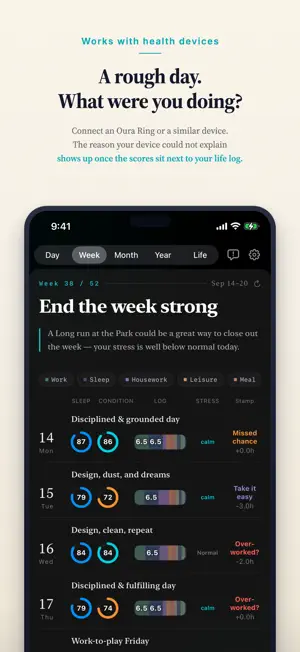
About LogLife: Auto Time Tracker
LogLife records your day for you. From the signals your iPhone already collects, AI works out what you were doing — work, breaks, sleep, moving around — and fills the day in. You are not the one keeping the record. You are the one looking at it. Works with your iPhone alone. No Apple Watch, no smart ring, nothing else to buy. YOUR DAY GETS RECORDED WITHOUT YOU DOING ANYTHING • Trips, commutes and time spent in one place are picked up from location • Sleep hours are detected from your iPhone alone (an Oura Ring or Apple Watch makes it more accurate, but is never required) • Calendar is optional — connect it and your plans sit next to what actually happened • The Mac companion app adds the time you spent working on your computer • Other connected work tools add hints about when you were working Nothing to type in, so it keeps going. CONNECT AN OURA RING AND YOUR CONDITION IS RECORDED TOO (OPTIONAL) • Readiness, sleep and stress scores appear on top of each day's log • Heart rate is used to tell focused hours from relaxed ones • "What I did" and "how I was doing" finally sit side by side ONE DAY, AT A GLANCE • A pie chart of where today's hours went • A timeline to walk back through the day • No more days that are simply gone before you notice PATTERNS OVER A WEEK, A MONTH, A YEAR • See how work and personal time balanced out each week • Break the hours down by category and watch the trend • Total up the time each project took • Look at this week and next week and see whether there is room Instead of days passing by unnoticed, your time is recorded on its own — and looking back at it is what changes how you spend the next one. Note: after a 14-day free trial, AI recording and AI analysis require a subscription (auto-renewing). Logging by hand stays free, forever. Note: location and health data are used only to estimate where you were and when you slept. ABOUT PREMIUM (SUBSCRIPTION) • Name: LogLife Premium (monthly, auto-renewing) • Payment is charged to your Apple Account at confirmation of purchase. • The subscription renews automatically and is charged unless auto-renew is turned off at least 24 hours before the end of the current period. You can cancel any time up to 24 hours before the renewal date. • You can review and cancel your subscription in your Apple Account settings after purchase. • Terms of Use (EULA): https://www.apple.com/legal/internet-services/itunes/dev/stdeula/ • Privacy Policy: https://tokyo-wakeup.com/en/privacy
What’s new
Version 1.0.16 · Updated October 9, 2026
Adjusted the initial setup screens.
App privacy
The developer, TokyoWakeUp Inc, reported these privacy practices to Apple.
Data Linked to You
The following data, which may be collected and linked to your identity, may be used for the following purposes:
- Usage Data: Product Interaction
- Health & Fitness: Health, Fitness
- Purchases: Purchase History
- Location: Precise Location
- Contact Info: Email Address, Name
- User Content: Other User Content
- Identifiers: User ID, Device ID
- Other Data: Other Data Types
Used for: Analytics, App Functionality
Alternatives to LogLife: Auto Time Tracker
Looking for apps like LogLife: Auto Time Tracker? Here are 6 similar apps on the App Store.


| App | Rating | Price | Last updated | Compare |
|---|---|---|---|---|
| LogLife: Auto Time Tracker | – | Free | October 9, 2026 | |
| マステログ | – | Free | Feb 2, 2026 | Compare |
| My-Lifelog | – | Free | Jul 29, 2026 | Compare |
| 文具Meet | – | Free | Feb 13, 2026 | Compare |
| Caleon | – | Free | Sep 29, 2026 | Compare |
| Petask デコれるTodo×シール帳 | – | Free | Sep 20, 2026 | Compare |
| log.life | – | Free | Sep 12, 2026 | Compare |