

ReplyContext: AI Reply Writer
helpful bits GmbH Productivity iPhoneiPadiPod touch
ReplyContext: AI Reply Writer is a free Productivity app for iPhone and iPad by helpful bits GmbH. Requires iOS 18.4. Updated October 1, 2026.
- Price
- Free
- on the App Store
- Size
- 9 MB
- Age 12+
- Updated
- Oct 1
- 2026 · v1.1.0
Screenshots


About ReplyContext: AI Reply Writer
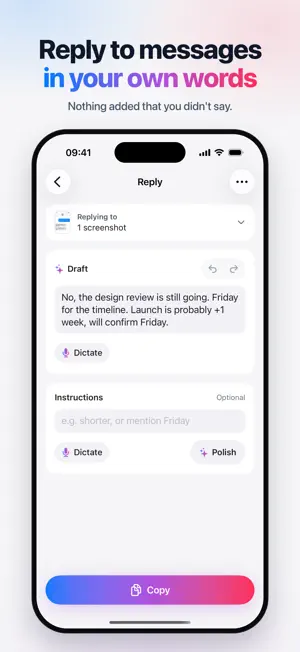
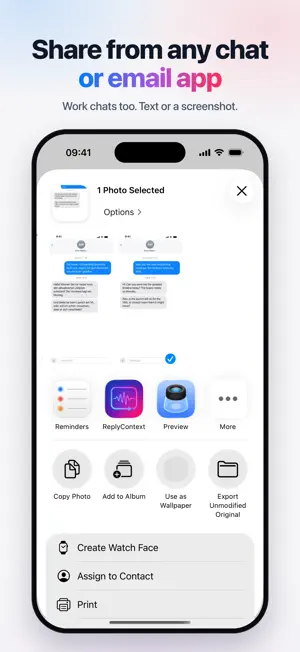
Reply to texts, chats and emails in your own words. Share the message you got, say roughly what you want to answer, and ReplyContext writes one reply you can send as your own. HOW IT WORKS • Share a message from any app, paste it, or add a screenshot of the chat. • Type or dictate the gist, like "not today, Friday is realistic". • Get one reply in your language and tone. No list of variants to compare. • Ask for changes such as "shorter" or "warmer", or tap Polish to fix grammar and punctuation. • Copy it and paste it into WhatsApp, Messages, Mail, Outlook, Slack, Microsoft Teams or wherever the conversation is. ReplyContext never sends anything for you. NOTHING YOU DIDN'T SAY ReplyContext keeps your meaning. It is built not to add facts, promises, deadlines, apologies or feelings you did not state. If something the reply needs is missing, it asks you one short question instead of guessing. POLISH YOUR OWN DRAFT No message to answer? Type or dictate a rough draft and get it back as a clean message, with the smallest changes needed. MADE FOR • Answering clients and colleagues from your phone, in work chats and email • Messages you would otherwise reread three times before replying • Writing in a language that is not your first DICTATION THAT KNOWS YOUR NAMES Dictate for up to 60 seconds. Add names and terms to your personal vocabulary so they are spelled right. Before the first recording, the app asks for your consent to send the audio and your vocabulary to Google Gemini for transcription. The recording is not kept on your device afterwards. PRIVATE BY DEFAULT • Captured messages are used to write your reply and are not stored on ReplyContext servers. • A reply you haven't copied stays on your iPhone until you delete it. • Copied replies stay on your iPhone for 30 days by default, with what you captured for them. You can shorten this or turn it off. • Optional memory is off by default. When on, it keeps three numbers about how you edit replies, which you can see and delete. It never keeps your text. An account and an internet connection are required. Eligible new accounts start with free credit. After that, choose a weekly, monthly or yearly subscription in the app. Subscriptions renew automatically unless cancelled at least 24 hours before the end of the current period. Manage or cancel them in your Apple Account settings. Terms of Use: https://www.replycontext.com/terms Privacy Policy: https://www.replycontext.com/privacy
What’s new
Version 1.1.0 · Updated October 1, 2026
ReplyContext is now a focused reply writer. Share or paste a message, or add a screenshot, say roughly what you want to answer, and get one reply in your own words. New in this version: • Ask for changes such as "shorter" or "warmer", or tap Polish to fix grammar and punctuation • Polish your own rough draft when there is no message to answer • Dictation with a personal vocabulary for names and terms • Optional memory, off by default, that you can see and delete The prompt library, knowledge spaces, community and model picker have been removed.
App privacy
The developer, helpful bits GmbH, reported these privacy practices to Apple.
Data Linked to You
The following data, which may be collected and linked to your identity, may be used for the following purposes:
- Purchases: Purchase History
- Contact Info: Email Address, Name
- User Content: Emails or Text Messages, Photos or Videos, Audio Data, Other User Content
- Identifiers: User ID, Device ID
- Usage Data: Other Usage Data
- Diagnostics: Other Diagnostic Data
Used for: App Functionality
Alternatives to ReplyContext: AI Reply Writer
Looking for apps like ReplyContext: AI Reply Writer? Here are 6 similar apps on the App Store. The highest rated is THOHT: Voice to Text (5.0/5), and all 6 are free to download.
-
 THOHT: Voice to Text
5.0
THOHT: Voice to Text
5.0
-
 Clak – Voice to Text
-
 Remindy
-
 VOR: Voice to Text
-
 Ai Prompts Pro
-
 BroSpeech: Voice to Text
| App | Rating | Price | Last updated | Compare |
|---|---|---|---|---|
| ReplyContext: AI Reply Writer | – | Free | October 1, 2026 | |
| THOHT: Voice to Text | 5.0 / 5 (1) | Free | Oct 4, 2026 | Compare |
| Clak – Voice to Text | – | Free | Oct 8, 2026 | Compare |
| Remindy | – | Free | Aug 17, 2026 | Compare |
| VOR: Voice to Text | – | Free | Jul 21, 2026 | Compare |
| Ai Prompts Pro | – | Free | Jul 9, 2026 | Compare |
| BroSpeech: Voice to Text | – | Free | Jul 10, 2026 | Compare |