

DK Calendar
Shenzhen DOKE Electronic Co., Ltd Utilities iPhoneiPadiPod touch
DK Calendar is a free Utilities app for iPhone and iPad by Shenzhen DOKE Electronic Co., Ltd. Rated 2.5/5 from 2 ratings. Requires iOS 15.6.
- Rating
- 2.5
- 2 ratings
- Price
- Free
- on the App Store
- Size
- 51 MB
- Age 4+
- Updated
- Sep 9
- 2026 · v1.0.62
Screenshots


About DK Calendar
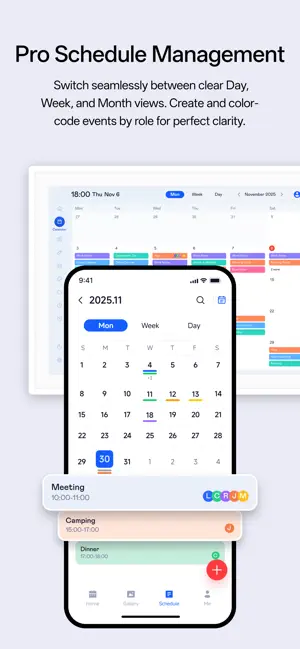
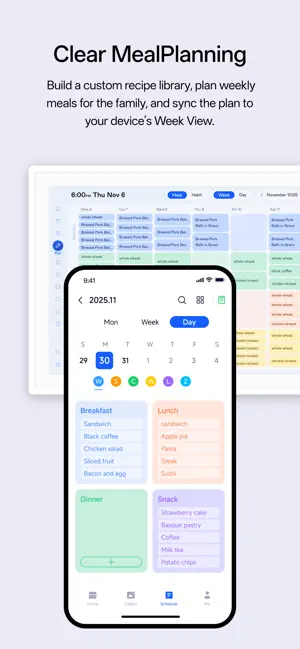
DK Calendar – Your Central Hub for a Smarter Life Plan efficiently, connect meaningfully, and live beautifully. Calendar Machine seamlessly integrates professional scheduling, family collaboration, and personal wellness into one intelligent ecosystem. 1. Centralized & Intelligent Scheduling • Master your time with intuitive Day, Week, and Month views. • One-tap sync with Google/iCloud Calendars for a unified schedule. Color-code events by custom roles for clarity. • Set alarms in the app to ring on your Calendar Machine device, ensuring perfect timing. 2. Your Connected Life Dashboard • Schedules and reminders set on your phone instantly appear on your desktop Calendar Machine screen. • Display personal photos as a rotating digital slideshow on the device. • View real-time weather and forecasts on the device, with city management in the app. 3. Effortless Daily Planning • Smart Meal Planning: Plan weekly meals, use a custom recipe library, and assign meals to family members. Plans sync clearly to the device. • Motivating Habit Tracking: Build personal or family habits. A cumulative check-in leaderboard and level-up system make consistency rewarding and fun. 4. Simple, Warm Family Collaboration • Create shared family photo albums and sync memories to your device screen. • Launch family habit challenges with shared leaderboards to encourage growth together. 5. Unlock a Premium Experience Upgrade to Membership for enhanced features: • More cloud space and unlimited creation of schedules, albums, and habits. • Access to personalized clock themes and a daily updated Art Gallery on your device. • Enjoy a members-only short-video library for entertainment on your Calendar Machine. 6. The free version is powerful. Upgrading to a Membership unlocks an even broader experience. Please note that the following exclusive benefits, marked as available on the device, are accessible on your connected Calendar Machine hardware after subscribing via the App. - Unlock more cloud storage and create unlimited schedules, albums and plans. - On your device, enjoy beautiful personalized clock themes and a daily-updated Art Gallery, transforming it from a tool into a desktop art piece. - Access the exclusive membership short-video library on your device for entertainment during breaks. 7. Membership Types & Pricing Membership Pricing - VIP: $5.29/month (auto-renew) / $50.90/year (auto-renew) - VIP + Short-Drama Access Pack: $6.29/month (auto-renew) / $60.90/year (auto-renew) - SVIP: $7.49/month (auto-renew) / $71.99/year (auto-renew) - SVIP + Short-Drama Access Pack: $8.49/month (auto-renew) / $91.99/year (auto-renew) - (Prices may vary by country/region and exchange rates.) Note: After users purchase or activate short drama entitlements through the app, they need to use the companion device to watch the short dramas. The app does not host or play the video content. Subscription Terms - Auto-Renewal: Subscriptions are auto-renewing services. The fee will be charged to your account upon purchase confirmation and will automatically renew for the same fee within 24 hours before the end of each subscription period, unless you turn it off in advance. - Easy Management: You can manage or cancel the auto-renewal at any time through your device's app store account settings (e.g., on iPhone: Settings > [Your Name] > Subscriptions). After cancellation, services will remain available for the duration of the current subscription period. - Service Agreements: By subscribing, you agree to our User Agreement (https://static.dokebyte.com/calendar_consent.html), Privacy Policy (https://static.dokebyte.com/calendar_privacy.htm), Membership Service Agreement (https://static.dokebyte.com/membership_agreement.html), and the Auto-Renewal Agreement.
What’s new
Version 1.0.62 · Updated September 9, 2026
DK Calendar now supports Dutch, along with fixes for several known issues and optimizations to the user experience. We recommend that you upgrade to the latest version.
App privacy
The developer, Shenzhen DOKE Electronic Co., Ltd, reported these privacy practices to Apple.
Data Used to Track You
The following data may be used to track you across apps and websites owned by other companies:
- Identifiers: Device ID
Data Linked to You
The following data, which may be collected and linked to your identity, may be used for the following purposes:
- Identifiers: Device ID
Used for: Analytics, App Functionality, Other Purposes
Data Not Linked to You
The following data, which may be collected but is not linked to your identity, may be used for the following purposes:
- Other Data: Other Data Types
- Diagnostics: Crash Data
Used for: Analytics, App Functionality, Other Purposes
Alternatives to DK Calendar
Looking for apps like DK Calendar? Here are 6 similar apps on the App Store.
-
 KeepReceipt: Receipt Vault
-
 MSFS Companion
-
 Boulodrome
-
 MedicAir Data
-
 Fax from iPhone App: Faxly
-
 Image Converter ⁺
| App | Rating | Price | Last updated | Compare |
|---|---|---|---|---|
| DK Calendar | 2.5 / 5 (2 ratings) | Free | September 9, 2026 | |
| KeepReceipt: Receipt Vault | – | Free | Jul 21, 2026 | Compare |
| MSFS Companion | – | 3.99 USD | Sep 16, 2026 | Compare |
| Boulodrome | – | Free | Oct 4, 2026 | Compare |
| MedicAir Data | – | Free | Jun 3, 2025 | Compare |
| Fax from iPhone App: Faxly | – | Free | Sep 9, 2026 | Compare |
| Image Converter ⁺ | – | Free | May 26, 2026 | Compare |
Compare DK Calendar with the top alternatives: ratings, updates, ASO score and keyword gaps →