

Cirola Pocket: Calm Finance
Ciro Baron Neto Finance iPhoneiPadiPod touch
Cirola Pocket: Calm Finance is a free Finance app for iPhone and iPad by Ciro Baron Neto. Requires iOS 15.5. Updated November 20, 2026.
- Price
- Free
- on the App Store
- Size
- 100 MB
- Age 4+
- Updated
- Nov 20
- 2026 · v1.2.2
Screenshots


About Cirola Pocket: Calm Finance
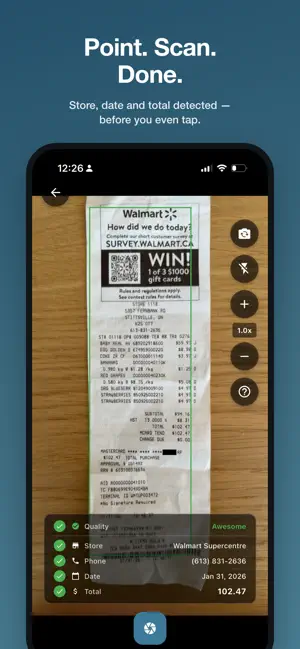
Cirola Pocket is calm finance that never asks for your bank login. Nothing to connect, no passwords to hand over. You add your spending yourself — a receipt photo or a quick entry — and that small act is the point: it keeps you aware of every purchase, and always sure of how much money you have left. NO BANK CONNECTION • Pocket never connects to your bank or cards and never asks for banking credentials • No bank passwords stored with us, no feed of transactions you don't remember • We don't sell your data and we don't track you across apps LEARN BY DOING • A bank account is easy to forget: you tap, you buy, the number changes on its own • Snapping a receipt takes a few seconds — just enough to notice what you spent • That small pause gives you back a sense of agency over your money SALARY AND BILLS, ON A SCHEDULE • Add your salary, other income, rent, subscriptions and fixed bills as scheduled entries • They post themselves on the day they're due — weekly, monthly, whatever fits • Open the app and your month is already laid out TAGS, YOUR WAY • Label entries and products with anything — road trip, kids, gluten-free • Ask once and Pocket tags the previous ones too; new purchases pick the tag up automatically • "By entry tag" and "By product tag" cards in your analytics CALM ANALYTICS • Spending over time — daily, weekly or monthly bars — with a gentle comparison against the period before • Cash in beside your spending, on the chart and on the home calendar, with the difference • Where your money went, top stores, when you spend, this month's pace • Color the bars by account or by tag; tap any row to see the entries behind it • Filters that stack: accounts, names, categories, entry tags, product tags COMPARE PRICES, FREE • Search products and compare real prices from real receipts across nearby stores • Follow what you buy and get a nudge when the price changes • Prices are shared by the community: only product, price and store, never anything personal — and you can opt out CATEGORIES THAT FILL THEMSELVES IN • Every entry gets a budget category, every product a fine-grained one • Fix a miss once and Pocket remembers your pick • Categorize the leftovers in one sheet, right from the chart ADD SPENDING ANY WAY YOU LIKE • Snap a receipt and let the AI read every item, total, tax and date • Forward order emails to your own Cirola inbox ([email protected]) • Type a quick entry — store names are suggested as you type — with its category and tags right there • Works offline; everything syncs when you're back SHARED ACCOUNTS AND THE WEB • Budget with your partner, family or roommates on shared accounts • The same insights, filters and tags at cirola.com/app • Export any date range to QuickBooks, Excel, CSV, OFX or QIF FREE TO START Free is genuinely useful forever: manual and camera entries, five AI receipt reads a month, product search and price comparison, price alerts, analytics with tags, categories and product insights, scheduled entries, shopping lists and shared accounts. CIROLA PRO — $3.99/month Everything in Free without the monthly limit — every receipt is read automatically — plus your own email-receipt inbox, cloud images kept indefinitely, and no ads. Starts with a 7-day free trial. Cirola Pocket Pro is an auto-renewable subscription billed at $3.99/month (US) after the 7-day free trial. Payment is charged to your Apple Account at confirmation of purchase. It renews automatically at the same price unless cancelled at least 24 hours before the end of the current period. Manage or cancel anytime in your Apple Account settings. PRIVACY We don't sell your data and we don't track you across apps. Receipts are read by a paid AI API that doesn't train on your content. Your data is stored in Canada. Terms of Use (EULA): https://www.apple.com/legal/internet-services/itunes/dev/stdeula/ Privacy Policy: https://cirola.com/privacy
What’s new
Version 1.2.2 · Updated November 20, 2026
• New: track a loan or mortgage. Create a loan account to see what's left to pay and when you'll be done • Each payment shows how much went to interest and how much paid down the loan • "What if I pay extra?" shows the interest and months you'd save, with an estimate of any prepayment penalty • Payments are added automatically on your schedule, and you can match the balance to your lender's statement • Small touch-ups and stability fixes
App privacy
The developer, Ciro Baron Neto, reported these privacy practices to Apple.
Data Linked to You
The following data, which may be collected and linked to your identity, may be used for the following purposes:
- Financial Info: Payment Info, Other Financial Info
- Contact Info: Email Address, Name
- User Content: Emails or Text Messages, Photos or Videos
- Identifiers: User ID
- Diagnostics: Crash Data
Used for: App Functionality
Data Not Linked to You
The following data, which may be collected but is not linked to your identity, may be used for the following purposes:
- Identifiers: Device ID
- Usage Data: Advertising Data
Used for: Developer’s Advertising or Marketing
Alternatives to Cirola Pocket: Calm Finance
Looking for apps like Cirola Pocket: Calm Finance? Here are 6 similar apps on the App Store.
-
 StillSum: Budget & Expenses
-
 SpendPulse - Spend Insights
-
 Saldox
-
 Money Tree: Save & Grow
-
 AGS Finance
-
 Keep Above: Bills & Budget
| App | Rating | Price | Last updated | Compare |
|---|---|---|---|---|
| Cirola Pocket: Calm Finance | – | Free | November 20, 2026 | |
| StillSum: Budget & Expenses | – | Free | Aug 8, 2026 | Compare |
| SpendPulse - Spend Insights | – | Free | Jun 21, 2026 | Compare |
| Saldox | – | Free | Aug 21, 2026 | Compare |
| Money Tree: Save & Grow | – | Free | Oct 6, 2026 | Compare |
| AGS Finance | – | Free | Oct 21, 2026 | Compare |
| Keep Above: Bills & Budget | – | Free | Oct 23, 2026 | Compare |