

Spektra IPTV Player
Xavier Derkenne Entertainment iPhoneiPadiPod touchMac
Spektra IPTV Player is a free Entertainment app for iPhone and iPad by Xavier Derkenne. Rated 5.0/5 from 1 ratings. Requires iOS 13.0.
- Rating
- 5.0
- 1 ratings
- Price
- Free
- on the App Store
- Size
- 75 MB
- Age 4+
- Updated
- Sep 20
- 2026 · v1.3.0
Screenshots

About Spektra IPTV Player
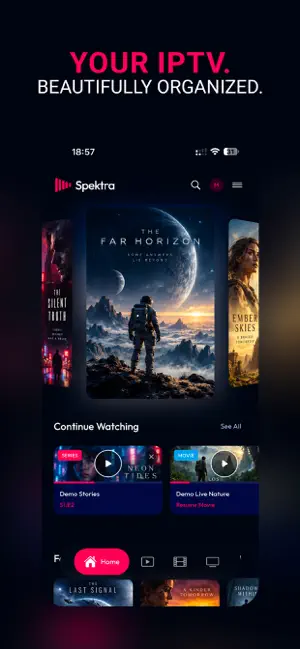
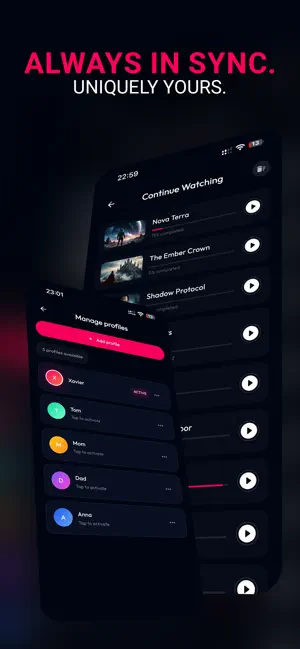
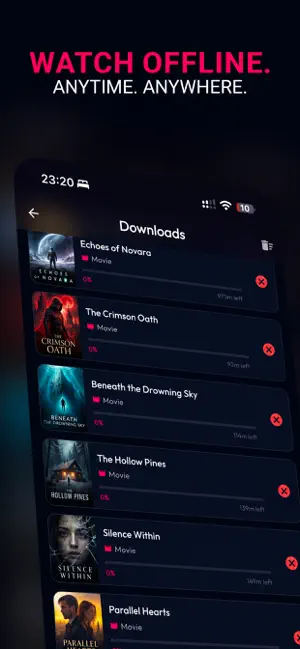
Spektra IPTV Player is a modern media player designed for users who watch content from their own legal sources. Add your M3U playlists or compatible portal credentials and enjoy a clean, fluid viewing experience across iPhone and iPad. MAIN FEATURES • Browse Live TV, Movies, and Series • View rich media details when available, including posters, backdrops, genres, cast with character names, and synopses in your language • Search quickly across your available content • Save channels, movies, and series to your favorites • Continue Watching keeps your place in every movie and episode • Multiple audio track and subtitle support • Adjustable video display modes and aspect ratios • Add and manage multiple content sources • Create separate viewer profiles, including a dedicated kids profile • Link a new device to your account with a short code, without retyping your password ENHANCED LIVE TV PLAYER • Rewind live television from 30 seconds up to 30 minutes on channels your provider archives, then return to live with one tap • A full programme guide showing what is on now, how far along it is, and what follows • The guide works with M3U playlists as well as compatible portals • Search the guide by programme title, not only by channel name • Access the channel list directly from the video player • Quickly return to the previously watched channel • See current and next programmes with the integrated mini EPG • Resume your last watched channel directly from the home screen • Control volume and brightness using gestures • Double-tap to seek forward or backward by 10 seconds on supported content • Built-in gesture guidance for new users MOVIES AND SERIES • Playback starts straight away when a version in your language exists, instead of asking every time • When a title exists in several versions, a button shows how many and lets you pick another • An optional setting prefers the lighter version, useful on slower connections IMPROVED NAVIGATION • Redesigned navigation menu with a modern glass-inspired interface • Switch profiles directly from the main menu • Change content sources quickly from the navigation bar • Faster access to your profiles, sources, settings, and playback options • Interfaces optimized for both iPhone and iPad PERFORMANCE AND COMPATIBILITY Spektra is continuously improved to provide better compatibility with IPTV servers, more reliable playback, improved memory management, and a smoother experience across iPhone and iPad. SPEKTRA PRO Spektra Pro is available as an auto-renewable monthly or yearly subscription, or as a one-time lifetime purchase. Either unlocks: • Offline Mode — download movies and episodes and watch them without a connection • Cloud Sync — your sources, profiles, and settings on every device • Resume Playback across devices — start on one, finish on another • Favorites synced to your account rather than kept on a single device • 4K playback • Enhanced player, including Picture in Picture • Personal recommendations based on what you have watched • New Pro features added regularly IMPORTANT Spektra does not provide, host, sell, or include TV channels, movies, series, playlists, subscriptions, or any other media content. Users must provide their own playlists or compatible credentials and must have the legal rights to access and play the content they add to the application. SUBSCRIPTION INFORMATION • Payment will be charged to your Apple ID at confirmation of purchase. • Subscriptions renew automatically unless canceled at least 24 hours before the end of the current subscription period. • Your account will be charged for renewal within 24 hours before the end of the current period. • You can manage or cancel your subscription from your App Store account settings. • The lifetime purchase is a one-time payment and does not renew. Privacy Policy: https://spektra.aetomia.com/privacy Terms of Use: https://spektra.aetomia.com/terms
What’s new
Version 1.3.0 · Updated September 20, 2026
This update unblocks several situations where the app became unusable, and adds live rewind, a full programme guide, and much richer film pages. WITHOUT A CONNECTION • The app no longer hangs at startup when there is no network. It says so plainly instead of reporting an authentication error. • Your downloads stay reachable from that screen: they are the content that genuinely works offline. • Losing the network while using the app leads there too. • As soon as the network returns, the app picks up on its own. DOWNLOADS • An interrupted download — locked screen, lost network, app closed — resumes where it stopped instead of starting over. • It no longer vanishes from your list: it stays visible, with a button to restart it. • Resuming is now automatic after a drop, with nothing to go back to. • Progress no longer falls back to zero after a failure, and an incomplete file can no longer be played by mistake. LIVE TV • New: rewind live television from 30 seconds up to 30 minutes on the channels your provider archives. The bar appears only on those. • A navigation bar at the bottom of the player lets you aim at a precise moment, and return to live with one gesture. PROGRAMME GUIDE • New: a guide reachable from the header and from the Live page. Each channel shows what is on now, how far along it is, and what follows. • It opens on your favorites, and search finds a programme by its title, not only a channel by its name. • Selecting a channel opens its full schedule, live and catch-up alike. • It now works with M3U sources and not only compatible portals: its address is read from the playlist itself. MOVIES AND SERIES • Film pages now show the title logo, a backdrop, the cast with the characters they play, and a synopsis in your language. • Playback starts straight away when a version in your language exists, instead of asking every time. • The wait before playback is markedly shorter on films with several versions. • A versions button shows how many exist and lets you pick another, 4K included. • New setting: prefer the lighter version. Useful on slow connections. TITLES AND TEXT • Titles and categories in Chinese, Japanese, Korean, Cyrillic and Arabic no longer appear as unreadable characters, whatever the source. • Titles written in a non-Latin alphabet are back in the home selections, where they were missing. • Resuming a film no longer restarts at another title's position. • French titles carrying a single accent now display correctly. DISPLAY AND NAVIGATION • On iPhone, navigation stays in portrait while the player rotates freely — the interface is no longer stretched when the device is lying down. • The sign-in page scrolls, and its content no longer slides under the notch. • A live channel no longer appears by mistake in Continue Watching. • Opening a series no longer throws an error screen when its page is incomplete. • A decoding hiccup on a live channel no longer covers a picture that is still playing with a full-screen error. ACCOUNT • New: connect another device to your account by entering a short code from a device already signed in. No password to retype. • Deleting an account now warns that it does not cancel your App Store subscription, and offers a direct way to manage it. • A subscription can no longer be bought without an account, which would have attached it to nothing. The screen offers to sign in, then resumes the purchase. • Adding a source: the library no longer shows up empty on first launch.
App privacy
The developer, Xavier Derkenne, reported these privacy practices to Apple.
Data Linked to You
The following data, which may be collected and linked to your identity, may be used for the following purposes:
- Contact Info: Email Address
Used for: App Functionality
Alternatives to Spektra IPTV Player
Looking for apps like Spektra IPTV Player? Here are 6 similar apps on the App Store. The highest rated is PlayMe IPTV (5.0/5), and all 6 are free to download.
-
 PlayMe IPTV
5.0
PlayMe IPTV
5.0
-
 Fluid IPTV
5.0
Fluid IPTV
5.0
-
 Aerial TV: IPTV Player
2.0
Aerial TV: IPTV Player
2.0
-
 Timonation IPTV
5.0
Timonation IPTV
5.0
-
 Crivid IPTV Player: M3U Xtream
3.0
Crivid IPTV Player: M3U Xtream
3.0
-
 Eiyo IPTV
5.0
Eiyo IPTV
5.0
| App | Rating | Price | Last updated | Compare |
|---|---|---|---|---|
| Spektra IPTV Player | 5.0 / 5 (1 rating) | Free | September 20, 2026 | |
| PlayMe IPTV | 5.0 / 5 (1) | Free | Oct 6, 2026 | Compare |
| Fluid IPTV | 5.0 / 5 (1) | Free | Oct 9, 2026 | Compare |
| Aerial TV: IPTV Player | 2.0 / 5 (1) | Free | Aug 24, 2026 | Compare |
| Timonation IPTV | 5.0 / 5 (1) | Free | Sep 8, 2026 | Compare |
| Crivid IPTV Player: M3U Xtream | 3.0 / 5 (2) | Free | Oct 2, 2026 | Compare |
| Eiyo IPTV | 5.0 / 5 (3) | Free | Jun 23, 2026 | Compare |