

Worker Tracker – Time Tracking
Cliyer Productivity iPhoneiPadiPod touch
Worker Tracker – Time Tracking is a free Productivity app for iPhone and iPad by Cliyer. Requires iOS 15.1. Updated March 6, 2026.
- Price
- Free
- on the App Store
- Size
- 40 MB
- Age 4+
- Updated
- Mar 6
- 2026 · v1.0.14
Screenshots
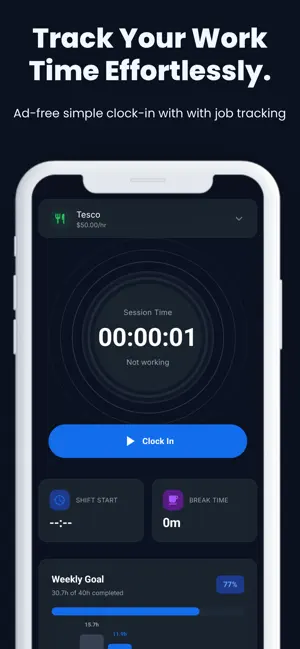
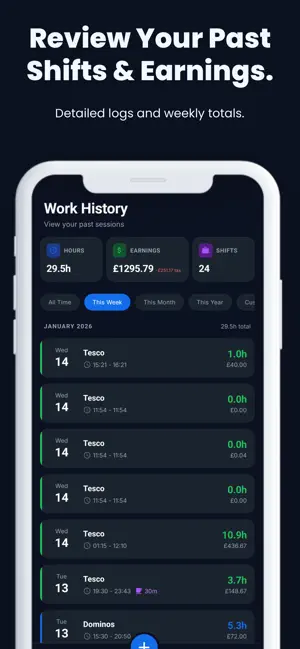

About Worker Tracker – Time Tracking
Worker Tracker – Time Tracking helps you track work sessions, breaks, and earnings fast and accurately. Whether you work part-time, freelance, or manage multiple jobs, Worker Tracker – Time Tracking keeps your logs organized and turns them into clear, useful insights. Track your work with confidence • Clock in/out with a live session timer • Start and end breaks with automatic tracking • Add manual logs for past shifts (edit anytime) • Prevent common mistakes with time validation Manage multiple jobs • Create jobs with custom names, colors, and icons • Set hourly rates (and optional tax rate) • Switch jobs quickly when logging time Goals & insights • Set a weekly hours goal and view progress at a glance • Daily breakdown chart to see when you worked most • Statistics for weekly, monthly, and yearly performance • Earnings analysis, job distribution, and recent logs Export & backup • Export your work history to CSV for sharing or reporting • Optional cloud sync to back up and restore your data across devices Customize your experience • Dark mode • Choose your currency symbol • Simple, clean interface designed for speed Worker Tracker – Time Tracking is built for people who want a lightweight way to track hours and understand earnings without spreadsheets. Download Worker Log – Time Tracking and make every shift count.
What’s new
Version 1.0.14 · Updated March 6, 2026
Pay Period Settings Configure how you get paid with flexible pay period options: • Monthly – Set a specific pay day (1st–31st) • Bi-weekly – Every 2 weeks with an anchor date • 4-Weekly – Every 4 weeks with an anchor date • Semi-monthly – Twice monthly with custom split days • Weekly – Uses your week start day Your earnings and stats automatically calculate based on your pay schedule, so you always know exactly what you've earned this period. Home Screen Widget Stay on top of your earnings at a glance: • View current pay period earnings, hours, and shifts • See tax deductions automatically calculated • Live session timer when clocked in • Dark mode support matches your app theme • Quick refresh to see latest data Add the widget to your home screen for instant access to your work progress without opening the app.
App privacy
The developer, Cliyer, reported these privacy practices to Apple.
Data Linked to You
The following data, which may be collected and linked to your identity, may be used for the following purposes:
- Financial Info: Other Financial Info
- Contact Info: Email Address
- User Content: Other User Content
- Identifiers: User ID
Used for: App Functionality
Alternatives to Worker Tracker – Time Tracking
Looking for apps like Worker Tracker – Time Tracking? Here are 6 similar apps on the App Store.
-
 Clarity - Vision Into Victory
-
 Span: Time Tracker & Timesheet
-
 Time Tracker: Time Calculator
-
 WorkTime Sheet
-
 Work Tracker: Hours & ManDays
-
 Work Time Track
| App | Rating | Price | Last updated | Compare |
|---|---|---|---|---|
| Worker Tracker – Time Tracking | – | Free | March 6, 2026 | |
| Clarity - Vision Into Victory | – | Free | Nov 7, 2025 | Compare |
| Span: Time Tracker & Timesheet | – | Free | Oct 19, 2026 | Compare |
| Time Tracker: Time Calculator | – | Free | Jan 9, 2026 | Compare |
| WorkTime Sheet | – | Free | Nov 7, 2024 | Compare |
| Work Tracker: Hours & ManDays | – | Free | Aug 29, 2026 | Compare |
| Work Time Track | – | Free | Jun 27, 2026 | Compare |