

Mermaid Editor - MMChart Live
TERMUX LIMITED LIABILITY COMPANY Developer Tools iPhoneiPadiPod touch
Mermaid Editor - MMChart Live is a free Developer Tools app for iPhone and iPad by TERMUX LIMITED LIABILITY COMPANY. Rated 4.7/5 from 13 ratings.
- Rating
- 4.7
- 13 ratings
- Price
- Free
- on the App Store
- Size
- 40 MB
- Age 4+
- Updated
- May 7
- 2026 · v1.1.7
Screenshots



About Mermaid Editor - MMChart Live
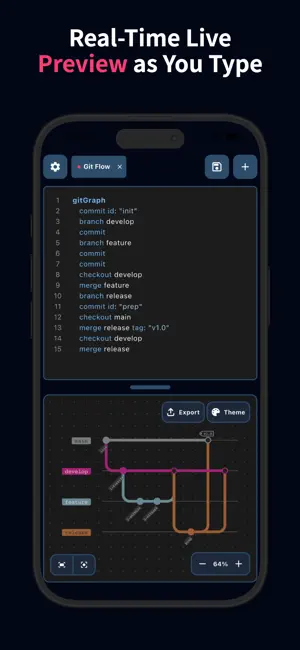
Bring your ideas to life with the power of Mermaid Live Editor - anytime, anywhere. Whether you are a developer mapping out system architecture, a student visualizing logic, or a project manager building Gantt charts, Mermaid Live Editor is the ultimate mobile workspace for Mermaid diagrams. No more waiting to get back to your desk; write code and visualize complex charts directly on your phone with a seamless, high-performance editor. Key Features: - Real-Time Live Preview: See your diagrams take shape as you type. Our split-screen or toggle view ensures your visual logic matches your code instantly. - Full Syntax Highlighting: Write clean, readable code with an editor designed specifically for Mermaid syntax. - Support for All Chart Types: Flowchart, Sequence Diagram, Class Diagram, State Diagram, Entity Relationship Diagram, User Journey, Gantt, Pie Chart, Quadrant Chart, Requirement Diagram, GitGraph Diagram, C4 Diagram, Mindmap, Timeline, Zenuml, Sankey, XYChart Diagram, Block Diagram, Packet Diagram, Kanban Diagram, Architecture Diagram, Radar Diagram, Treemap Diagram. - Learn & Template Gallery: New to Mermaid? Browse our library of examples to learn the syntax and kickstart your projects with one tap. - Powerful File Management: Open, edit, and save .mmd files directly. Keep your workflow consistent across your mobile and desktop environments. - Professional Exports: Share your work in high resolution. Export your diagrams in PNG, JPEG, WebP, SVG, or PDF formats. - Offline Mode Support: No internet? No problem. Generate and preview diagrams locally without needing a network connection. Why Choose Mermaid Live Editor? - Speed: Light-weight and optimized for mobile performance. - Versatility: Perfect for documentation, software design, and business presentations. - Privacy: Your data stays on your device. Turn complex thoughts into beautiful diagrams with Mermaid Chart Editor. Download now and start creating! Term of Use: https://termux-studio.org/terms-of-use?name=Mermaid Privacy Policy: https://termux-studio.org/privacy-policy?name=Mermaid
Ratings & reviews
4.7
13 ratings
What’s new
Version 1.1.7 · Updated May 7, 2026
Fix bugs
App privacy
The developer, TERMUX LIMITED LIABILITY COMPANY, reported these privacy practices to Apple.
Data Used to Track You
The following data may be used to track you across apps and websites owned by other companies:
- Identifiers: Device ID
- Usage Data: Product Interaction, Advertising Data
Data Not Linked to You
The following data, which may be collected but is not linked to your identity, may be used for the following purposes:
- Identifiers: Device ID
- Usage Data: Product Interaction, Advertising Data
Used for: Third-Party Advertising
Alternatives to Mermaid Editor - MMChart Live
Looking for apps like Mermaid Editor - MMChart Live? Here are 6 similar apps on the App Store. The highest rated is Lunel (5.0/5), and all 6 are free to download.
-
 MarkChart - Mermaid Editor
4.0
MarkChart - Mermaid Editor
4.0
-
 DevMate - Connect & Debug
3.2
DevMate - Connect & Debug
3.2
-
 PrivyMermaid: AI Diagram
-
 Happier - Remote Claude, Codex
4.4
Happier - Remote Claude, Codex
4.4
-
 Lunel
5.0
Lunel
5.0
-
 Syncthing Monitor
3.0
Syncthing Monitor
3.0
| App | Rating | Price | Last updated | Compare |
|---|---|---|---|---|
| Mermaid Editor - MMChart Live | 4.7 / 5 (13 ratings) | Free | May 7, 2026 | |
| MarkChart - Mermaid Editor | 4.0 / 5 (14) | Free | Oct 19, 2026 | Compare |
| DevMate - Connect & Debug | 3.3 / 5 (8) | Free | Jul 1, 2026 | Compare |
| PrivyMermaid: AI Diagram | – | Free | Oct 29, 2026 | Compare |
| Happier - Remote Claude, Codex | 4.4 / 5 (16) | Free | Oct 23, 2026 | Compare |
| Lunel | 5.0 / 5 (8) | Free | May 6, 2026 | Compare |
| Syncthing Monitor | 3.0 / 5 (2) | Free | Apr 2, 2026 | Compare |