

HeyJerni: Receipt Scanner
ng ka ho Finance iPhoneiPadiPod touch
HeyJerni: Receipt Scanner is a free Finance app for iPhone and iPad by ng ka ho. Requires iOS 16.4. Updated October 23, 2026.
- Price
- Free
- on the App Store
- Size
- 82 MB
- Age 4+
- Updated
- Oct 23
- 2026 · v2.4.2
Screenshots


About HeyJerni: Receipt Scanner
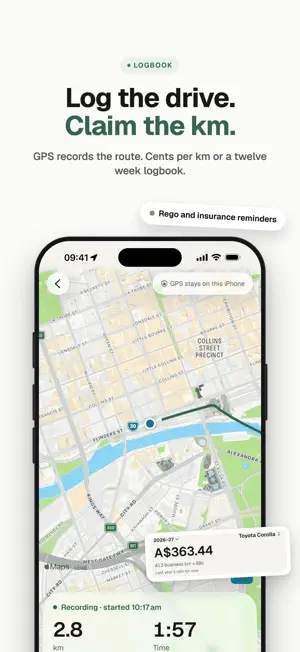
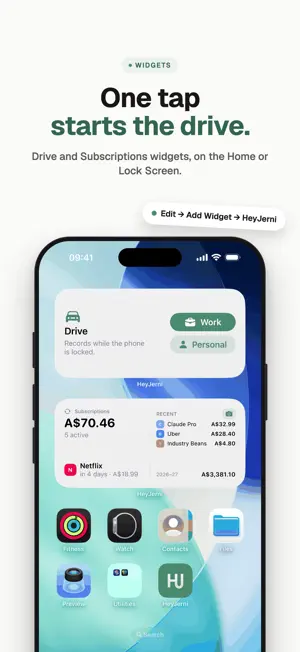
HeyJerni turns a shoebox of receipts and the kilometres you drive for work into a tidy, tax-ready record, without sending a single expense to us or anyone else. Scan receipts, record work drives, speak expenses or import a bank statement. Export records for your accountant. No account, no bank linking. SCAN ANY RECEIPT • Snap one receipt or a whole stack, and each page becomes its own record • Or share one in from Photos, a screenshot or an email • On-device AI extracts amount, merchant and date; you just review and save • The app remembers which merchant belongs to which category CUSTOM PURPOSES • Tag expenses by client, project or trip, with a deduction percentage for each purpose • Add several purposes to one transaction and filter your records by purpose LOG THE DRIVE, CLAIM THE KILOMETRES • Tap Record a drive and GPS draws the route as you go. It keeps recording with the phone locked • Or add a trip by hand, with Apple Maps place search • Claim by cents per kilometre, with the published rate and the 5,000 km cap • Or keep a logbook for at least twelve weeks and claim a share of what the car really costs, with the estimate shown while the period runs • Keep fuel, servicing and rego beside the car, and get a reminder before the rego or insurance is due • One optional CarPlay automation asks "In the car?" when you get in and finishes the drive when you get out • Or start and end a drive from the Drive widget on your Home or Lock Screen SAY IT, IT IS RECORDED • Tap + then Say it, and say what you spent: "lunch twenty dollars, parking eight" • Several expenses in one sentence become separate drafts to check, like a stack of scans • Heard on your iPhone in English, Cantonese or Mandarin. Needs iOS 26 READ A BANK STATEMENT • Share the PDF your bank exports and see the month as a checklist • Nothing is written until you tick it, so importing never doubles up a receipt • Transfers between your own accounts stay out of your spending IT LOGS ITSELF WHEN YOU TAP TO PAY • Use a Shortcuts automation to log eligible Wallet payments • Optional, and HeyJerni never sees your card details. Needs iOS 26.7 ASK HEYJERNI • "How much did I spend on groceries this month?" answered instantly, in English or Chinese • Every figure is computed from your own records on your iPhone SEE THE YEAR, READY FOR TAX TIME • Insights draws your financial year by month, purpose, category and merchant • See the estimated tax effect of your deductions, using published ATO rates • Record Check lists what is still missing before you lodge • Export an Accountant Pack: PDF summary, CSV of every expense, the car logbook and all receipt images 100% PRIVATE, BY ARCHITECTURE • No account and no sign-up. We never learn who you are • No bank linking, and no servers of ours holding your data • Records, routes and recordings stay in an AES-256 encrypted database on your iPhone • Ads in the free version are non-personalised; the app never asks for tracking permission • Back up your way: an archive you keep, or an optional backup to your own iCloud Drive. None of it reaches us FREE TO RECORD, FREE TO CHECK Scanning, drives, voice, statements, search, Ask, Insights, Record Check and the tax estimate are all free, with a small banner ad. Two ways to switch the ad off: • Remove Ads Forever, a single one-time purchase • A monthly support tier, which also unlocks the Accountant Pack export. Your first export is free, so you can see it before you decide. Cancel any time in Settings → Apple ID → Subscriptions Terms of Use: https://www.apple.com/legal/internet-services/itunes/dev/stdeula/ Privacy Policy: https://www.heyjerni.com/privacy Requires iOS 16.4 or later. iPhone 12 or newer recommended for on-device AI. Choose from eight currencies. HeyJerni is a record-keeping assistant, not a tax adviser. For your own entitlements, check the ATO website or a registered tax agent.
What’s new
Version 2.4.2 · Updated October 23, 2026
Bills get a list of their own, and entering an amount is quicker. • Auto-log not logging? Delete the old Auto-Log shortcut in the Shortcuts app, add the new one from Settings → Auto-log, then choose it in your Wallet automation. • Bills have their own list: internet, mobile and health insurance now sit under ⋯ → Bills. Like subscriptions, they remind you and log themselves. • The amount has its own keypad with + − × ÷. For a split bill, type 12.50 + 8 and it adds up for you. • Start typing a merchant to see the ones you’ve used before, then tap one to fill it in. • Add again: swipe right on a record, or open it and tap ⋯, to log it again for today. Your records, routes and receipts stay on your device unless you choose to export or back them up.
App privacy
The developer, ng ka ho, reported these privacy practices to Apple.
Data Not Collected
The developer does not collect any data from this app.
Alternatives to HeyJerni: Receipt Scanner
Looking for apps like HeyJerni: Receipt Scanner? Here are 6 similar apps on the App Store.
-
 Expense Minion
-
 Daybook: Expense Tracker
-
 Receipt Scanner - Recey
-
 Spenno
-
 ScanLedger: Receipt Scanner
-
 FinPilot: Expense Tracker
| App | Rating | Price | Last updated | Compare |
|---|---|---|---|---|
| HeyJerni: Receipt Scanner | – | Free | October 23, 2026 | |
| Expense Minion | – | Free | Oct 22, 2026 | Compare |
| Daybook: Expense Tracker | – | Free | Oct 22, 2026 | Compare |
| Receipt Scanner - Recey | – | Free | Jun 5, 2026 | Compare |
| Spenno | – | Free | May 6, 2026 | Compare |
| ScanLedger: Receipt Scanner | – | Free | Oct 12, 2026 | Compare |
| FinPilot: Expense Tracker | – | Free | Oct 19, 2026 | Compare |