

Eclipta: App & Website Blocker
Bingen Larranaga Productivity iPhoneiPadiPod touch
Eclipta: App & Website Blocker is a free Productivity app for iPhone and iPad by Bingen Larranaga. Rated 5.0/5 from 11 ratings. Requires iOS 17.6.
- Rating
- 5.0
- 11 ratings
- Price
- Free
- on the App Store
- Size
- 67 MB
- Age 4+
- Updated
- Oct 21
- 2026 · v1.1.11
Screenshots


About Eclipta: App & Website Blocker
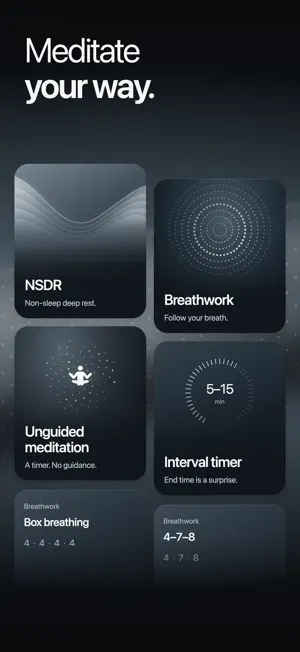
You don't have a willpower problem. You have an off-switch problem. Every blocker puts its escape hatch where the temptation is. Eclipta asks you first: switch on Strict mode and the block holds until you meditate. "Ignore Limit." "15 more minutes." A switch buried three menus deep. Every app that promised to guard your attention also shipped the button that hands it back. In Strict mode, Eclipta ships no such button. You train your attention, then you unlock. That is the entire mechanism. HOW IT WORKS 1. Pick the apps that own you: social, news, games, anything you open on reflex. 2. Choose how they're held: a scheduled window, a daily allowance that runs out, or time you earn by meditating. 3. Open Eclipta and meditate. The apps open when you've done the work. FOUR KINDS OF BLOCK • Scheduled block: a window you set. It can run overnight, end at a fixed time, or stay shut until you've meditated. • Daily allowance: a budget for the day. It shows what's left, counts down as you spend it, and closes when it runs out, whether or not Eclipta is open. • Earned time: every minute you meditate buys app minutes at a rate you set. Meditate longer, get longer. • Instant block: one tap, blocked now, for when you can feel it starting. Each block picks its own apps and its own days. Set once, runs on its own. Need one app for a moment? Without Strict mode, open an app you picked for 1 to 15 minutes, up to 15 minutes a day, and the rest of the block stays on. WHAT ELSE YOU GET • Guided sessions: a calm voice leads you into deep rest in 5, 10, 15 or 20 minutes. Or choose breathwork, or a quiet unguided timer, timed or open-ended, with a bell or in silence. • System-level blocking built on Apple's Screen Time (FamilyControls): not a timer you can swipe away. • Clarity: one daily number from your meditation, focus and recovery, with streaks that show your attention compounding week over week. • Apple Health (Mindful Minutes) sync and cloud backup, offline-first, across your devices. • No courses, no mood sliders, no sleep stories. It looks like a tool because it is one. WHY MEDITATION AND NOT JUST A BLOCKER Feeds have spent years training your brain to crave the next swipe. A blocker alone stops the damage but builds nothing back. Ten focused minutes a day trains the attention itself. In Strict mode, Eclipta forces the trade: no session, no apps: so the two compound instead of taking turns. PRIVATE AND SECURE Eclipta uses Apple's Screen Time API, so your app usage is read on your device and stays there. Your browsing data never leaves your phone. Eclipta does not sell or share your data for advertising. Eclipta is free to download and needs a subscription to use. There is no free tier and no ads; the annual plan begins with a free trial. This is for people who have already tried Screen Time, grayscale, and three other blockers, and watched themselves switch every one of them off. With Strict mode on, this is the version with no door. Subscription Information: Service: Eclipta Premium (Weekly, Monthly or Annual access) Payment will be charged to your App Store Account at confirmation of purchase. Subscription automatically renews unless auto-renew is turned off at least 24 hours before the end of the current period. Your account will be charged for renewal within 24 hours prior to the end of the current period at the cost of the chosen plan. Subscriptions may be managed by the user and auto-renewal may be turned off in Account Settings after purchase. Any unused portion of a free trial period, if offered, will be forfeited when the user purchases a subscription. Privacy Policy: https://eclipta.app/privacy-policy/ Terms of Use (EULA): https://eclipta.app/terms-of-service/
Ratings & reviews
5.0
11 ratings
What’s new
Version 1.1.11 · Updated October 21, 2026
Thanks for your feedback. This update: • Open a blocked app for a few minutes. Take one breath, choose how long, and the rest of the block stays on. • Give a friend a free month of Eclipta, right from Settings. • NSDR is now narrated in Spanish, French, German, Japanese and Chinese, with new sounds like waterfall and singing bowls. • Smart reminders learn when to arrive, and once meditating is a habit, they only come on days you have not meditated yet. • A Daily allowance gives you its full time again after you meditate, plus clearer stats and fixes across blocks and sessions.
App privacy
The developer, Bingen Larranaga, reported these privacy practices to Apple.
Data Linked to You
The following data, which may be collected and linked to your identity, may be used for the following purposes:
- Usage Data: Advertising Data, Product Interaction
- Purchases: Purchase History
- Other Data: Other Data Types
- Contact Info: Name, Email Address
- User Content: Other User Content
- Identifiers: User ID, Device ID
Used for: Developer’s Advertising or Marketing, Analytics, Product Personalization, App Functionality
Data Not Linked to You
The following data, which may be collected but is not linked to your identity, may be used for the following purposes:
- Contact Info: Email Address
- User Content: Other User Content
- Identifiers: User ID, Device ID
- Diagnostics: Crash Data, Performance Data
Used for: Developer’s Advertising or Marketing, Analytics, App Functionality
Alternatives to Eclipta: App & Website Blocker
Looking for apps like Eclipta: App & Website Blocker? Here are 6 similar apps on the App Store. The highest rated is BackToLife Feed (5.0/5), and all 6 are free to download.
-
 Pomodoro Timer - FocusKit
4.8
Pomodoro Timer - FocusKit
4.8
-
 Easlo Experiments
4.6
Easlo Experiments
4.6
-
 One Thing: Earn Screen Time
4.7
One Thing: Earn Screen Time
4.7
-
 Readrrr - Focus Reader
4.5
Readrrr - Focus Reader
4.5
-
 BackToLife Feed
5.0
BackToLife Feed
5.0
-
 Monke - Habit Game
4.8
Monke - Habit Game
4.8
| App | Rating | Price | Last updated | Compare |
|---|---|---|---|---|
| Eclipta: App & Website Blocker | 5.0 / 5 (11 ratings) | Free | October 21, 2026 | |
| Pomodoro Timer - FocusKit | 4.8 / 5 (53) | Free | Oct 3, 2026 | Compare |
| Easlo Experiments | 4.6 / 5 (24) | Free | Aug 27, 2026 | Compare |
| One Thing: Earn Screen Time | 4.7 / 5 (892) | Free | Oct 23, 2026 | Compare |
| Readrrr - Focus Reader | 4.5 / 5 (45) | Free | Sep 29, 2026 | Compare |
| BackToLife Feed | 5.0 / 5 (3) | Free | Oct 28, 2026 | Compare |
| Monke - Habit Game | 4.8 / 5 (1,979) | Free | Sep 28, 2026 | Compare |