

HDMI Cam - OBS Camera
成昭 苑 Photo & Video iPhoneiPadiPod touch
HDMI Cam - OBS Camera is a paid Photo & Video app for iPhone and iPad by 成昭 苑. Requires iOS 17.6. Updated May 13, 2026.
- Price
- 1.99 USD
- on the App Store
- Size
- 1 MB
- Age 4+
- Updated
- May 13
- 2026 · v2.0.0
Screenshots



About HDMI Cam - OBS Camera
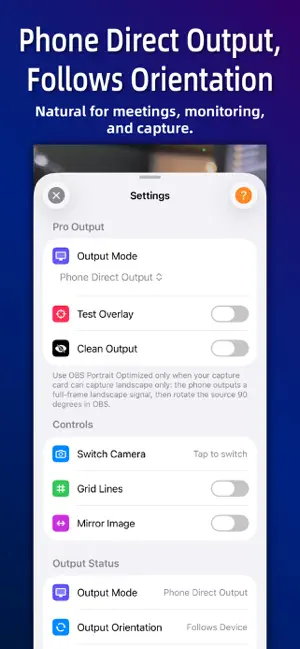
Turn your iPhone into a professional HDMI streaming camera. HDMI Cam is designed for OBS streaming, video meetings, capture cards, and teaching demos. Connect your iPhone to an HDMI adapter and capture card to get a clean, watermark-free camera feed with no distracting UI. PRO OUTPUT IN 2.0 - Phone Direct Output: follows your phone orientation by default, ideal for monitoring, meetings, and regular capture. - OBS Portrait Optimized: for capture cards that can capture landscape only. Output a full-frame landscape signal, then rotate the source 90 degrees in OBS to get a full-pixel portrait feed. - Clean Output: hide all overlays before going live. LIVE CONTROL - Tap to focus, long press to lock AF/AE and avoid focus hunting or exposure jumps. - Double tap to open Settings and quickly control camera switching, grid, mirroring, test overlay, and clean output. - Front camera auto mirroring for better self-facing capture and portrait workflows. TEST OVERLAY Before going live, check device model, active camera, AF/AE status, screen orientation, output frame, battery, power connection, and thermal state. iOS NATIVE VIDEO EFFECTS HDMI Cam works with iOS native video effects. While the app is running, open Control Center and tap “Video Effects” to enable supported system features such as Portrait, Studio Light, and Voice Isolation. Perfect for: - OBS streaming and portrait live streams - E-commerce live selling and teaching demos - Video meetings and remote classes - Face cam and secondary camera workflows For best results, use an official Apple HDMI adapter or a reliable USB-C/Lightning HDMI adapter with a mainstream HDMI capture card.
What’s new
Version 2.0.0 · Updated May 13, 2026
Version 2.0 is a major upgrade for OBS and capture-card workflows. It adds Phone Direct Output and OBS Portrait Optimized modes, a professional test overlay with device, camera, AF/AE, frame, battery, power, and thermal status, improved front-camera mirroring, orientation lock warnings, focus feedback, clean output improvements, and new Traditional Chinese, Japanese, and Korean localizations.
App privacy
The developer, 成昭 苑, reported these privacy practices to Apple.
Data Not Collected
The developer does not collect any data from this app.
Alternatives to HDMI Cam - OBS Camera
Looking for apps like HDMI Cam - OBS Camera? Here are 6 similar apps on the App Store. The highest rated is ZestCam: 4K Streaming Webcam (5.0/5), and 4 of the 6 are free to download.
-
 ZestCam: 4K Streaming Webcam
5.0
-
 SuperCam Studio
-
 HDMI Input
-
 Photo Perspective
2.2
-
 Full Screen Camera Pro
3.0
-
 Zu3D Remote Camera
3.0
| App | Rating | Price | Last updated | Compare |
|---|---|---|---|---|
| HDMI Cam - OBS Camera | – | 1.99 USD | May 13, 2026 | |
| ZestCam: 4K Streaming Webcam | 5.0 / 5 (1) | Free | Oct 12, 2026 | Compare |
| SuperCam Studio | – | Free | Sep 14, 2026 | Compare |
| HDMI Input | – | 9.99 USD | Feb 26, 2025 | Compare |
| Photo Perspective | 2.2 / 5 (19) | 0.99 USD | Nov 6, 2025 | Compare |
| Full Screen Camera Pro | 3.0 / 5 (2) | Free | Sep 28, 2026 | Compare |
| Zu3D Remote Camera | 3.0 / 5 (2) | Free | Jan 18, 2024 | Compare |