

Dead Man's Switch: Check In
Aaron Jin Lifestyle iPhoneiPadiPod touchApple Watch
Dead Man's Switch: Check In is a free Lifestyle app for iPhone and iPad by Aaron Jin. Rated 4.5/5 from 2 ratings. Requires iOS 16.0.
- Rating
- 4.5
- 2 ratings
- Price
- Free
- on the App Store
- Size
- 9 MB
- Age 4+
- Updated
- Oct 22
- 2026 · v2.5.1
Screenshots

About Dead Man's Switch: Check In
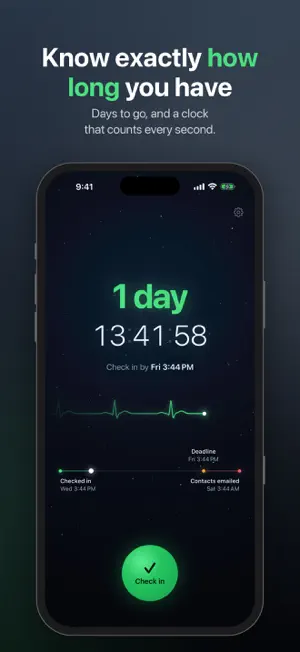
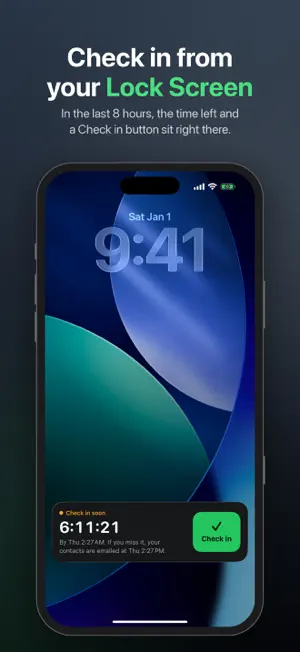
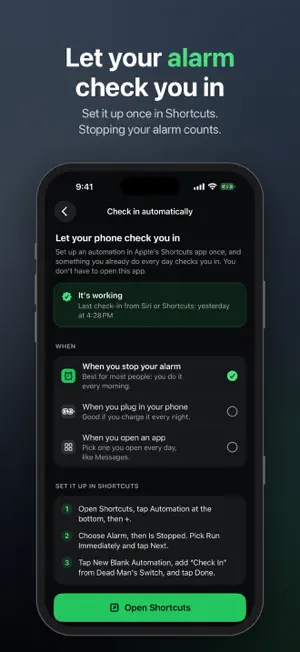
Free to use: email alerts, reminders, widgets, Apple Watch, the daily deadline and up to 3 people. Dead Man's Switch checks that you're OK. Choose how often you'll check in, anywhere from once a day to once a year. Miss your deadline and your phone reminds you. Still no check-in after the grace window, and the people you chose get an email with the message you wrote. It's for anyone who lives alone, hikes or travels solo, has a health condition, or wants the people who care about them to know if something is wrong. CHECK IN WITH ONE TAP • From the app, a widget, a notification, Siri, Control Center or the Action Button • Or automatically: a Shortcuts automation can check you in when you stop your morning alarm • On Apple Watch: see the time left on your watch face and check in from your wrist • On your Lock Screen: in the last 8 hours, the time left and a Check in button that works without unlocking • A live countdown shows exactly how long you have, down to the second • Every check-in is confirmed by our server, so what you see is what will happen • Every day by a set time: pick a time, say 9 PM, and that's your deadline every day. Checking in early doesn't move it KNOW WHAT HAPPENS, AND WHEN • See when your contacts would be emailed, and who • Reminders every day and before your deadline • A grace window before anyone is emailed • Send a test email so your contacts know what to expect • If you check in after an alert went out, your contacts get an "all clear" email YOUR MESSAGE, YOUR PEOPLE • Write one message for everyone, or a personal one for each person • Your contacts don't need the app. They just get an email • When you add someone, they get one short heads-up email from us, so a real alert is never a surprise (you can switch it off) • A typo in someone's address (like gmial.com) is caught when you add them • The people you add are kept on our server only to send your alerts, never shared or sold, and deleted when you turn the switch off. The app asks before anything is sent TEXT ALERTS (US AND CANADA) • Your contacts can get a text as well as the email, once they say yes with one tap • Texts come in small packs. Emails are always free AWAY MODE • Going somewhere without signal? Pick the day you're back, and nobody is emailed before then PRIVATE BY DESIGN • No account to create • No location tracking DEAD MAN'S SWITCH PRO (OPTIONAL) • Short safety timers: check in every 1 to 23 hours, for a hike, a run, a first date or a long drive • Up to 10 people instead of 3 • App icons: Pulse, Green, Moon or Daylight on your Home Screen instead of the candle • Yearly $9.99 with the first week free, monthly $1.99, or lifetime $19.99 once • Bought the app before it was free? Pro is included • Subscriptions renew automatically until you cancel in your Apple ID settings. Terms of Use: https://www.apple.com/legal/internet-services/itunes/dev/stdeula/ Available in English, Spanish, German, Polish, French, Italian and Dutch. Dead Man's Switch is not an emergency service and does not contact emergency services. If you are in danger, call 911 or your local emergency number.
What’s new
Version 2.5.1 · Updated October 22, 2026
What's new in 2.5.1: • Dead Man's Switch is now free. Email alerts, reminders, widgets, Apple Watch, the daily deadline and up to 3 people stay free. • Pro adds short safety timers (check in every 1 to 23 hours) and up to 10 people. Bought the app before it went free? Pro is already yours. • App icons with Pro: pick Pulse, Green, Moon or Daylight in Settings > App icon. Going back to the candle is always free. • On your wrist: a check-in made with Siri or from a reminder now shows on your Apple Watch within seconds, and the watch catches up by itself as your deadline gets close. • On your Lock Screen: open the app in the last 8 hours before your deadline and the time left stays on your Lock Screen and in the Dynamic Island, with a Check in button that works without unlocking. • Typos caught: an address like [email protected] now gets "Did you mean [email protected]?", and placeholder or unfinished addresses are flagged, so your alert reaches the person. • Check in automatically: set up a Shortcuts automation once, and stopping your morning alarm (or plugging in your phone, or opening an app) checks you in. Settings > Check in automatically.
App privacy
The developer, Aaron Jin, reported these privacy practices to Apple.
Data Linked to You
The following data, which may be collected and linked to your identity, may be used for the following purposes:
- Contact Info: Email Address, Name, Phone Number, Other User Contact Info
- Identifiers: User ID, Device ID
- Usage Data: Product Interaction
Used for: App Functionality
Alternatives to Dead Man's Switch: Check In
Looking for apps like Dead Man's Switch: Check In? Here are 6 similar apps on the App Store. The highest rated is SafeGuard: Deadman Switch (5.0/5), and 5 of the 6 are free to download.
-
 SafeGuard: Deadman Switch
5.0
SafeGuard: Deadman Switch
5.0
-
 A Dead Mens Switch
4.8
A Dead Mens Switch
4.8
-
 Meter Utility Ledger 2026
-
 Check In Together: Call & Text
-
 LastingNote
5.0
LastingNote
5.0
-
 DeadSender
| App | Rating | Price | Last updated | Compare |
|---|---|---|---|---|
| Dead Man's Switch: Check In | 4.5 / 5 (2 ratings) | Free | October 22, 2026 | |
| SafeGuard: Deadman Switch | 5.0 / 5 (1) | Free | Jun 29, 2026 | Compare |
| A Dead Mens Switch | 4.8 / 5 (5) | Free | May 28, 2026 | Compare |
| Meter Utility Ledger 2026 | – | 0.29 USD | Jul 25, 2026 | Compare |
| Check In Together: Call & Text | – | Free | Sep 30, 2026 | Compare |
| LastingNote | 5.0 / 5 (1) | Free | Jul 16, 2026 | Compare |
| DeadSender | – | Free | Jul 10, 2026 | Compare |