

MobileCLI
Alexander Knigge Developer Tools iPhoneiPadiPod touch
MobileCLI is a free Developer Tools app for iPhone and iPad by Alexander Knigge. Rated 5.0/5 from 1 ratings. Requires iOS 15.1. Updated May 16, 2026.
- Rating
- 5.0
- 1 ratings
- Price
- Free
- on the App Store
- Size
- 31 MB
- Age 4+
- Updated
- May 16
- 2026 · v1.0.2
Screenshots
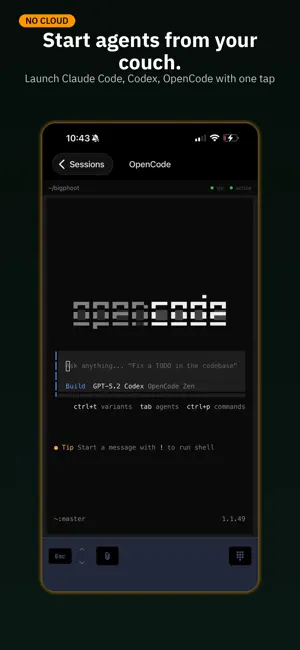


About MobileCLI
Your desktop terminal, in your pocket. MobileCLI connects to your development machine and gives you full access to your terminal sessions from your phone. Pair with a QR code, and you're in — no accounts, no cloud relay, no configuration files. Built for developers who use AI coding assistants. Watch Claude Code, Codex, or Gemini work in real time. Approve tool calls from the couch. Fix a stuck prompt from the grocery store. Your sessions keep running whether you're watching or not. REAL TERMINAL, NOT A TOY Full xterm.js terminal with keyboard toolbar — arrow keys for history navigation, escape, paste from clipboard, and file attachments. Everything you type goes straight to your PTY. Everything your PTY outputs streams back instantly over WebSocket. CONNECT YOUR WAY Scan a QR code on your local network, or connect over Tailscale from anywhere in the world. Link multiple machines and switch between them. All connections are direct — your data never touches a third-party server. FILE BROWSER & EDITOR (Pro) Browse your project files, edit code with syntax highlighting, view images and PDFs, search by filename or content. Create, rename, move, and delete files and folders. Upload photos and documents straight from your phone into your terminal session. SPAWN SESSIONS FROM YOUR PHONE Start new terminal sessions remotely — Claude Code, Codex, Gemini CLI, OpenCode, or a plain shell. Pick a working directory, name your session, and go. NOTIFICATIONS WHEN IT MATTERS Get a push notification when your AI assistant needs input — tool approvals, plan confirmations, or clarifying questions. Tap to jump straight into the session. MULTIPLE THEMES Classic black terminal, Tokyo Night, or Light mode. Pick what feels right. FREE TO START Connect one device, open terminal sessions, type commands, and get notifications — all free. Upgrade to Pro to unlock the file browser, file editor, and attachment uploads. PRO SUBSCRIPTION MobileCLI Pro unlocks file browsing, editing, and attachment uploads. • $19.99/year with a 3-day free trial • $29.99 lifetime purchase (one-time) • Payment is charged to your Apple ID account at confirmation of purchase • Subscription automatically renews unless canceled at least 24 hours before the end of the current period • Your account is charged for renewal within 24 hours prior to the end of the current period • Manage or cancel anytime in Settings → Apple ID → Subscriptions Privacy Policy: https://www.mobilecli.app/privacy Terms of Use: https://www.mobilecli.app/terms
What’s new
Version 1.0.2 · Updated May 16, 2026
- Security Improvements
App privacy
The developer, Alexander Knigge, reported these privacy practices to Apple.
Data Not Collected
The developer does not collect any data from this app.
Alternatives to MobileCLI
Looking for apps like MobileCLI? Here are 6 similar apps on the App Store. The highest rated is Web Finder for Tailscale (5.0/5), and all 6 are free to download.
-
 Clawdex: Code from Phone
-
 Web Finder for Tailscale
5.0
Web Finder for Tailscale
5.0
-
 ServerCC - Claude Code & Codex
4.8
ServerCC - Claude Code & Codex
4.8
-
 Vibe Pocket: AI Coding Agents
4.0
Vibe Pocket: AI Coding Agents
4.0
-
 Mobile Terminal - SSH & AI CLI
1.0
Mobile Terminal - SSH & AI CLI
1.0
-
 QuickTUI: AI Agent Terminal
5.0
QuickTUI: AI Agent Terminal
5.0
| App | Rating | Price | Last updated | Compare |
|---|---|---|---|---|
| MobileCLI | 5.0 / 5 (1 rating) | Free | May 16, 2026 | |
| Clawdex: Code from Phone | – | Free | May 31, 2026 | Compare |
| Web Finder for Tailscale | 5.0 / 5 (1) | Free | Aug 28, 2026 | Compare |
| ServerCC - Claude Code & Codex | 4.8 / 5 (8) | Free | Oct 30, 2026 | Compare |
| Vibe Pocket: AI Coding Agents | 4.0 / 5 (1) | Free | Oct 20, 2026 | Compare |
| Mobile Terminal - SSH & AI CLI | 1.0 / 5 (1) | Free | Mar 26, 2026 | Compare |
| QuickTUI: AI Agent Terminal | 5.0 / 5 (2) | Free | Oct 29, 2026 | Compare |
Compare MobileCLI with the top alternatives: ratings, updates, ASO score and keyword gaps →