

Tempus World Clock
Viktor Gamov Utilities iPhoneiPadiPod touchApple Watch
Tempus World Clock is a paid Utilities app for iPhone and iPad by Viktor Gamov. Rated 5.0/5 from 1 ratings. Requires iOS 17.0. Updated October 14, 2026.
- Rating
- 5.0
- 1 ratings
- Price
- 1.99 USD
- on the App Store
- Size
- 52 MB
- Age 4+
- Updated
- Oct 14
- 2026 · v1.3.0
Screenshots


About Tempus World Clock
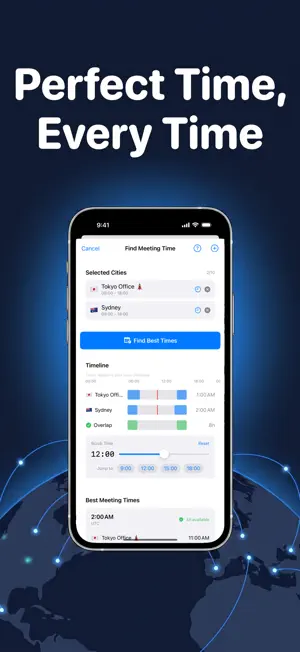
Tempus is a world clock and time zone converter built for people who work, travel, and stay in touch across time zones. It is at home on iPhone, iPad, and Apple Watch. NAME YOUR CLOCKS Add clocks for cities or for the people you talk to. Give each one a custom name, an emoji, and a color tag so "Mum in Sydney" or "Design team, Berlin" is readable at a glance. Choose emoji from a searchable catalog with recents and suggestions for the city. Pick analog or digital faces, 12 or 24 hour time, and see the time difference from wherever you are. CONVERT TIMES INSTANTLY Pick any time in any zone and see it in all your clocks at once. Drag the time scrubber to slide through the day and watch every clock move together. Day and night indicators show who is awake. PROFILES Group your clocks into profiles such as Work or Family and switch between them from the title on iPhone or the sidebar on iPad. A city can be in several profiles, and the active profile syncs to your other devices and Apple Watch. FIND A MEETING TIME THAT WORKS Select two or more clocks, set working hours for each, and Tempus shows the overlapping windows where everyone is available. Add the meeting to your calendar in one tap or share it as an .ics invite. CITY DETAIL Tap any clock for a full city view: a skyline illustration that changes with the time of day, sunrise and sunset on a daylight arc, and current weather conditions. IPAD On iPad, Tempus uses a native split layout: browse your clocks in a sidebar while City Detail stays open beside them. Time Converter and Meeting Finder open in the detail column with room for a full-width overlap timeline. Keyboard shortcuts and pointer hover are supported throughout. APPLE WATCH Tempus on Apple Watch shows your clocks on your wrist, lets you convert times with the Digital Crown, and offers complications for your favorite clocks. Clocks sync instantly between iPhone and Apple Watch. WIDGETS AND SYNC Home Screen widgets keep your clocks in view. Your clocks sync across all your devices with iCloud. PRIVACY FIRST Tempus has no account, no ads, and no tracking. Your clocks are stored on your device and in your private iCloud database. Weather is provided by Apple Weather for the cities you add, never for your own location.
What’s new
Version 1.3.0 · Updated October 14, 2026
• Profiles: keep named sets of cities, such as Work or Family, and switch the clock list between them • Switch profiles from the title on iPhone or the Profiles section of the iPad sidebar, or show All • Manage Profiles to create, rename, reorder and delete profiles, and give each one a symbol • A city can be in several profiles; deleting a profile never deletes its cities • Find Meeting Time on a profile sends its cities to the meeting finder • The active profile syncs via iCloud and shows on Apple Watch • Apple Watch now gets clocks added, edited or removed on other devices right away • Clock rows no longer show through the status bar and top controls when scrolling, and settings save and sync more reliably
App privacy
The developer, Viktor Gamov, reported these privacy practices to Apple.
Data Not Collected
The developer does not collect any data from this app.
Alternatives to Tempus World Clock
Looking for apps like Tempus World Clock? Here are 6 similar apps on the App Store. The highest rated is Worlds Apart: World Clock (4.2/5), and 5 of the 6 are free to download.
-
 ZoneFlip
-
 Nice-Clock
-
 Meridian World Clocks
-
 Multi-Zone Times Tool
-
 Worlds Apart: World Clock
4.2
Worlds Apart: World Clock
4.2
-
 CommaSurf - Watch Browser
| App | Rating | Price | Last updated | Compare |
|---|---|---|---|---|
| Tempus World Clock | 5.0 / 5 (1 rating) | 1.99 USD | October 14, 2026 | |
| ZoneFlip | – | Free | Aug 12, 2026 | Compare |
| Nice-Clock | – | Free | Sep 29, 2026 | Compare |
| Meridian World Clocks | – | Free | Sep 7, 2026 | Compare |
| Multi-Zone Times Tool | – | Free | Nov 10, 2025 | Compare |
| Worlds Apart: World Clock | 4.2 / 5 (5) | Free | Oct 16, 2026 | Compare |
| CommaSurf - Watch Browser | – | 2.99 USD | May 11, 2026 | Compare |
Compare Tempus World Clock with the top alternatives: ratings, updates, ASO score and keyword gaps →