

Peppar: AI Calorie Counter
Innoveramera Health & Fitness iPhoneiPadiPod touchApple Watch
Peppar: AI Calorie Counter is a free Health & Fitness app for iPhone and iPad by Innoveramera. Requires iOS 15.0. Updated October 23, 2026.
- Price
- Free
- on the App Store
- Size
- 106 MB
- Age 4+
- Updated
- Oct 23
- 2026 · v3.47.0
Screenshots


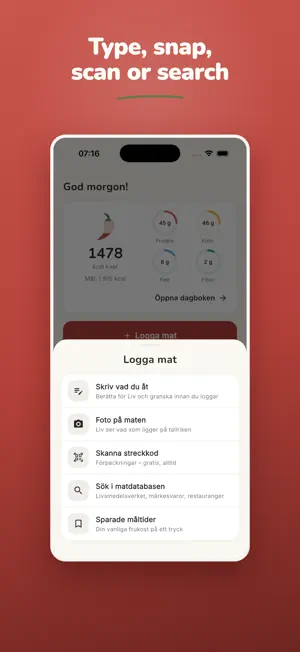

About Peppar: AI Calorie Counter
What's your reason? Muscle, weight loss, more energy – or just staying on top of the everyday? Peppar makes calorie tracking simple AND encouraging. Built for people who eat roughly the same things every day and want control without fiddling with every meal. MEET LIV – YOUR OWN DIET COACH Liv knows your day. Ask for dinner ideas, how you're tracking against your goals, or about your macros – and log a whole meal with a single message or a photo. Encouragement and answers right when you need them. (Included in Peppar Pro.) FAST LOGGING FOR ROUTINE EATERS • Save your usual meals once – add them again with one tap • Your most-used and recent foods always on top • Log yesterday's dinner as today's lunch in seconds • Scan a barcode, snap a photo or describe in words – Peppar does the math LOGGED AUTOMATICALLY – EVERY DAY Morning coffee, milk in your oats, your creatine. Set up your daily staples once, then they're checked off for you. Never enter the same thing twice. YOUR MEALS, YOUR ORDER Breakfast, lunch, snack, midnight sandwich? Create, rename and reorder your own meal sections to match how your day actually looks. PROTEIN GOAL FRONT AND CENTRE Set goals for calories and macros – with protein always visible. Pick a plan that fits you: balanced, high-protein, 16:8, Mediterranean or GLP-1. A STEP GOAL THAT FITS YOU 10,000 isn't a magic number. Peppar suggests a realistic goal based on your activity. Better to hit a smaller goal every day than miss a big one. BUILD HABITS THAT STICK Creatine, vitamins, a glass of water – add your own daily habits and check them off from the home screen. Small things that add up. PEPPAR ON APPLE WATCH See what's left today right on your wrist – as a ring in the watch app or on your watch face, with macros and today's meals one swipe away. Free to download and log your first meal. Peppar Pro unlocks the Liv coach, unlimited saved meals and more. What's your reason? Find out today.
What’s new
Version 3.47.0 · Updated October 23, 2026
Peppar on iPad. • The menu sits along the side and every screen is a clear column in the middle, upright or sideways. • The same tabs and the same Liv as on your phone – nothing new to learn.
App privacy
The developer, Innoveramera, reported these privacy practices to Apple.
Data Linked to You
The following data, which may be collected and linked to your identity, may be used for the following purposes:
- Health & Fitness: Health, Fitness
- User Content: Photos or Videos, Emails or Text Messages
- Purchases: Purchase History
- Contact Info: Email Address
- Identifiers: User ID
Used for: Product Personalization, App Functionality
Data Not Linked to You
The following data, which may be collected but is not linked to your identity, may be used for the following purposes:
- Usage Data: Product Interaction
- Contact Info: Name
- Diagnostics: Crash Data, Performance Data
Used for: Analytics, App Functionality
Alternatives to Peppar: AI Calorie Counter
Looking for apps like Peppar: AI Calorie Counter? Here are 6 similar apps on the App Store.
-
 Belly Flow
-
 MacroMeal: Protein & Calories
-
 BDYCTRL - AI Fitness Coach
-
 KaloriAI - Calorie Tracker
-
 Frayso: Habits & Challenges
-
 Control Fitness Collective
| App | Rating | Price | Last updated | Compare |
|---|---|---|---|---|
| Peppar: AI Calorie Counter | – | Free | October 23, 2026 | |
| Belly Flow | – | Free | Aug 4, 2026 | Compare |
| MacroMeal: Protein & Calories | – | Free | Oct 22, 2026 | Compare |
| BDYCTRL - AI Fitness Coach | – | Free | Oct 23, 2026 | Compare |
| KaloriAI - Calorie Tracker | – | Free | Jan 22, 2026 | Compare |
| Frayso: Habits & Challenges | – | Free | Oct 13, 2026 | Compare |
| Control Fitness Collective | – | Free | Aug 31, 2026 | Compare |