

HSA Monster: Expense Tracker
Christopher Scott Schultz Productivity iPhoneiPadiPod touchMac
HSA Monster: Expense Tracker is a free Productivity app for iPhone and iPad by Christopher Scott Schultz. Rated 5.0/5 from 3 ratings. Requires iOS 18.6.
- Rating
- 5.0
- 3 ratings
- Price
- Free
- on the App Store
- Size
- 41 MB
- Age 4+
- Updated
- Oct 23
- 2026 · v1.1.4
Screenshots


About HSA Monster: Expense Tracker
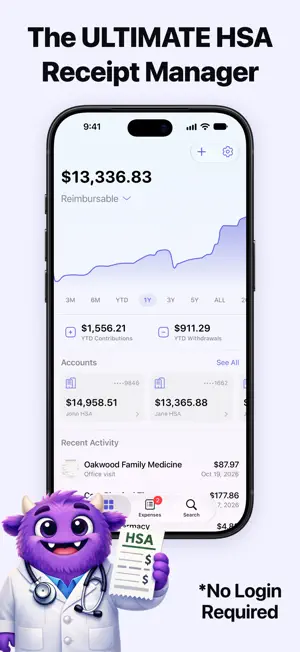
HSA Monster is a smart tool for saving HSA expenses for tax-free reimbursement in retirement. Snap a photo of any receipt and let AI automatically extract the provider, amount, date, and more. Your receipts are organized in iCloud and ready for tax season or future reimbursements. Sync with a family member and put an end to missing reimbursements and lost receipts. Perfect for the HSA Triple Tax Advantage strategy: contribute tax-free, invest for growth, and reimburse yourself decades later. HSA Monster keeps your receipts safe for as long as you need them and shows you how much you can withdraw tax-free. Key Features: • Privacy-first: No logins to remember. All receipt processing is on-device. No ads. • AI-powered receipt scanning with automatic data extraction, Snap - Save - Done! • Track your out-of-pocket expenses and maximize your deferred reimbursements • See your HSA growth over time • Project tax-free growth with calculators • Export annual reports and receipt archives • Move data to another platform at any time • Family sharing via iCloud—track expenses together • An Apple-first experience so you can sync between iPhone, iPad, or Mac Free To Try, No Sign-Up Required HSA Monster includes a free tier for tracking HSA balances and adding up to 10 expense entries. Unlimited expense tracking requires an upgrade to a Premium license. You can cancel at any time and keep all of your expense data. View it, export it, or resubscribe at any time to add more expenses. Terms of Service: https://hsamonster.com/Terms_of_Service.html Privacy Policy: https://hsamonster.com/Privacy_Policy.html
What’s new
Version 1.1.4 · Updated October 23, 2026
Keep every document for an expense together, plus... Quality of life improvements based on your feedback: - Attach more than one document to an expense: the receipt, an EOB, an insurer's statement or a reimbursement confirmation, all in one place. When viewing a transaction, select Edit and tap the add button, then pick a photo or choose several files at once - Swipe between documents in the form and in the receipt viewer, and long-press an expense to add another document - Account tabs no longer crowd the tab bar on an open iPhone Duo - Fixed an issue with searching on Mac - General polish and stability improvements If you think HSA Monster is a useful tool, leave us a positive review in the App Store. It helps the app continue to improve!
App privacy
The developer, Christopher Scott Schultz, reported these privacy practices to Apple.
Data Not Linked to You
The following data, which may be collected but is not linked to your identity, may be used for the following purposes:
- Usage Data: Product Interaction
- Diagnostics: Crash Data, Performance Data
Used for: Analytics