

ClipCard: Paste Keyboard
Wilder Lopez Productivity iPhoneiPadiPod touch
ClipCard: Paste Keyboard is a free Productivity app for iPhone and iPad by Wilder Lopez. Rated 5.0/5 from 2 ratings. Requires iOS 17.0.
- Rating
- 5.0
- 2 ratings
- Price
- Free
- on the App Store
- Size
- 16 MB
- Age 4+
- Updated
- Sep 30
- 2026 · v1.3.2
Screenshots
About ClipCard: Paste Keyboard
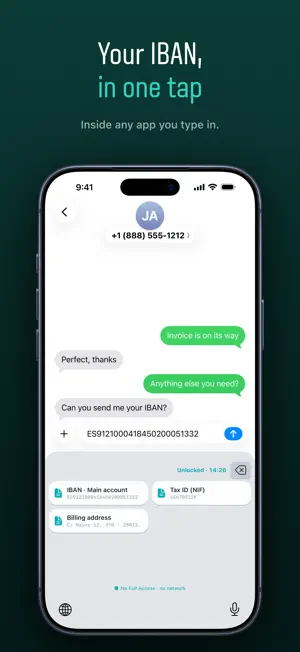
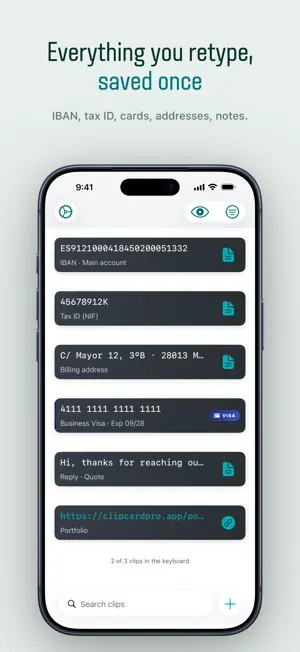
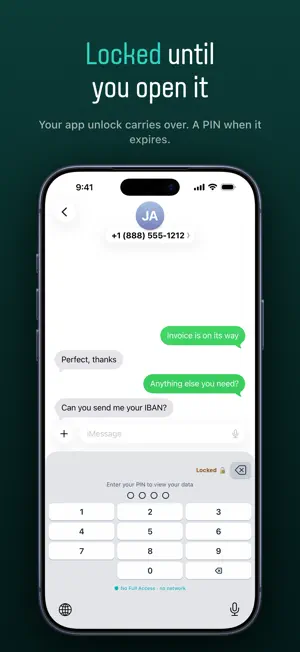
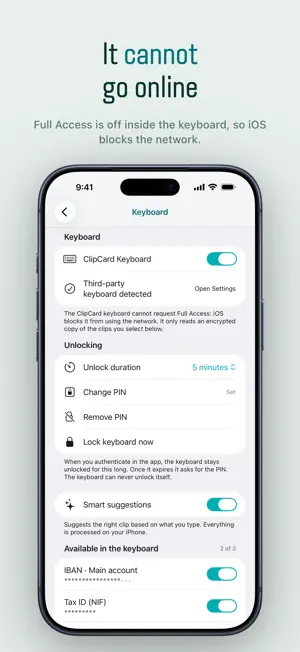
Your IBAN. Your card number. Your tax ID. The things you retype twenty times a month, always from memory, always wrong the first time. ClipCard saves them once and puts them on your keyboard. Open WhatsApp, Safari or your bank app, switch to the ClipCard keyboard, tap the clip. Done. Nothing retyped, nothing left sitting in your clipboard. A KEYBOARD THAT CANNOT LEAK Most keyboards ask you for Full Access, which is what lets a keyboard send whatever you type somewhere else. The ClipCard keyboard never asks, because it cannot: Full Access is switched off inside the extension itself, so iOS blocks it from the network completely. You can check it yourself in iOS Settings. It reads an encrypted snapshot from the app, and the words next to your cursor so it can suggest the right clip. That text is matched in memory and thrown away: never stored, never logged, and with nowhere to go. LOCKED, NOT JUST HIDDEN * Face ID or Touch ID to open the app * Unlock the app with Face ID and the keyboard opens with it, on every plan * A 4 digit PIN when that session expires, or if your device has no biometrics * AES-256-GCM encryption on everything the keyboard can see * Masked previews: cards read **** 4242, wallets read 0x12...5678 * You choose clip by clip what reaches the keyboard. Card numbers are off by default. Recovery phrases, BIP39 passphrases and 2FA secrets never reach it at all. WHAT YOU KEEP IN IT IBANs, tax IDs, billing addresses, card numbers, phone numbers, links, crypto wallet addresses and plain notes. Ten data types, every one of them free. IT FILLS ITSELF IN * Copy something and ClipCard recognises what it is: card, phone, link or wallet address * Scan a card with the camera and it captures the number, Luhn-checked before it is saved. You add the expiry date and CVV * Card numbers are checked as you go (Visa, Mastercard, Amex, Discover) * Wallet address formats are recognised across Ethereum, Bitcoin, Solana and TRON, and the chain is suggested. Always check an address against the original before sending funds * Smart suggestions offer the right clip for the field you are in, decided on your iPhone and nowhere else YOURS, ON EVERY DEVICE Sync runs through your own iCloud. There is no ClipCard server, no account to create, no email to hand over. We could not read your data if we wanted to. FREE MEANS FREE * Unlimited clips. There is no cap, ever, on how much you save. * All ten data types, camera scanning, Face ID, iCloud sync and search. * Reading, copying, pasting and exporting your data stays free forever, even if you cancel Pro. * The keyboard itself, carrying 3 clips of your choice. PRO ADDS * Every clip in the keyboard, not only three * Password protected encrypted backup * Three extra themes Pro Monthly $2.99, Pro Yearly $19.99 (44% less than paying monthly) or Pro Lifetime $49.99 once. The subscriptions include a free trial. BUILT TO BE USED BY EVERYONE Full VoiceOver support across the app and the keyboard, Dynamic Type throughout the app, and Reduce Motion respected. Card numbers are read aloud as "ending in 4242" and never in full. Available in English and Spanish. Works with the Shortcuts app. Privacy Policy: https://wilderlopezelias.com/en/apps/clipcard-pro/privacy/ Terms of Use: https://wilderlopezelias.com/en/apps/clipcard-pro/terms/ Subscription details: payment is charged to your Apple ID account at confirmation of purchase. A subscription renews automatically unless it is cancelled at least 24 hours before the end of the current period, and your account is charged for renewal within 24 hours before that period ends. You can manage and cancel your subscriptions in your App Store account settings. Any unused part of a free trial is forfeited when you buy a subscription.
What’s new
Version 1.3.2 · Updated September 30, 2026
Internal improvements and maintenance. Unlimited clips and all 10 data types, still free.
App privacy
The developer, Wilder Lopez, reported these privacy practices to Apple.
Data Not Collected
The developer does not collect any data from this app.
Alternatives to ClipCard: Paste Keyboard
Looking for apps like ClipCard: Paste Keyboard? Here are 6 similar apps on the App Store. The highest rated is PinShot: Smart Screenshots (5.0/5), and all 6 are free to download.
-
 PrivyMask: Redact PDF & Photo
-
 PinShot: Smart Screenshots
5.0
-
 OpenFounders: Build Your Dream
-
 IBAN Cepte – Easy IBAN Manager
-
 iCard: Digital Cardholder
-
 All Cloud Hub: Storage Manager
| App | Rating | Price | Last updated | Compare |
|---|---|---|---|---|
| ClipCard: Paste Keyboard | 5.0 / 5 (2 ratings) | Free | September 30, 2026 | |
| PrivyMask: Redact PDF & Photo | – | Free | Sep 14, 2026 | Compare |
| PinShot: Smart Screenshots | 5.0 / 5 (1) | Free | Aug 16, 2026 | Compare |
| OpenFounders: Build Your Dream | – | Free | May 20, 2025 | Compare |
| IBAN Cepte – Easy IBAN Manager | – | Free | Jan 26, 2026 | Compare |
| iCard: Digital Cardholder | – | Free | Oct 4, 2026 | Compare |
| All Cloud Hub: Storage Manager | – | Free | Sep 23, 2026 | Compare |